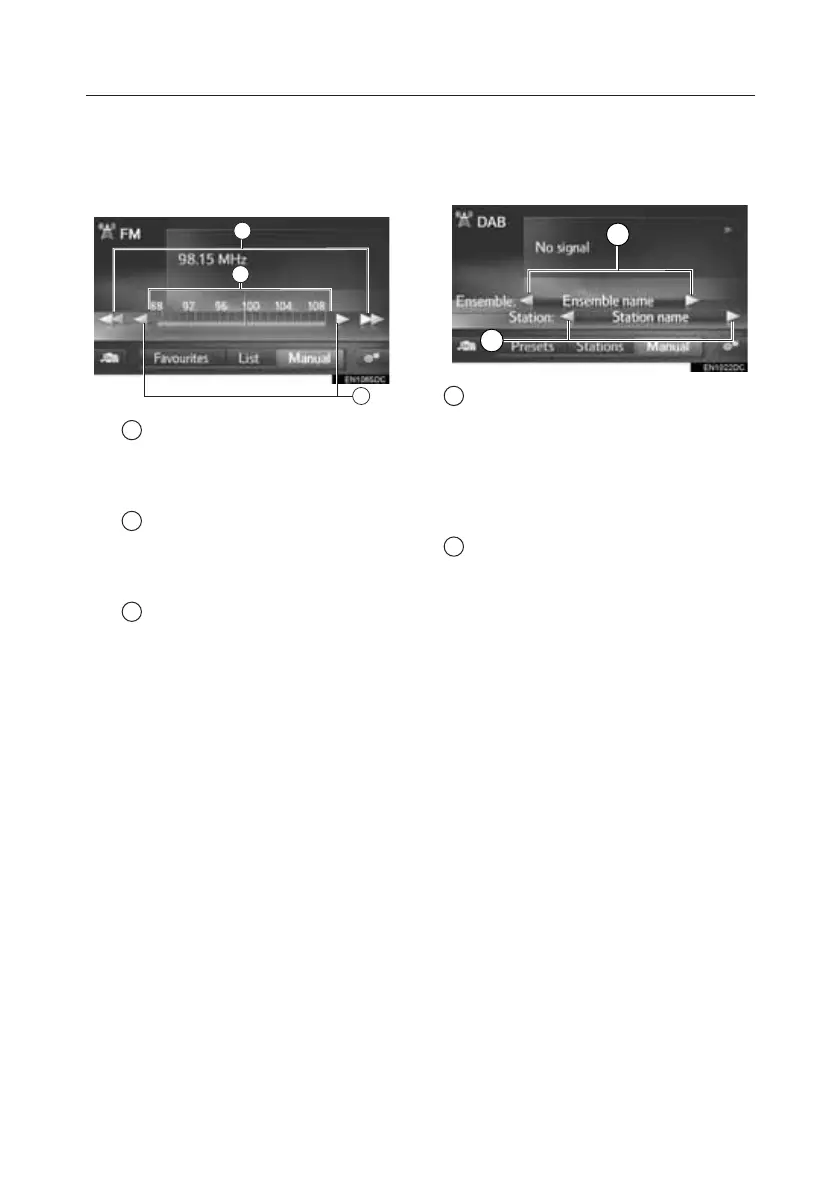
Manual Tuning
AM/FM Screen
1. Select “Manual”.
2. Tune the desired station.
1 Select to seek up/down a
station.
Select and hold to seek stations
non-stop.
2 Select to step up/down
frequencies.
Select and hold to seek frequencies
non-stop.
3 It is possible to drag and drop
the marker by sliding your finger on
the screen (in the area where the
marker is shown). Relocating the
marker by a single select on the
frequency band is also possible.
DAB Screen (If equipped)
1. Select “Manual”.
2. Tune the desired ensemble or
service.
1 Select to seek up/down available
ensembles.
Select and hold the button for the
non-stop seek up/down function. When
your finger is released from the button,
the search function will stop at the next
receivable station.
2 Select to set available service.
Toyota Touch 2 – Select and hold to set
the available services every one second.
2
1
3
1
2
TOUCH-SCREEN MULTIMEDIA
8







 To Next Page