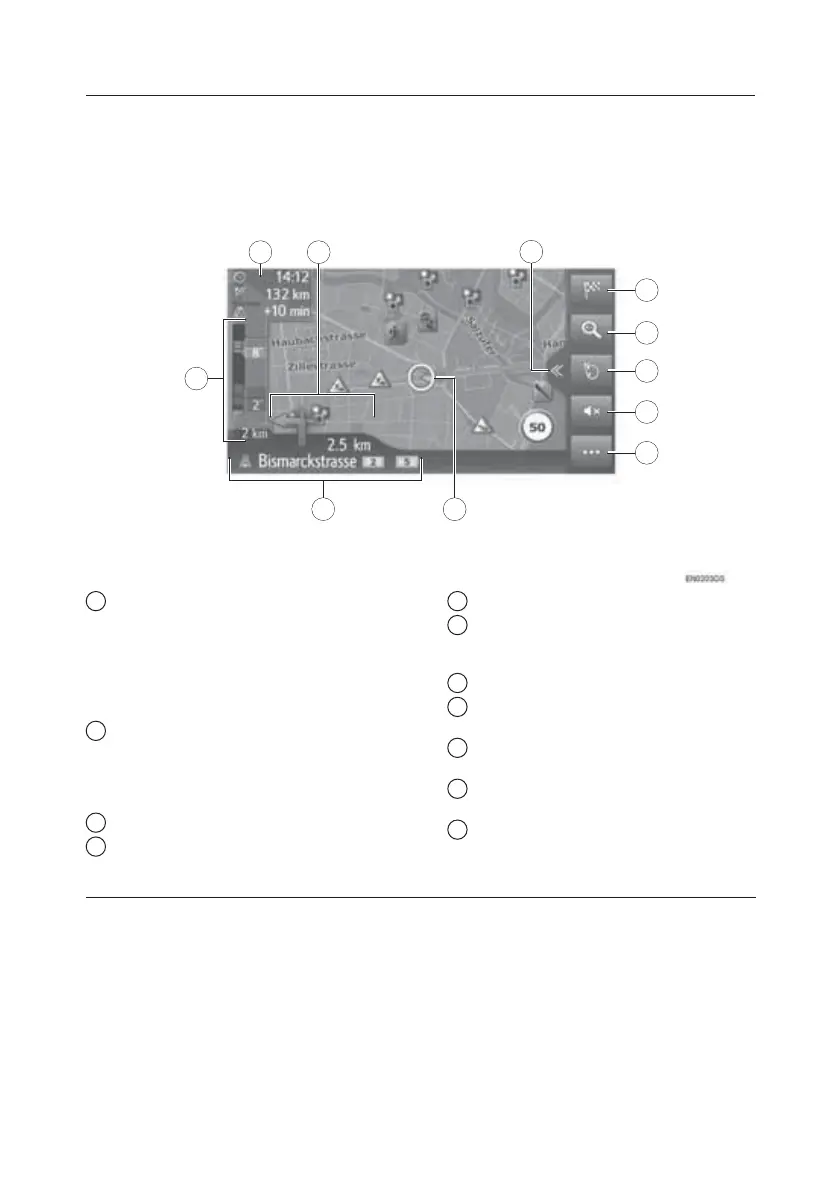
Map Screen
X
4
X
10
X
X
2
1
3
11
1
9
X
5
X
6
X
7
X
8
X
1
1 Displays information about the
destination, such as estimated arrival
time, remaining travel time, distance, and
traffic prediction information. Each time
this area is selected, the information will
change between the arrival time and
remaining travel time to the destination.
2 Displays the distance to the next
turn with the arrow indicating the turn
direction. When the arrow icon is
selected, the last navigation
announcement will be repeated.
3 Select to open/close the split view.
4 Select to display the navigation
menu screen.
5 Select to zoom in/out the map scale.
6 Select to change the map layout.
This symbol indicates a current map
layout.
7 Select to mute the voice guidance.
8 Select to open/close the options
menu.
9 Displays the current vehicle
position.
10 Displays the name of the current
street or the next street.
11 Displays traffic events on the route.
The remaining length and the remaining
delay time are displayed.
TOUCH-SCREEN MULTIMEDIA
20







 To Next Page