4
4. CONFIGURING WI-FI
To use Wi-Fi, ensure that you have already setup your wireless
adapter on your PC/laptop.
Configuration Guide TP-LINK C1200
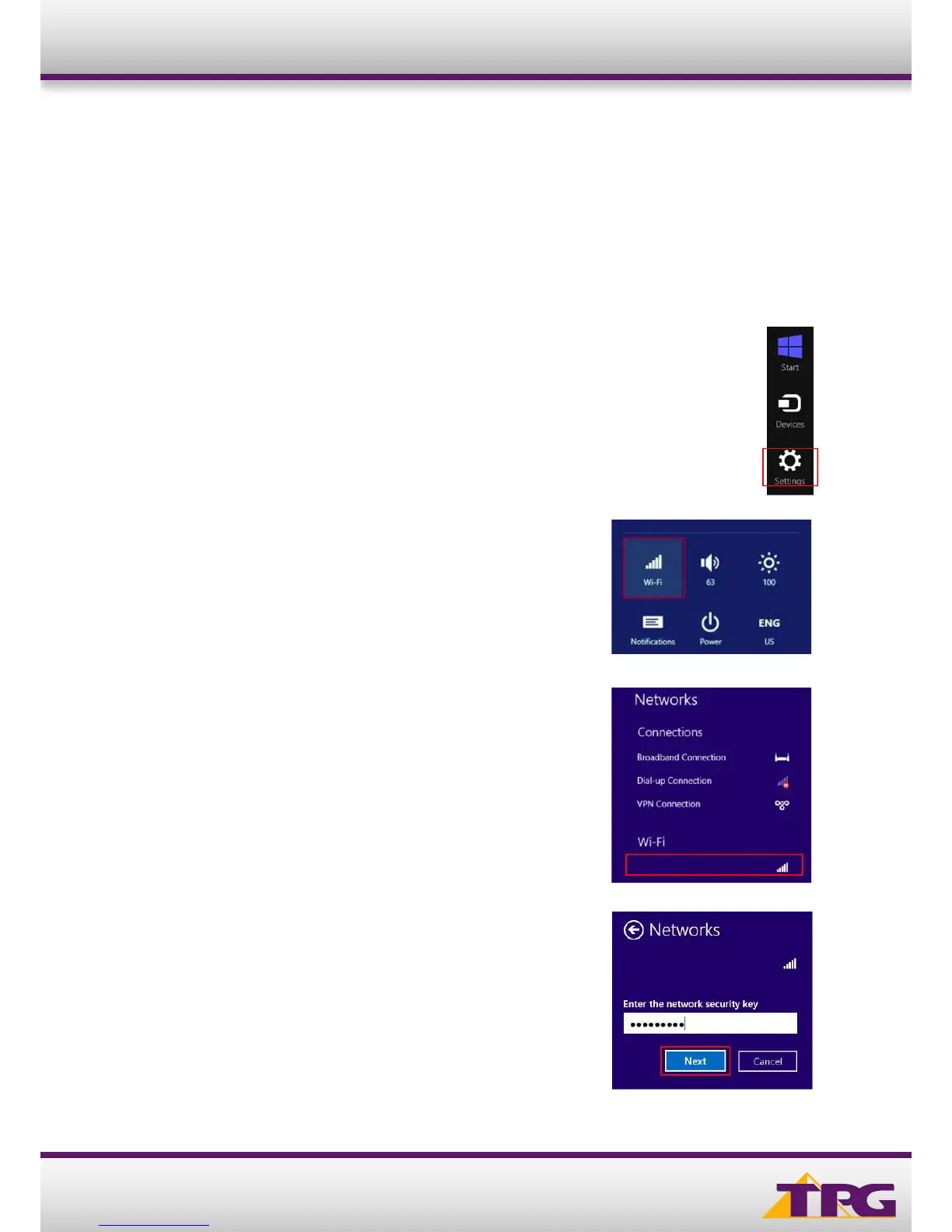
3. Find the SSID (network name) of your modem
and click Connect By default, the network name
should be TP-LINK_XXXX (XXXX is a random 4
digit alpha numeric code).
4. Select the Wi-Fi network you wish to connect to.
By default, the Wi-Fi access point name (SSID) is
TP-LINK_XXXX (XXXX is a random 4 digit alphanumeric code)
5. Enter the network security key (Wi-Fi password)
and then click Next. By default, the password is
printed on a sticker underneath your router
(Wireless Password/Pin).
2. Click Settings inside the Charms Bar.
1. Open the Charms Bar by moving your mouse pointer to the top corner of the screen and then moving your
mouse pointer down. If you have a touch screen, simply swipe from the right side of the screen to the left.
TP-LINK_XXXX
TP-LINK_XXXX












 To Next Page