Configuring VLAN Configuration Example for 802.1Q VLAN
User Guide
53
5
Configuration Example for 802.1Q VLAN
5.1 Network Requirements
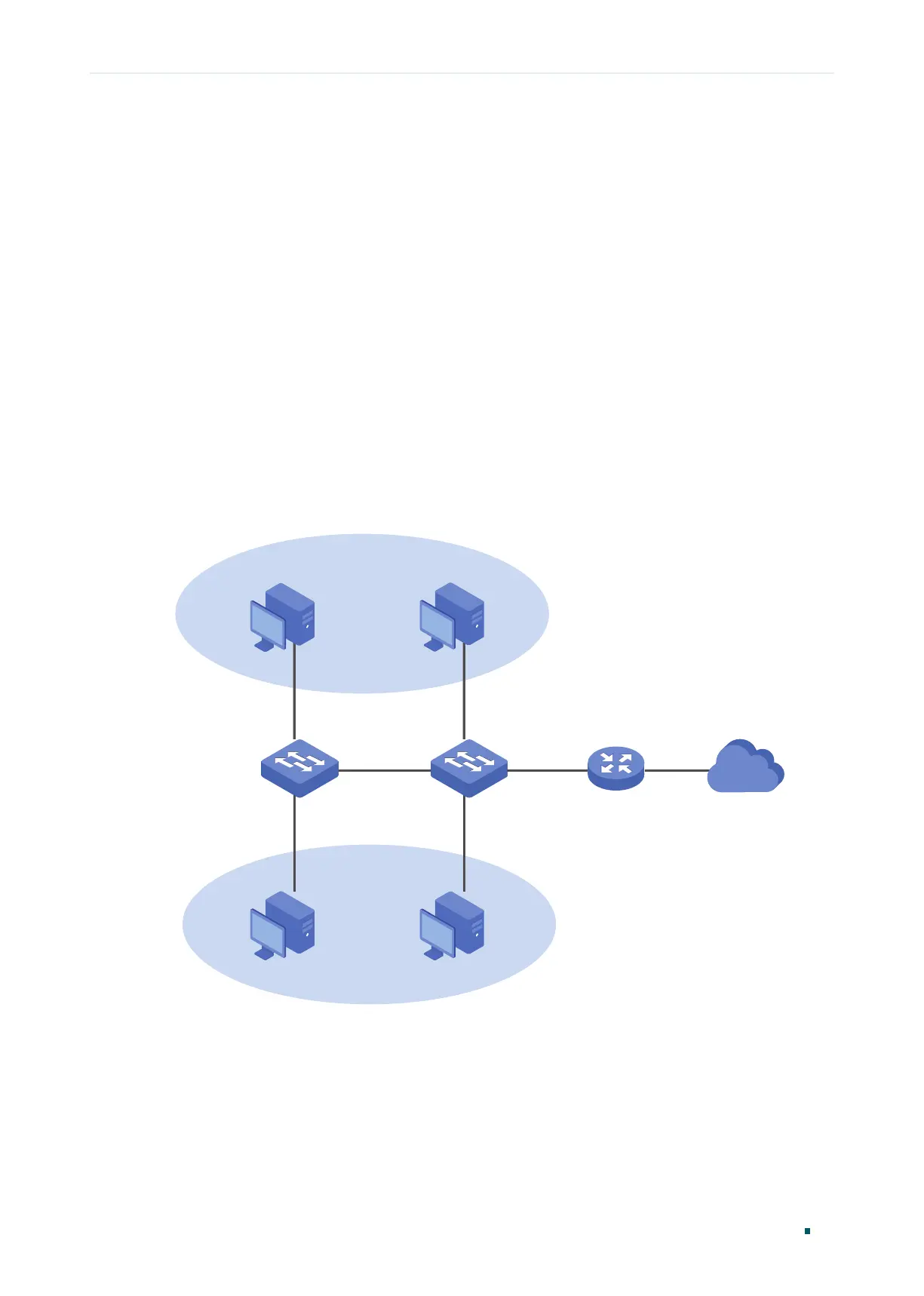
As the following figure shows, a company has two departments. Hosts of the same
department are located in different places and connected to different switches
respectively.
It’s required that:
■ Hosts of both departments can access the internet.
■ Hosts of the same department can communicate with each other, but hosts of different
departments cannot.
Figure 5-1 Network Topology
VLAN 2
Department A
VLAN 3
Department B
Host A1 Host A2
Host B1
Host B2
Switch A
Switch B
Port 2
Port 3
Port 4
Port 2
Port 3
Port 4
Internet
Port 1
5.2 Configuration Scheme
To implement the above requirements, configure 802.1Q VLAN on both switches.
■ Create VLAN 2. On Switch A, add port 2 and port 4 to VLAN 2, while on Switch B, add
port 1, port 2 and port 4 to VLAN 2.











 To Next Page