
 Need help?
Do you have a question about the TP-Link omada EAP110-Outdoor and is the answer not in the manual?
This document describes the TP-Link Omada EAP110-Outdoor, a 300Mbps Wireless N Outdoor Access Point, and serves as its installation guide. The device is designed for outdoor use, providing wireless network access and can be managed either through a centralized controller or directly via a web browser.
The EAP110-Outdoor functions as a wireless access point, extending network coverage outdoors. It operates on the Wireless N standard, offering a maximum speed of 300Mbps. The device is capable of providing reliable Wi-Fi connectivity in outdoor environments. Its primary role is to broadcast a wireless signal, allowing various client devices such as smartphones, tablets, and laptops to connect to the network.
The EAP supports two main configuration options:
The EAP110-Outdoor is designed to be powered via a passive Power over Ethernet (PoE) adapter, which is included in the package. This allows for flexible placement of the EAP, as it can receive both power and data over a single Ethernet cable, simplifying installation in outdoor locations where power outlets might be scarce. The PoE adapter itself can also be mounted, offering further installation flexibility.
The EAP110-Outdoor is built for outdoor environments, featuring a robust design that includes waterproof elements. The installation guide emphasizes the importance of lightning and ESD protection, recommending the use of shielded CAT5e (or above) cables and proper grounding to mitigate damage from electrostatic discharge and lightning strikes. This highlights its suitability for deployment in exposed outdoor settings.
The device offers flexible mounting options:
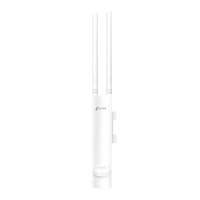
The EAP is equipped with two external antennas, which need to be connected after the EAP is mounted. These antennas are crucial for broadcasting the wireless signal and ensuring optimal range and performance.
Connecting cables to the EAP involves a specific procedure to ensure waterproofing:
The passive PoE adapter facilitates power delivery. The EAP is connected to the PoE port of the adapter, and the LAN port of the adapter is connected to a router or switch. The adapter itself is powered by a standard power outlet. The PoE adapter also features a Remote Reset button, allowing users to reset the EAP to its factory default settings by pressing and holding it for 8 seconds. It also has a Power LED indicator to show its operational status.
The EAP110-Outdoor's design incorporates features that contribute to its ease of maintenance and long-term reliability. The robust outdoor casing and waterproofing measures are fundamental to minimizing the need for frequent physical maintenance due to environmental exposure.
The SYS LED on the EAP provides visual feedback on the device's status, which is a key diagnostic tool for maintenance:
These LED indicators allow for quick assessment of the EAP's operational state without needing to access its software interface, making initial troubleshooting straightforward.
For software-related maintenance and configuration, both the EAP Controller and the web browser interface offer tools for managing the device:
The passive PoE adapter's Remote Reset button is a direct hardware maintenance feature, allowing for a quick factory reset without needing to physically access the EAP's reset button, which might be less accessible once mounted.
Overall, the EAP110-Outdoor is designed with both robust physical protection for outdoor use and clear diagnostic indicators, along with flexible software management options, to ensure straightforward installation and ongoing maintenance.
 General
| Band Technology | dual |
|---|---|
| Frequency Band | 2.4 ghz |
| QoS Traffic Prioritization | yes |
| Ethernet Standard | 10/100 |
| Wireless Networking Standard | wi-fi 4 |
| Wireless Standard | n |
| 2.4 Ghz Streams | 1 |
| 5.0 Ghz Streams | 0 |
| Gigabit Ethernet Speed | no |
| Antennas | 2 |
| Firewall | other |
| Data Encryption | yes |
| Encryption Type | wep, wpa, wpa-psk, wpa2-enterprise, wpa2-psk |
| Security Features | rogue ap detection; ssid to vlan mapping; 802.1x supplicant |
| Ports | rj-45 |
| WAN Ports | 1 |
| Built In Modem | no |
| Bluetooth | no |
| System Requirements | microsoft windows 10/8/7/vista/xp |
 Weight and Dimensions
| Height | 1.9 inches |
|---|---|
| Width | 7.1 inches |
| Net Weight | 2 pounds |







 To Next Page