10
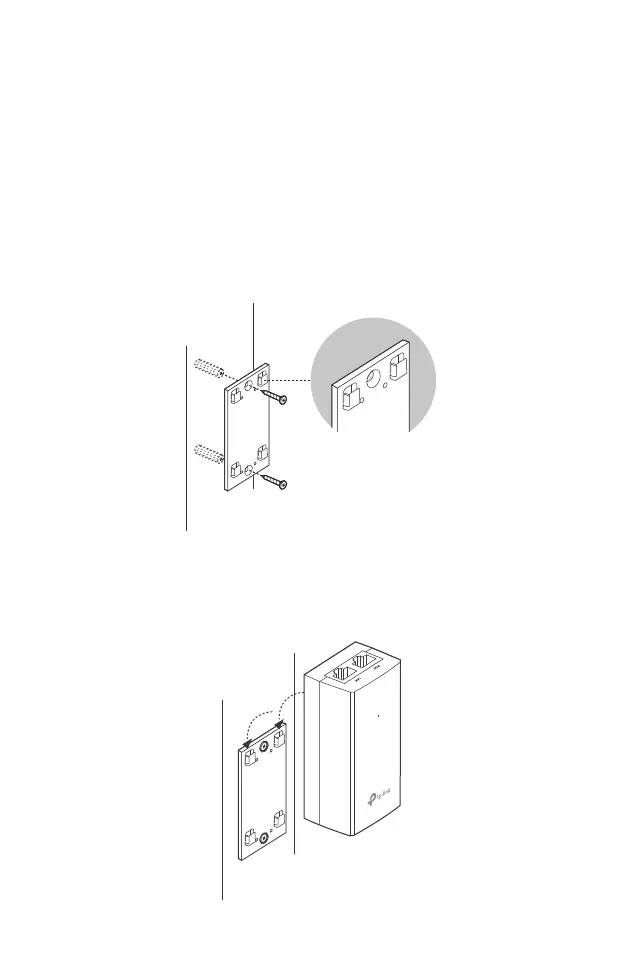
Mounting the PoE Adapter (Optional)
Note: To ensure the passive PoE adapter is attached most securely, it is
recommended to install the adapter with the Ethernet port facing
upward.
Drill two holes on the wall and insert the plastic wall anchors into
the the holes. Secure the mounting bracket (for PoE Adapter) to
the wall. Make sure the shoulders at the corners of the mounting
bracket are on the outside and pointing upward.
Step 1:
Attach the passive PoE adapter to the mounting bracket (for PoE
Adapter) by sliding the adapter in the direction of the arrows until
it locks into place.
Step 2:








 To Next Page