16
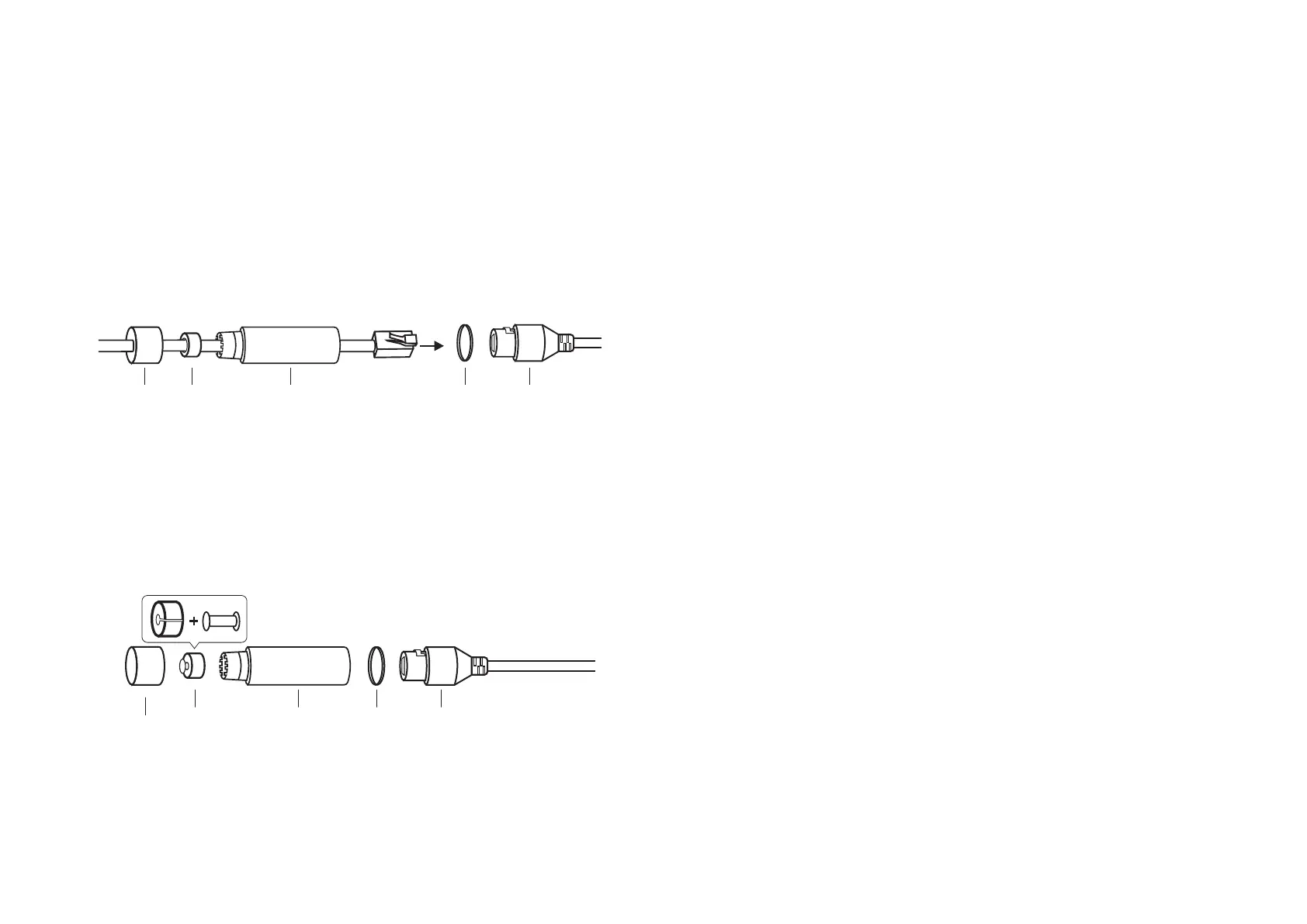
When the Ethernet port connects to a network device:
1. Route the network cable through the following components in order: x nut, waterproof ring, and then the waterproof jacket.
2. Insert the waterproof ring into the waterproof jacket.
3. Fix the O-ring to the network interface of the camera and connect the network cables.
4. Attach the network interface with the waterproof jacket, then twist to lock. Rotate the x nut to secure it to the waterproof jacket.
When the Ethernet port does not connect to a network device:
1. Insert the waterproof plug into the waterproof ring, then insert them into the waterproof jacket.
2. Fix the O-ring to the network interface of the camera. Attach the network interface with the waterproof jacket, then twist to lock. Rotate the x nut to
secure it to the waterproof jacket.
Fix Nut
Waterproof
Ring
O-ring
Network
Interface
Waterproof
Jacket
Fix Nut
Waterproof
Ring + Plug
Network
Interface
Waterproof
Jacket
O-ring










 To Next Page