TF-3200 10/100Mbps PCI Network Adapter
2
Chapter 1. Introduction
1.1 Overview of the product
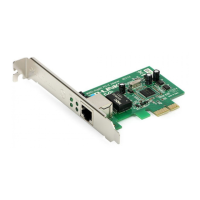
The TF-3200 10/100M PCI Network Adapter is a highly integrated and cost-effective Fast
Ethernet Adapter that provides 32-bit performance, PCI bus controller, and full compliance with
IEEE 802.3 10Base-T, IEEE 802.3u 100Base-TX specifications and IEEE 802.3x Full Duplex
Flow.
The TF-3200 keeps low cost and eliminates usage barriers. It is the easiest way to upgrade a
network from 10 to 100Mbps. Supports both 10Mbps and 100Mbps network speed both in
Half-Duplex and Full-Duplex transfer modes, using Auto-Negotiation technology to detect the
network speed. It also can be widely used in most modern Operating System.
1.2 Features
¾ Comply with IEEE 802.3 10Base-T and IEEE 802.3u 100Base-TX Ethernet standard
¾ Compliant to PCI Revision 2.1/2.2
¾ PCI local bus single-chip Ethernet controller
¾ Supports auto MDI-MDIX Function
¾ Supports ACPI, PCI power management
¾ Supports Full Duplex Flow Control (IEEE 802.3x)
¾ Full duplex design to double the performance
¾ Supports Auto-Negotiation function
¾ Supports drivers for Linux, Windows 7 (32bit / 64 bit), Windows Vista (32bit / 64 bit), Windows
2000, Windows 2003 and Windows XP
1.3 LED Status
The green LED indicates if the 10 or 100Mbps STP/UTP has been link or not. When the LED
radiate, it indicates the adapter connect to the network at 10/100Mbps speed. Otherwise, it
indicates connection is not available. When the LED glitters, it means the STP/UTP port is
receiving or transmitting data.



 To Next Page