EasyManua.ls Logo

TP-Link UH720 - User Manual

TP-Link UH720
2 pages
Print Icon
To Next Page IconTo Next Page
Loading...
©2022 TP-Link 7106509777 REV4.0.0
USB 3.0 Hub
Model No.UH720
User Guide
For technical support, the user guide and other information, visit https://www.tp-link.com/support/
To ask questions, find answers, and communicate with TP-Link users or engineers, please visit
https://community.tp-link.com to join TP-Link Community.
TP-Link hereby declares that the device is in compliance with the essential
requirements and other relevant provisions of the Electromagnetic Compatibility
Regulations 2016 and Electrical Equipment (Safety) Regulations 2016.
The original UK Declaration of Donformity may be found at
https://www.tp-link.com/support/ukca
TP-Link hereby declares that the device is in compliance with the essential requirements and other
relevant provisions of directives 2014/30/EU, 2014/35/EU, 2009/125/EC, 2011/65/EU and
(EU)2015/863.
The original EU declaration of conformity may be found at https://www.tp-link.com/en/support/ce/
This product can be powered only by power supplies that comply with Power Source Class 2 ( PS2) or
Limited Power Source (LPS) of IEC 62368-1.
Question and Answer IconNeed help?

Do you have a question about the TP-Link UH720 and is the answer not in the manual?

Summary

Important Precautions and Safety

Regulatory Information

FCC Compliance Statement

This device adheres to FCC rules, requiring compliance with interference regulations.

CE Mark and UKCA Declarations

Product meets EU and UK directives for EMC, safety, and energy efficiency requirements.

Hardware Connection and Setup

Hub Functionality and Usage

Super-Speed Data Transfer

Utilize 7 USB 3.0 ports for high-speed data transfer, backward compatible with USB 2.0/1.1.

High-Power Device Charging

Two dedicated ports provide up to 2.4A for rapid charging of mobile devices.

Summary

Important Precautions and Safety

Regulatory Information

FCC Compliance Statement

This device adheres to FCC rules, requiring compliance with interference regulations.

CE Mark and UKCA Declarations

Product meets EU and UK directives for EMC, safety, and energy efficiency requirements.

Hardware Connection and Setup

Hub Functionality and Usage

Super-Speed Data Transfer

Utilize 7 USB 3.0 ports for high-speed data transfer, backward compatible with USB 2.0/1.1.

High-Power Device Charging

Two dedicated ports provide up to 2.4A for rapid charging of mobile devices.

Overview

This document describes a USB 3.0 hub, designed to expand the connectivity of your computer by providing additional USB ports for data transfer and charging. The hub is a plug-and-play device, meaning it requires no special driver installation for most operating systems, including Windows, Mac OS X, and Linux.

Function Description

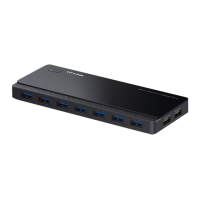
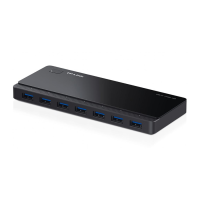
The primary function of this device is to offer an expanded number of USB 3.0 ports for your computer. Specifically, it provides seven additional USB 3.0 ports, enabling super-speed data transfer. This allows users to connect multiple peripherals simultaneously, such as smartphones, USB flash drives, mobile hard disks, and USB mice, without constantly swapping devices.

Beyond data transfer, the hub also incorporates dedicated charging capabilities. It features two charging ports designed to quickly charge various mobile devices, including those running Android, Apple, and Windows operating systems. These charging ports are capable of delivering a maximum current of 2.4A, ensuring efficient power delivery to your devices. It's important to note that these dedicated charging ports are solely for power delivery and do not support data transfer.

The hub is designed to be powered by an external power adapter. When the power adapter is plugged into a power outlet, the hub automatically turns on, and a power LED illuminates to indicate its operational status. This external power source is crucial for ensuring stable performance, especially when multiple high-power devices are connected.

Usage Features

The hub offers several user-friendly features to enhance its utility:

  • Plug-and-Play Operation: As mentioned, the device is plug-and-play, eliminating the need for complex driver installations. Users can simply connect it to their computer and begin using it immediately.
  • Automatic Power-On: The hub powers on automatically when its power adapter is connected to an outlet, simplifying the startup process.
  • Data Transfer with or without Power Adapter: The hub is capable of transferring data even when the power adapter is unplugged. However, in this mode, the power button will not function as a power switch, indicating a change in its operational state. For optimal performance and to utilize all features, including charging, the power adapter should be connected.
  • Backward Compatibility: The USB 3.0 ports on the hub are backward compatible with USB 2.0 and USB 1.1 specifications. This ensures that older USB devices can still be connected and function, albeit at their respective lower speeds.
  • High-Speed Data Transfer: The USB 3.0 ports support data transfer rates of up to 5Gbps. However, the actual transfer rate will be limited by the capabilities of the connected devices.
  • Intelligent Charging: The dedicated charging ports feature intelligent current adjustment. If a connected device requires less than 2.4A, the charging port will automatically adjust the supplied current to match the device's needs, preventing potential damage from overcurrent.
  • Optimal Performance Considerations: For the best performance, the combined current draw of all connected devices should not exceed 7A. Users should also be aware that the performance of 2.4GHz wireless devices (such as wireless keyboards and mice) may be affected if they are operating too close to USB 3.0 devices, due to potential interference.

Maintenance Features

To ensure the longevity and proper functioning of the device, several maintenance guidelines are provided:

  • Environmental Protection: The hub should be kept away from water, fire, humidity, and extreme environments. These conditions can damage the internal components and impair its functionality.
  • Physical Handling: Users are advised not to heavily drop or impact the hub. Physical shocks can lead to internal damage or malfunction.
  • No Self-Disassembly or Modification: Users should not attempt to disassemble, modify, or repair the hub themselves. Doing so poses a risk of electric shock and will void the limited warranty. In case of service needs, users should contact the manufacturer's support.
  • Cleaning Procedures: Before cleaning the hub, it should be disconnected from the computer. Liquid cleaning methods should not be used. This suggests using a dry cloth or a slightly damp cloth with a non-abrasive cleaner, ensuring no moisture enters the device.
  • Power Supply Compliance: The product must only be powered by power supplies that comply with Power Source Class 2 (PS2) or Limited Power Source (LPS) of IEC 62368-1. Using an incompatible power supply can damage the device or pose safety risks.
  • Data Integrity: To prevent potential data loss or corruption, it is crucial to avoid unplugging or plugging the power adapter while data is being transferred or devices are charging. This ensures a stable power supply during critical operations.
  • Manufacturer Responsibility: The manufacturer explicitly states that it will not be held responsible for any damage to disk or hard disk data caused by improper use of the device. This emphasizes the importance of following the provided usage and maintenance guidelines.

In summary, this USB 3.0 hub is a versatile and essential accessory for expanding computer connectivity, offering both high-speed data transfer and efficient mobile device charging, all while emphasizing user safety and device longevity through clear usage and maintenance instructions.

TP-Link UH720 Specifications

General IconGeneral
DC-in jackYes
Hub interfacesUSB 3.2 Gen 1 (3.1 Gen 1) Type-A
Ports quantity9
Cable length1 m
Product colorBlack
Input voltage12 V
Output current2.24 A
Power supply typeUSB
ChipsetVIA VL812
Package depth209 mm
Package width110 mm
Package height86 mm
Package weight540 g
Harmonized System (HS) code84719000
Weight and Dimensions IconWeight and Dimensions
Depth65.5 mm
Width165 mm
Height17.5 mm

Related product manuals