The Tracker Classic Receiver System is a directional radio-location device designed for tracking hunting dogs, pets, remote control airplanes, and model rockets. It features an integrated folding antenna system for easy transport and is built with a rugged, splash-proof, CNC-milled aluminum body.
Function Description:
The receiver operates by detecting a distinctive pulse broadcast by a transmitter (collar). It provides an indication of signal strength through a row of 11 LEDs and an audible beep. The device is capable of monitoring a maximum of two frequencies, ranging from 216 MHz to 220 MHz. A manual gain control allows users to adjust sensitivity for precise direction finding. The "Near" button acts as an attenuator, reducing sensitivity for locating transmitters at short distances (less than 1/2 mile). A frequency fine adjustment wheel helps compensate for frequency drift due to temperature and atmospheric conditions, ensuring maximum distance tracking and optimizing the beep pitch for audibility. The receiver includes a low battery indicator and an automatic shut-off feature to conserve battery life, typically activating after 15 minutes of inactivity. A headphone jack/mute plug allows for private listening and mutes the internal speaker when headphones are connected.
Important Technical Specifications:
- Weight with Batteries: 10.7 oz (420g)
- Dimensions (antenna folded): 8¼" x 2" x 1½" (206 x 48 x 30 mm)
- Dimensions (antenna unfolded): 8¼" x 16" x 1½" (206 x 405 x 30 mm)
- Spurious emission: < 2 pW
- Operating voltage: 7 - 10 V DC
- Battery types (2 pcs): 9V/6LR61 - 6AM6EU (Alkaline recommended)
- Current consumption: Max 70 mA
- Sensitivity: >-130 dB /.078°V
- Operating temperature: -14 to 131° F (-10 to + 55° C)
- Available Frequencies: 216.000-220.000 MHz
- Antenna elements: Patented, virtually unbreakable circuit board material with steel hinges, offering a 10-year warranty.
Usage Features:
- Turning ON/OFF: Press and hold the ON/OFF switch for 1-2 seconds. CH 1 will illuminate when on; all lights extinguish when off.
- Changing Channels: Use the CH button to switch between Channel 1 (red indicator) and Channel 2 (green indicator).
- Setting the Gain: Turn the gain wheel to the lowest level where an audible beep is heard and only green LEDs are illuminated in the direction of the strongest signal. This provides the most precise bearing. Avoid high gain settings, which can make direction finding difficult. Red LEDs indicate the need to reduce gain.
- NEAR Mode: Press the NEAR button to activate the attenuator (red light illuminates). This reduces sensitivity, making it easier to set gain when the transmitter is close.
- Frequency Fine Adjustment: Rotate the adjustment wheel on the left side of the receiver to maximize the received signal (LEDs or speaker) and adjust the beep pitch.
- Headphone Plug/Sound Cut-off: A standard mini (¼") headphone plug can be used. Inserting the plug turns off the internal speaker. The signal is audible in both headphone speakers. A metal flange adjacent to the jack is provided for attaching the receiver to a holster or belt.
- Antenna Deployment: Unfold all four antenna elements before use. The receiving antennas are at the front, perpendicular to the receiver's axis. The reflecting antennas are at the back, forming a 75-degree angle to the axis.
- Holding the Receiver: Grasp the receiver with one hand, thumb near the gain wheel. Avoid touching the antenna elements, especially the rear ones, with your wrist or forearm, as this can affect bearing accuracy.
- Tracking Technique: Begin by activating a transmitter and placing it in an open area. Turn on the receiver, select the channel, and reduce gain until only 2-3 green LEDs are illuminated. Sweep the receiver continuously in a 180-degree arc, walking towards the strongest signal. Continuously reduce gain as you approach the transmitter. Practice in varied terrain to become proficient.
- Signal Interpretation: A consistent bearing of the strongest signal and a consistent pattern of signal strength diminishing 30 or more degrees from the true bearing are characteristics of a line-of-sight signal.
- Dealing with Obstacles and Signal Bounce: Radio waves can be affected by terrain, buildings, and other obstructions. "Signal bounce" occurs when waves reflect off objects like cliffs, water, or wet vegetation, potentially creating multiple strong signals. To manage this, move to different locations, take readings from higher elevations, or move perpendicular to the source of a suspected bounce signal.
- Polarization: The signal is strongest when the receiver antenna's orientation matches the transmitting antenna's.
- Overhead Utilities: Power lines can re-radiate radio waves, complicating tracking.
- Use in Vehicles: The receiver can be operated from a vehicle, but older vehicles may cause interference. For best results without an external antenna, turn off the vehicle and move at least 20 feet away. Be aware of reflected signals from the vehicle.
- Transmitter Location Impact: Transmitters located higher off the ground provide maximum range. Conversely, a transmitter close to the ground (e.g., in a well) will have a shorter effective range. Similarly, a receiver positioned higher in the air will obtain a stronger signal.
Maintenance Features:
- Storage: Store the unit in a dry place at room temperature when not in use.
- Water Exposure: Minimize contact with water. The receiver is water-resistant but not waterproof. Do not store in a wet holster. If submerged or soaked, immediately remove batteries and send to Tracker Radio for chemical cleaning and drying to prevent corrosion and damage.
- Battery Replacement: Replace BOTH 9V batteries at the same time with new alkaline batteries of the same type and equal strength. Rechargeable batteries may be used, but the low battery indicator may be less effective. To replace, turn the receiver upside down, loosen the retaining screw on the battery cover, remove the cover, replace batteries, and reattach the cover.
- Cleaning: Clean the body and antenna with alcohol or a damp cloth if soiled.
- Antenna Lubrication: DO NOT lubricate antennas yourself. If they fold with difficulty, send the unit to Tracker for service, as special non-penetrating conductive lubricant is required.
- Antenna Adjustment: DO NOT attempt to adjust forward/front antennas, as this can damage the circuit board and void the warranty. If they are loose, send for service. Rear antennas can be adjusted with a screwdriver for snug, smooth operation; be careful not to strip threads.
- Antenna Obstruction: Do not place metallic objects, metal tape, or stickers on the antennas, as this can influence direction accuracy. Avoid touching antenna elements with any part of your body during tracking.
Troubleshooting:
- Receiver will not turn on: Check if the ON/OFF button is held for at least 1 second. Inspect battery connections and wires. Test batteries with a battery tester. Replace batteries. If issues persist, send for service.
- Receiver is on but no sound: Ensure gain control is set high enough. Verify the Black Plastic Mute/Silencer plug is fully inserted or removed from the Headphone Jack. If no sound from the internal speaker, send for service.
- Distorted Audio or loss of Signal: If audio is always distorted, send for repair. Check frequency fine adjustment for both channels.
- Antenna/s loose or too tight: Do not tighten front antennas. Adjust rear antennas with a screwdriver for snug, smooth operation. If issues persist or corrosion is present, send for service.
- Direction Accuracy: Ensure antennas are fully extended and not resting on your body. Adjust rear antennas if loose. Check for corrosion on hinges. If issues persist, send for service.
- Reduced reception: Change receiver batteries if the low battery indicator is on. Replace collar batteries. Compare reception with another receiver/transmitter if available. If range is significantly less, send for service.
- Gain control abrupt change: Check battery. If the problem persists, the gain control potentiometer may be defective and require service.
- Other Problems (require service): LED/indicator light not illuminating, broken antenna element, broken battery clip, squeal from speaker (note channel), unit submerged or soaked (remove batteries immediately and send for service).
Important Warning: If a wet receiver is allowed to dry, corrosion may occur, leading to eventual failure and costly repairs (potentially $200+ and voided warranty). It is strongly recommended to send a wet unit for service immediately.

 Need help?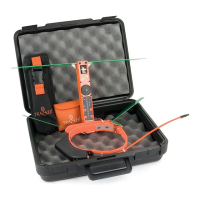

 To Next Page
 General