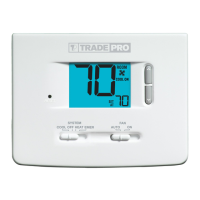
Program Event Indicators
Program Event Indicators appear in the display to let you know what part of
your current program is active. The 4 different program event indicators are
MORN, DAY, EVE and NIGHT. When the program event indicator is flashing,
your program has been temporarily bypassed and will resume at the next
scheduled event. NOTE: You will not see a program event indicator while in
HOLD Mode.
Resetting the Thermostat
This thermostat provides you with a reset button that will erase all of your
user settings and 5-2 day programming. To reset the thermostat, use a small
object such as a tooth pick or paperclip and gently press the button located
inside the small hole on the front of the thermostat housing labeled “reset”.
6
Additional Operation Features
Compressor Protection
This thermostat includes an automatic compressor protection delay to
avoid potential damage to your system from short cycling. This feature
activates a short delay after turning off the system compressor.
7
Thermostat Maintenance
Changing the Batteries
Depending on your particular installation, this thermostat may be equipped
with two (2) “AA” type alkaline batteries.
If batteries are installed and they
become low, a low battery indicator will appear in the display.
You
should
change your batteries immediately when you see the low battery signal by
following these instructions.
1. Remove thermostat body by gently pulling it from base.
2. Remove old batteries and replace with new batteries.
3. Make sure to correctly position the (+) and (-) symbols.
4. Gently push thermostat body back onto base.
NOTE: We recommend replacing the thermostat batteries annually or if the
thermostat will be unattended for an extended period of time.
Thermostat Cleaning
Never spray any liquid directly on the thermostat. Using a soft damp cloth
wipe the outer body of the thermostat. Never use any abrasive cleansers to
clean your thermostat.
©2018 TRADEPRO • All Rights Reserved • Made in China.
TPP-100-01
Store this manual for future reference.
3 Year Limited Warranty
TRADEPRO
®
warrants each new TRADEPRO
®
thermostat against any defects that are
due to faulty material or workmanship. This warranty and our liability does not apply
to batteries, nor does it include damage to merchandise or the thermostat resulting
from accident, alteration, neglect, misuse, improper installation or any other failure
to follow TRADEPRO
®
installation and operating instructions. This limited warranty ap-
plies for the duration of the warranty period from the original date of purchase by a
professional service technician. TRADEPRO
®
agrees to repair or replace at its option
any TRADEPRO
®
thermostat under warranty provided it is returned postage prepaid to
our warranty facility in a padded carton within the warranty period, with proof of the
original date of purchase and a brief description of the malfunction. This limited war-
ranty does not include the cost of removal or re-installation. This warranty gives you
specific legal rights and you may also have other rights that vary from state to state or
province to province. Answers to any questions regarding our limited warranty may be
obtained by writing our corporate offices. For warranty service, please visit your nearest
TRADEPRO
®
facility.
Technical Assistance: 866-268-5599 (U.S.) • 630-844-1968 (Outside the U.S.)


 To Next Page
 Loading...