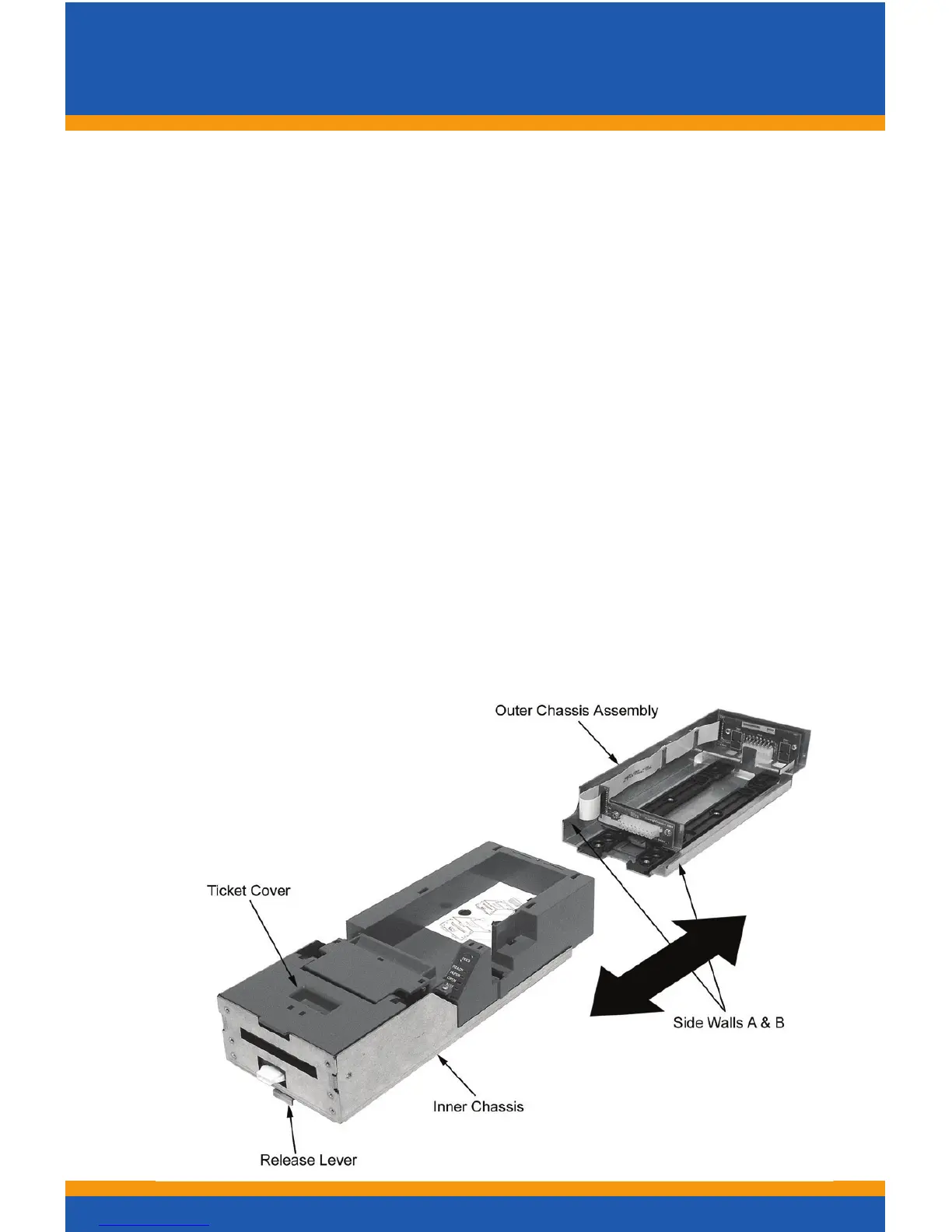
Racking/Un-rackingtheInnerChassis
8
To remove the Inner Chassis:
• Pull on the Ticket Cover to release the rear detents, pulling
the Inner Chassis towards you until it’s latches catch the
forward detent slots
• Push the Inner Chassis back in slightly, pull on the Re-
lease lever and pull forward on the Inner Chassis to
un-dock it form the Outer Chassis
To return the Inner Chassis: (see warning before racking)
• Align the base of the Inner Chassis with the outer walls
of the Outer Chassis, seating it within side walls A and B
as shown. Make certain it’s straight so the Inner Chassis
doesn’tdamagetheexcable
• While pulling outwards on the Release Lever, slide the
Inner Chassis towards the rear of the Outer Chassis. Push
the Inner Chassis all the way to the back until it stops.
When fully seated, the front metal plate of the Inner Chas-
sisandthefrontleftedgeoftheOuterChassisareush
Warning: Interconnect PC Board
Assembly must be latched in position shown
Check by trying to move the board by hand
prior to racking.
MAKE SURE IT IS LATCHED



 To Next Page