6
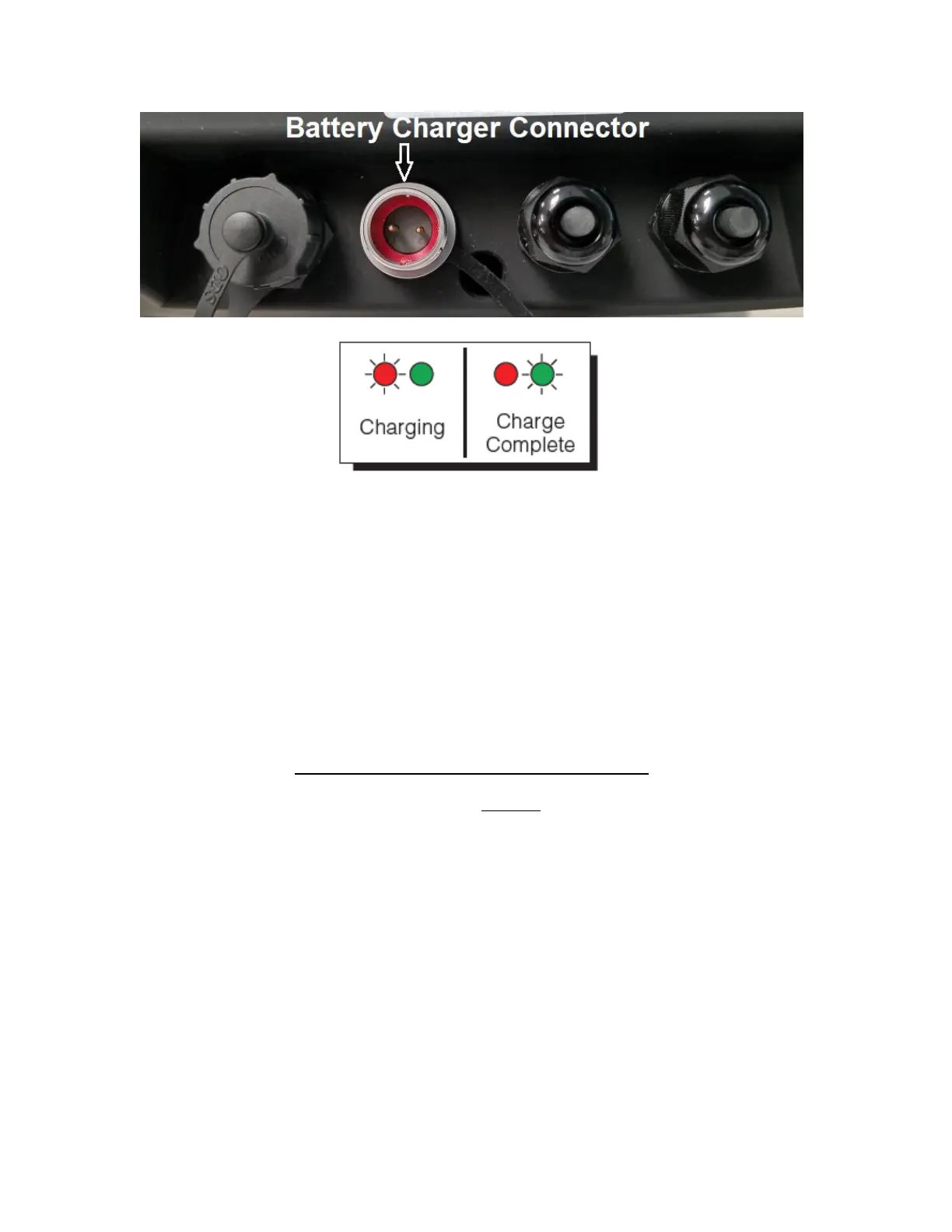
To prolong battery life, disconnect the external battery charger from the unit when charg-
ing is complete (Green LED).
Caution: the external battery charger is rated for IP54 only and exposure to water may
void the warranty. Be sure to remove the battery charger from the indicator and apply the cap
to the battery charger connector before washing it down.
The indicator’s battery should operate for about 85 hours if left on continuously. The display unit
is configured to power down after 5 minutes of inactivity, but this parameter can be changed thru
the A1-10 menu setting.
The battery can be charged while ON or OFF and the indicator can be operated while it’s charg-
ing unless the state of charge is very low.
WHEN TO CHARGE THE INTERNAL BATTERY
The best time to charge the Lithium Ion battery is any time the indicator is not in use. You need
not wait for the Low Battery Indication – in fact it’s best that you don’t.
When the battery has been discharged below 30%, the Low Battery Indication will start blinking
in the lower left-hand corner of the display. The indicator may be used for an additional 2
minutes before it automatically powers down. When the system reaches this state, it is im-
perative that you charge the battery to avoid permanent damage.


 To Next Page