8
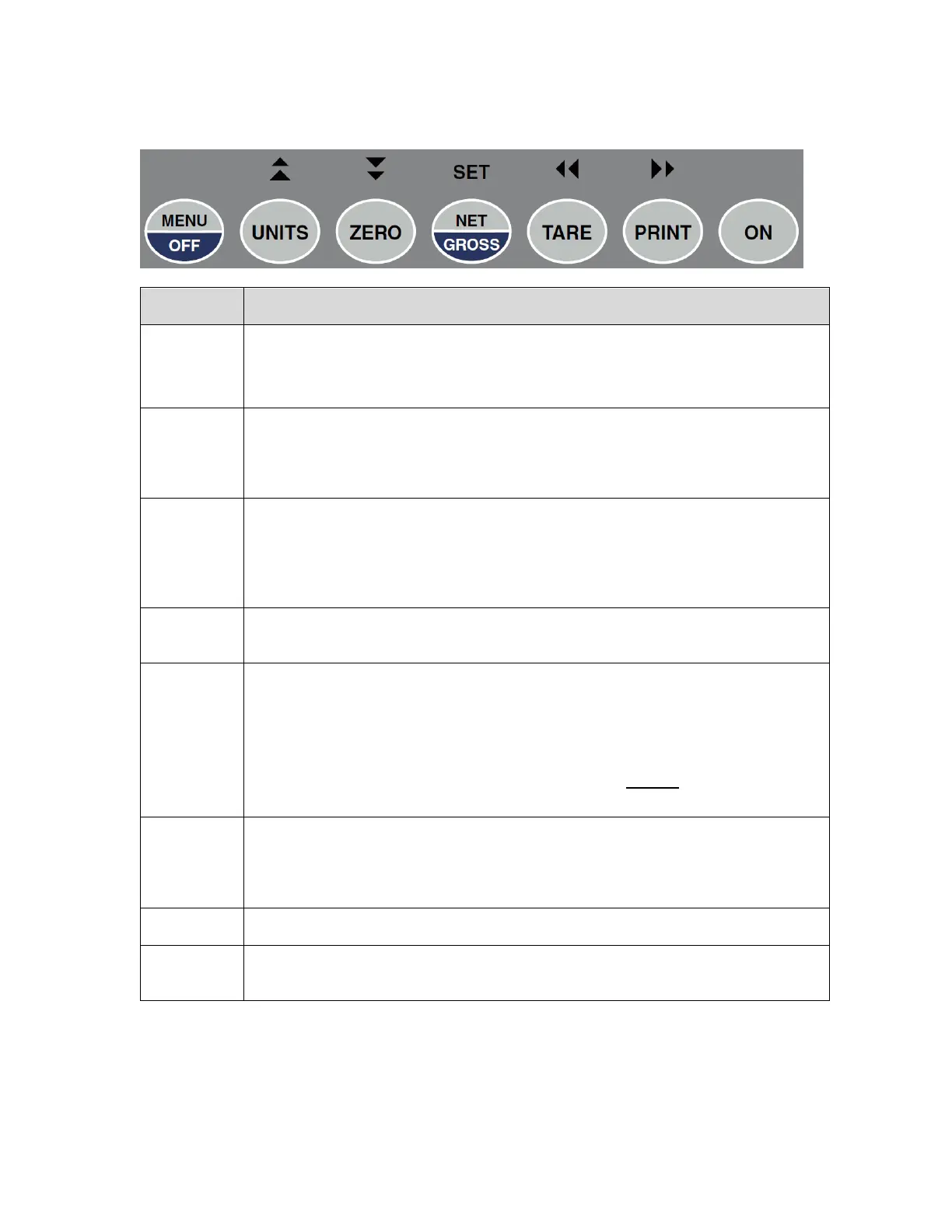
The capacitive touch keypad is composed of a total of seven (7) function keys.
This key provides access to the various configuration menus (please see the in-
staller guide for more information)
Press and hold for 2-3 seconds to shut the unit OFF.
When unit conversion is enabled, this key toggles the displayed weight indication
among pounds (lb), kilograms (kg), grams (g) and ounces (oz). If your scale sys-
tem has been configured to display pound-ounces (lb-oz), this key will not func-
tion.
This key sets the indicator to display zero weight provided the following conditions
are met:
1. The indicator is displaying Gross weight.
2. The scale is not in motion.
3. The scale is not in overload (see error codes).
This key toggles the indicator between Gross weight and Net weight – provided
that a Tare weight has first been established
This key is used to establish a Tare weight provided the following conditions are
met:
1. The indicator is displaying a Gross weight above zero.
2. The scale is not in motion.
3. The scale is not in overload (see error codes).
If a tare weight has already been established, this key cancels the current tare
weight.
This key is used to send weight information out to the serial port provided the fol-
lowing conditions are met:
1. The scale is not in motion.
2. The scale is not in overload (see error codes).
Press and hold for 2-3 seconds to turn the unit ON.
Utilized in the various configuration menus (please see installer guide for more in-
formation)


 To Next Page