TransitionNetworksE‐100BTX‐FX‐06UserGuide
33791Rev.A http://www.transition.com/ Page5of13
InstallingtheFiberCable
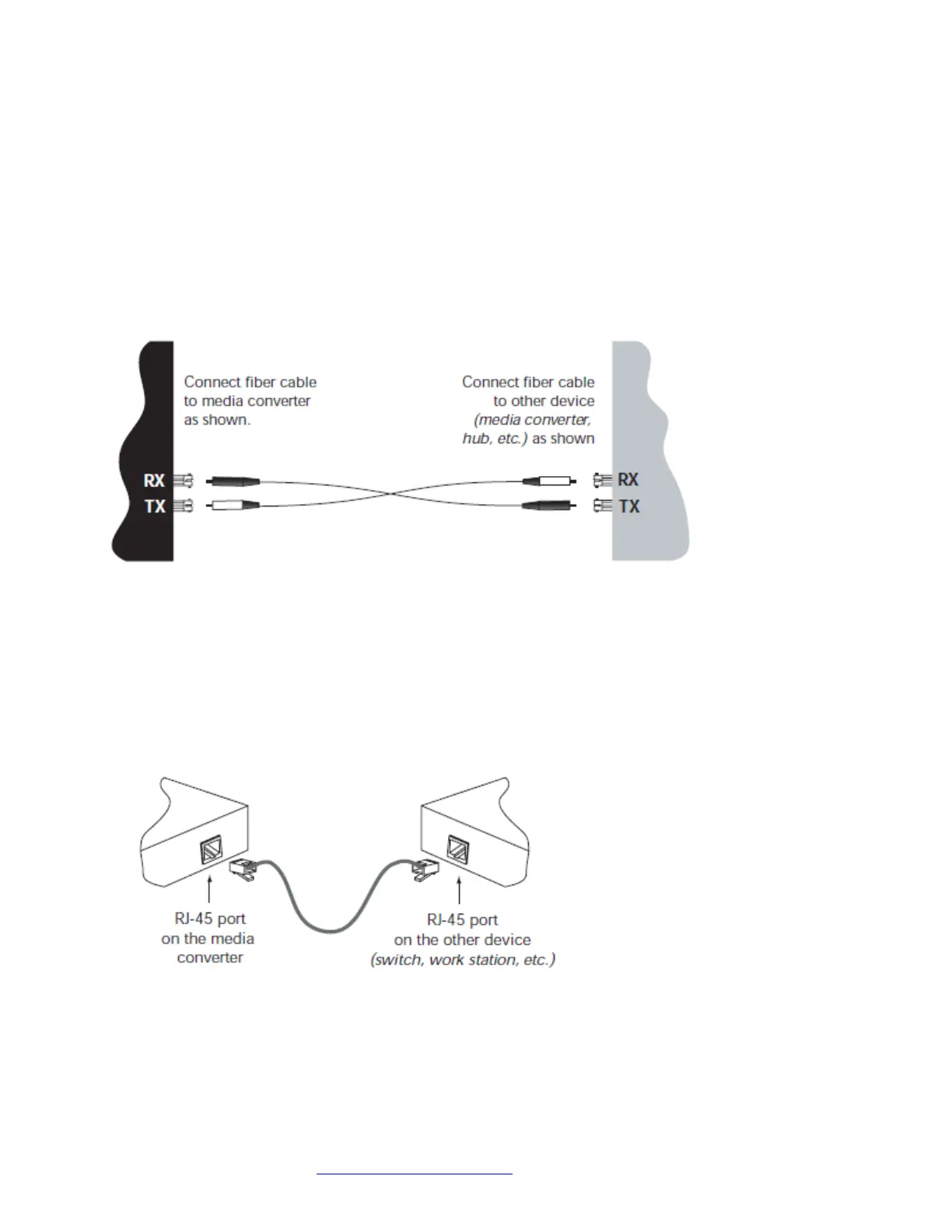
1.Locatea100Base‐FXcompliantfibercablewithmale,two‐strandedTXtoRXconnectorsinstalledatbothends.
2.Connectthefibercablestothemediaconverterasdescribed:
•ConnectthemaleTXcableconnectortothefemaleTXport.
•ConnectthemaleRXcableconnectorto
thefemaleRXport.
3.Connectthefibercablestotheotherdevice(anothermediaconverter,EthernetSwitch,etc.)asdescribed:
•ConnectthemaleTXcableconnectortothefemaleRXport.
•ConnectthemaleRXcableconnectortothefemaleTXport.
InstallingtheCopperCable
1.Locatea100Base‐TXcompliantcoppercablewithmale,RJ‐45connectorsinstalledatbothends.
2.ConnecttheRJ‐45connectoratoneendofthecabletotheRJ‐45portonthemediaconverter.
3.ConnecttheRJ‐45connectorattheotherendofthecable
totheRJ‐45portontheotherdevice(switch,
workstation,etc.).


 To Next Page