VII. PATENTED MICROPROCESSOR CONTROL (continued)
-10-
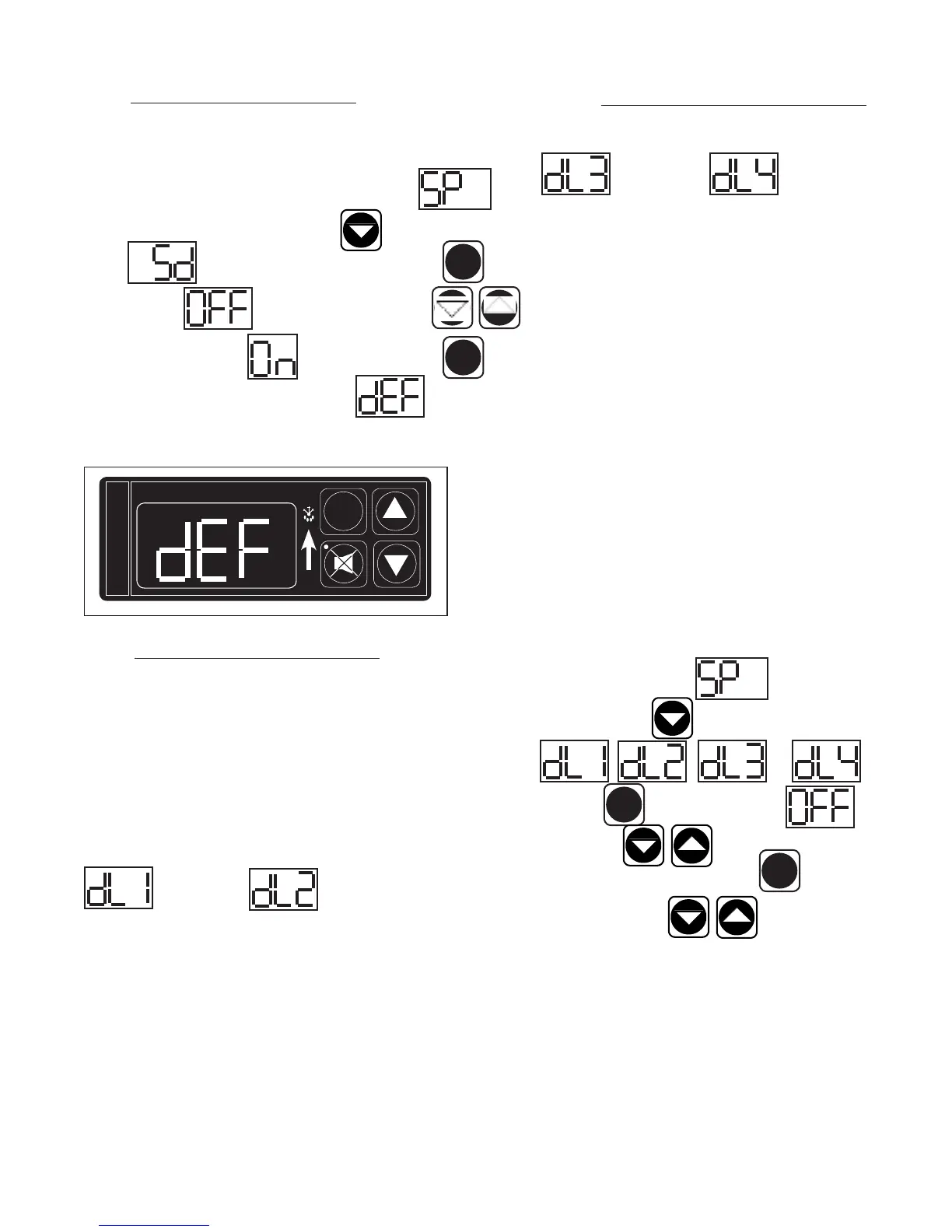
VII. m - STARTING A MANUAL DEFROST CYCLE:
This parameter allows a service technician to start a defrost cycle at any time. This
parameter will override any lockout settings. Follow the instructions to enter the
customer access code on page 7. When the control displays Ther-
mostat Set Point, press the down arrow key until the control display
reads Start Manual Defrost. Press the set button . The
display will show (OFF). Press either arrow key
(ON). The display will show . Press the set button . The
defrost icon will be lit, and the display will read when the unit is
in defrost.
VII. n - SETTING THE DEFROST LOCKOUTS:
The defrost lockout parameters allow the customer to prevent the unit from going
into a defrost cycle for two hours during a set time frame. Customers can set up
to four defrost lockout parameters. They are all programmed the same way. The
parameters will be set for the time the lockout is to start. The controller automati-
cally calculates 2 hours from that setting. The options are similar to the 24-hour
clock settings and are in 30-minute increments. Each of the lockout parameters
covers 6 hours of the 24-hour clock. Note: The 24-hour clock must be set for
this feature to operate at the correct time of day. See “Setting the 24-Hour Clock”
on page 8.
OFF OFF
020 = 2:00 a.m. 080 = 8:00 a.m.
023 = 2:30 a.m. 083 = 8:30 a.m.
030 = 3:00 a.m. 090 = 9:00 a.m.
033 = 3:30 a.m. 093 = 9:30 a.m.
040 = 4:00 a.m. 100 = 10:00 a.m.
043 = 4:30 a.m. 103 = 10:30 a.m.
050 = 5:00 a.m. 110 = 11:00 a.m.
053 = 5:30 a.m. 113 = 11:30 a.m.
060 = 6:00 a.m. 120 = 12:00 p.m.
063 = 6:30 a.m. 123 = 12:30 p.m.
070 = 7:00 a.m. 130 = 1:00 p.m.
SET
SET
FREEZER
SET
INTELA-TRAUL
°F °C
DEFROST ICON
VII. n - SETTING THE DEFROST LOCKOUTS (contin-
ued):
OFF OFF
140 = 2:00 p.m. 200 = 8:00 p.m.
143 = 2:30 p.m. 203 = 8:30 p.m.
150 = 3:00 p.m. 210 = 9:00 p.m.
153 = 3:30 p.m. 213 = 9:30 p.m.
160 = 4:00 p.m. 220 = 10:00 p.m.
163 = 4:30 p.m. 223 = 10:30 p.m.
170 = 5:00 p.m. 230 = 11:00 p.m.
173 = 5:30 p.m. 233 = 11:30 p.m.
180 = 6:00 p.m. 240* = 12:00 a.m.
183 = 6:30 p.m. 243* = 12:30 a.m.
190 = 7:00 p.m. 010 = 1:00 a.m.
* Denotes not available.
A lockout can not be programmed to start at 12:00 am or 12:30 am
due to conflicts with other internal programs. The defrost lockouts can
not be programmed to run back-to-back. For example, if dL1 is set to
080, then a defrost cycle would be locked out from 8:00 am to 10:00
am. Because of the dL1 setting the dL2 parameter would not let the
user choose a lockout start time before 10:30 am. All lockouts are
preset at the factory to OFF.
Follow the instructions to enter the customer access code on page 7.
When the control displays Thermostat Set Point, press
the down arrow key until the control the display reads
or . Press the
set button . The display will show Off. Press
the arrow keys to set the start time. When the correct
time is displayed, press the set button . You can press the
up or down arrow keys to scroll to the next parameter,
or wait 30 seconds for the control to return to normal operation.
SET
SET



 To Next Page