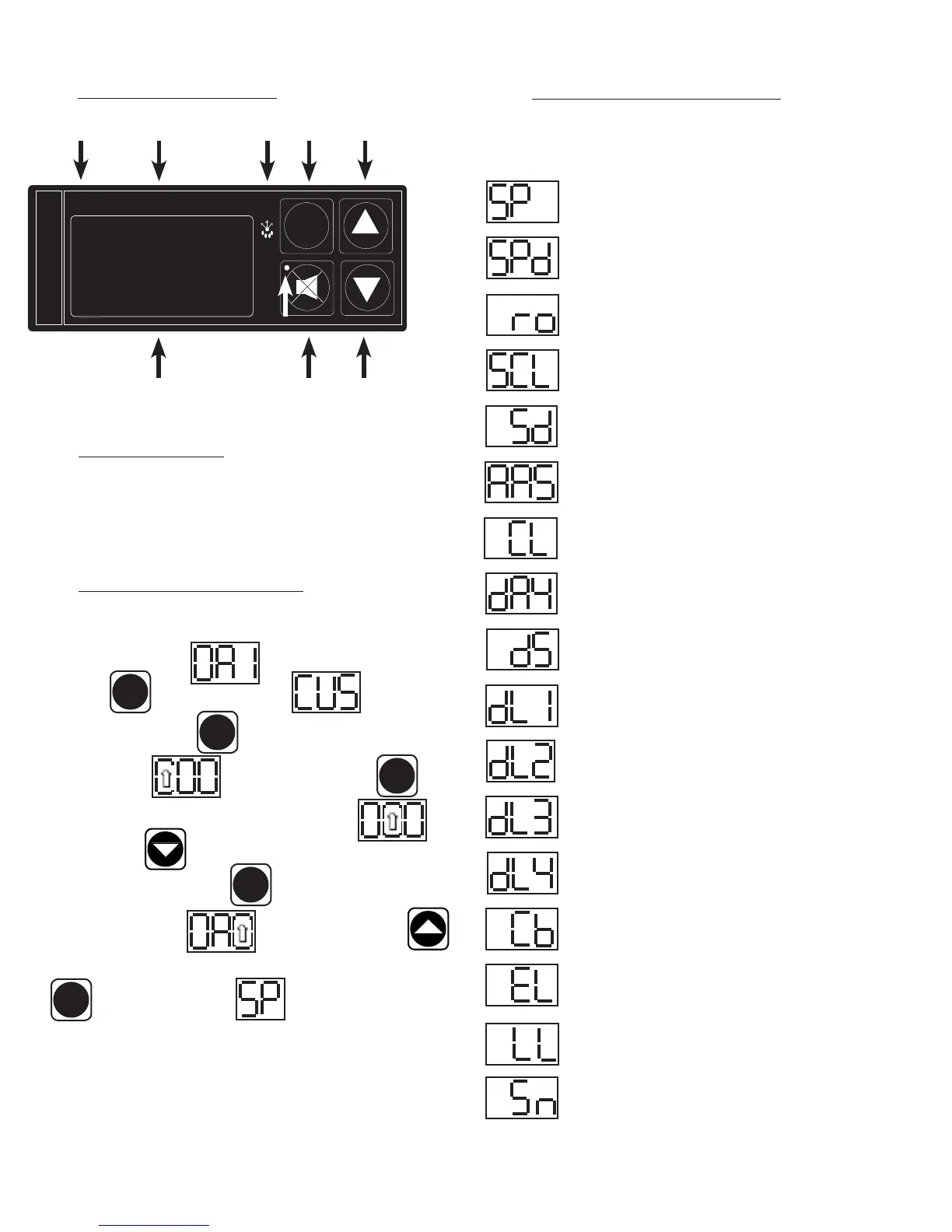
VII. c - CONTROL PANEL DIAGRAM:
VII. d - NOTES TO THE USER:
You only have 20-30 seconds between button pushes. If you take longer than 30
seconds, the controller will revert back to displaying the cabinet temperature. If
you enter the wrong security code, the controller will revert back to displaying the
cabinet temperature. You can exit the parameters at any time by waiting 20-30
seconds for the control to return to normal operation.
VII. e - ENTER THE CUSTOMER ACCESS:
Note: This is required to set any of the control parameters.
Use the security code 0, A, 1 and the following instructions: Press
the set button . The display will read Customer/Service
Access. Press the set button . The display will show three zeros with
the left zero ashing . Press the set button . The
display will show three zeros with the center zero ashing Press
the down arrow key to sequence through F, E, d, C, b, A, 9, 8, 7,…
etc. When you reach “A” press set The display will show zero, A, zero
with the right zero ashing . Press the up arrow key to
sequence through 1, 2, 3, 4, 5, 6, 7, 8, 9, A, b,…etc. When you reach “1” press
set . The display will read Thermostat Set Point. You are
now in the CUSTOMER/SERVICE PARAMETERS.
-7-
VII. PATENTED MICROPROCESSOR CONTROL (continued)
FREEZER
SET
INTELA-TRAUL
°F °C
ALARM CANCEL
BUTTON
RED ALARM LIGHT
0
F LED
LED DISPLAY DOWN BUTTON
0
C LED
UP BUTTON
SET
SET
SET
SET
SET
DEFROST
SYBMBOL
SET
BUTTON
VII. f - CUSTOMER/SERVICE PARAMETERS:
Listed below are the available parameters in the order they appear,
using the down arrow key on the controller. You can use either the up
or down arrow keys to scroll through the options.
Thermostat Set Point
Thermostat Set Point Differential
Room Temperature Offset
Temperature Scale
Start Manual Defrost
Audible Alarm Style
Time (24-hour clock)
Date (month-day-year)
Daylight Savings
Defrost Lockout 1
Defrost Lockout 2
Defrost Lockout 3
Defrost Lockout 4
Cabinet Air Temperature
Evaporator Coil Temperature
Liquid Line Temperature
Serial Number



 To Next Page