VII. g - ADJUSTING THE THERMOSTAT SET POINT:
This parameter sets the high point of the desired cabinet temperature range.
Typically, refrigerators will range from 36° F to 40° F (2.5° C to 3.3° C) for this
parameter setting. This parameter is preset at the factory and does not have to
be adjusted unless the customer chooses to do so.
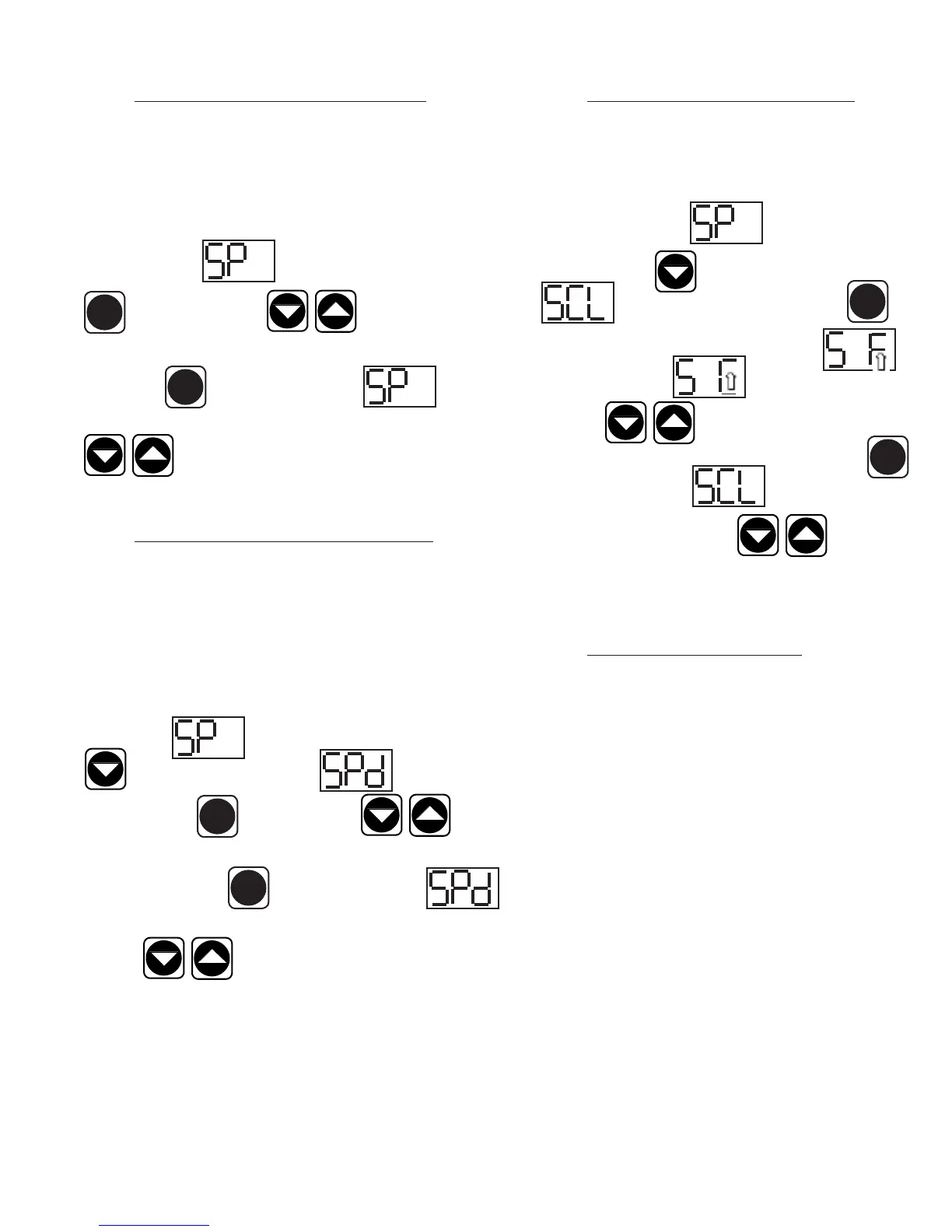
Follow the instructions to enter the customer access code on page 7. When the
control display reads Thermostat Set Point. Press the set button
. Use the arrow keys to adjust the temperature to
your desired setting. When the display shows the temperature you want press
the set button . The display will then read Thermostat Set
Point. You can use the up or down arrow keys to scroll to the next parameter
or wait 30 seconds for the control to return to normal opera-
tion.
VII. h - ADJUSTING THE SET POINT DIFFERENTIAL:
This parameter sets the number of degrees the air temp will rise above set point
before the refrigeration system will cycle on. The set point differential is set at
1.5 which will allow the air temperature to rise 1.5 degrees above SP (set point)
setting before cycling refrigeration on. This parameter is preset at the factory and
does not have to be adjusted unless the customer chooses to do so.
Follow the instructions to enter the customer access code on page 7. When the
control displays Thermostat Set Point, press the down arrow key
until the control display reads Set Point Differential.
Press the set button . Use the arrow keys to adjust the
temperature to your desired setting. When the display shows the temperature you
want press the set button . The display will then read Set
Point Differential. You can use the up or down arrow keys to scroll to the next
parameter or wait 30 seconds for the control to return to normal
operation.
VII. PATENTED MICROPROCESSOR CONTROL (continued)
-8-
SET
SET
SET
SET
VII. i - CHANGING THE TEMPERATURE SCALE:
The temperature scale determines if the temperature displayed will
be in degrees Fahrenheit or degrees Celsius.
Follow the instructions to enter the customer access code on page 7.
When the control displays Thermostat Set Point, press
the down arrow key until the control display reads
Temperature Scale. Press the set button .
The display will start with the current setting either for
degrees Fahrenheit or for degrees Celsius. Use the
arrow keys to toggle between the options. When
the display shows the scale you want press the set button .
The display will then read Temperature Scale. You
can use the up or down arrow keys to scroll to the
next parameter or wait 30 seconds for the control to return to normal
operation.
VII. j - SETTING THE 24-HOUR CLOCK:
The internal time clock must be set in order for the data storage memory
to correctly log events and to allow any defrost lockout to occur at the
correct time of day. If the clock is not set, the control assumes the time
is 12 a.m. at the time power is supplied to the unit. The hours on a
24-hour time clock read the following way:
H01 = 1:00 a.m. H09 = 9:00 a.m. H17 = 5:00 p.m.
H02 = 2:00 a.m. H10 = 10:00 a.m. H18 = 6:00 p.m.
H03 = 3:00 a.m. H11 = 11:00 a.m. H19 = 7:00 p.m.
H04 = 4:00 a.m. H12 = 12:00 a.m. H20 = 8:00 p.m.
H05 = 5:00 a.m. H13 = 1:00 p.m. H21 = 9:00 p.m.
H06 = 6:00 a.m. H14 = 2:00 p.m. H22 = 10:00 p.m.
H07 = 7:00 a.m. H15 = 3:00 p.m. H23 = 11:00 p.m.
H08 = 8:00 a.m. H16 = 4:00 p.m. H24 = 12:00 a.m.
SET
SET



 To Next Page