67
EN
U
minipool Quarz
Use
ADJUSTING THE TEMPERATURE
Warm Jets(1)
menu/
select
Cool Light
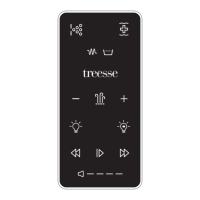
When using a panel with WARM and COOL buttons (Temperature buttons), pressing WARM or COOL will cause the
temperature to ash.
Pressing a temperature button again will adjust the set temperature in the direction indicated on the button. When
the LCD stops ashing, the spa will heat to the new set temperature when required.
If the panel has a single temperature button, pressing the button will cause the temperature to ash. Pressing the
button again will cause the temperature to change in one direction (e.g. -). After allowing the display to stop ashing,
pressing the Temperature Button will cause the temperature to ash and the next press will change the temperature
in the opposite direction (e.g. -).
If a Temperature button is pressed and held when the temperature is ashing, the temperature will continue to change
until the button is released. If only one temperature button is available and the limit of the Temperature Range is
reached when the button is being held, the progression will reverse direction.


 To Next Page