15
EN
minipool Phantom PR1
First run
Automatic filling
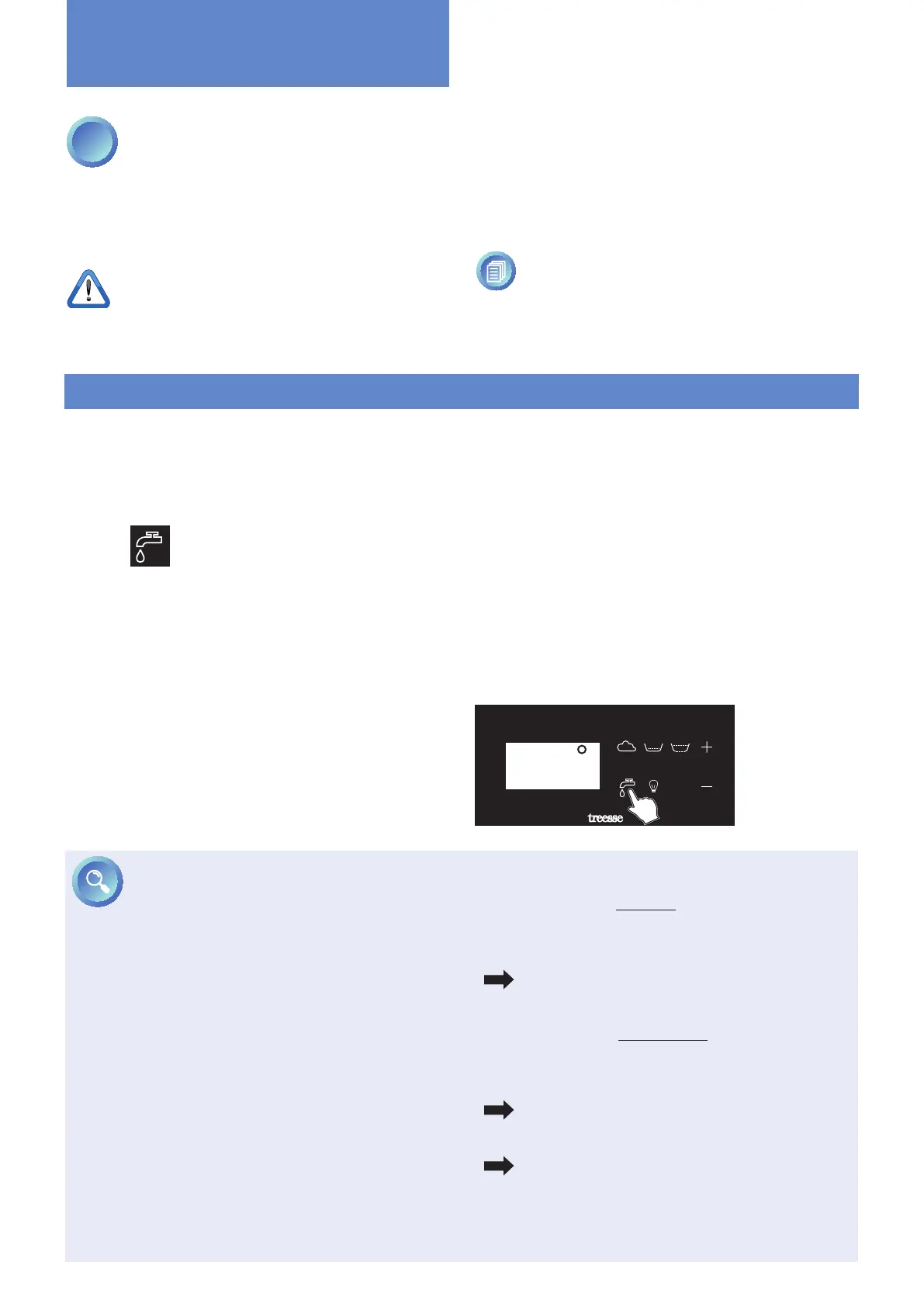
using the keypad:
pressing the key
activates the auto-
matic filling of the
minipool, controlled
by two level sensors.
26∞
OK
1
FILLING THE MINIPOOL
Perform a preliminary cleaning of the minipool using a
bit of water and a mild detergent.
Do not use cloths or cleaners that are abrasive, aggressive
or that contain solvents because they could irreparably
damage the surface of the minipool.
Do not start any operation until the minipool has
been completely lled, otherwise the minipool
could be damaged.
AUTOMATIC FILLING USING THE KEYPAD
Once the pool is powered, the display will show the word
"treesse" and after a few seconds the display will show
the current ambient temperature, and the various symbols
on the keypad will be illuminated with white light.
Press the
key on the keypad to activate lling: lling
in progress is indicated by the blue icon.
First, the compensation tank is lled, and then - once
the water has reached the maximum level inside the
tank - the bathtub is lled through a recirculation pump,
passing through the paper lter and the heater.
This cycle will be repeated many times until both the
compensation tank and bathtub are lled. At this stage
and until lling is completed, no other functions of the
minipool - except chromatherapy - will be available.
During the lling phase, if the times for reaching the
minimum (90 min) and maximum (60 min) levels in the
overow tank are not met, alarms "AL1" (minimum level)
and "AL2 "(maximum level) will be triggered, stopping
Before lling, once again check the quality of the water
supply. This is very important for the well-being of the
users and for the long life of the minipool.
For more information see chapter “Characteristics
of the water supply” on page 11.
all operation.
In this case, you will have to disconnect the power and
restore it after about 30 seconds using the product's main
power switch and check the reason for this anomaly (leaky
pipes, obstructed supply valves, insufcient pressure).
During the use of the minipool the system automati-
cally maintains the water level ush with the edge of the
bathtub.
PHANTOM PR1
More information
MAINTAINING THE WATER LEVEL IN THE
MINIPOOL
When the minipool is completely lled a maximum
sensor (SL2) and a minimum sensor (SL1) continuously
monitor the water level inside the compensation tank.
SL1 (minimum sensor) = 0, the sensor does NOT detect
water
SL1 (minimum sensor) = 1, the sensor detects water
SL2 (maximum sensor) = 0, the sensor does NOT detect
water
SL2 (maximum sensor) = 1, the sensor detects water
If the lack of water is minimal (e.g., evaporation or a
person gets out):
• The minimum sensor still detects water (SL1 = 1).
• The maximum sensor does not detect water (SL2 = 0).
• activates automatic lling until conditions are
restored and for a maximum of 60 minutes.
If the lack of water is considerable (e.g., two or more
people get out of the minipool):
• Both the minimum and maximum sensors do not
detect water (SL1 = 0, SL2 = 0).
• The recirculation pump moves the water from
the compensation tank to the minipool.
• The minimum sensor detects water (SL1 = 1, SL2 = 0).
• activates automatic lling until conditions are
restored and for a maximum of 60 minutes.



 To Next Page