Chassis
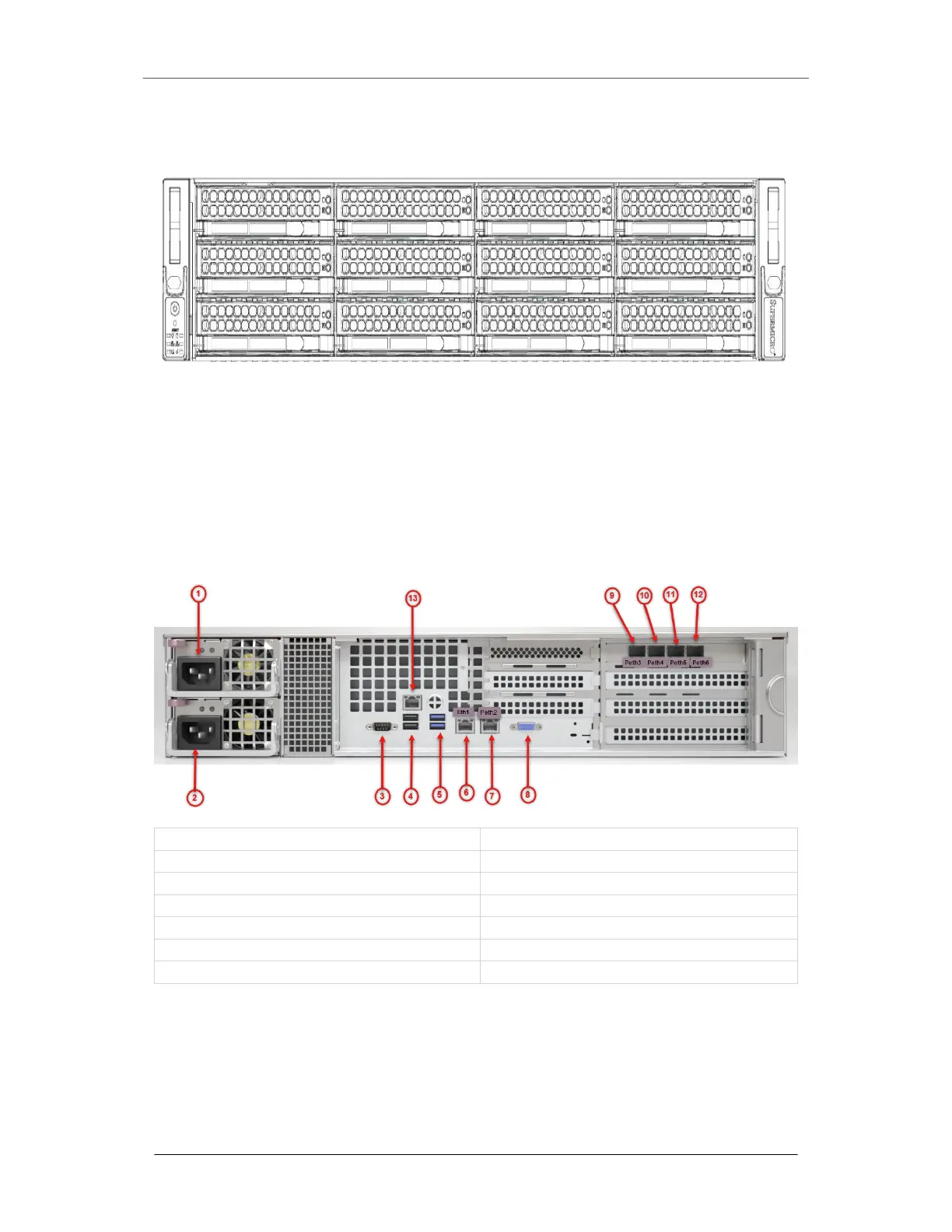
1. Disk Drive Carrier: Each carrier can house a hot-swappable disk drive. A drive
slot map displays the disk slot numbers on top of the appliance.
2. Handle Release: Press this tab to release the handle. Use the handle to pull the
disk drive carrier from the chassis.
The Rear View
1) Power Supply 1 8) VGA Connector
2) Power Supply 2 9) pether3 (SFP+) SMTP interface 3 Port
3) Serial Console Port 10) pether4 (SFP+) SMTP interface 4 Port
4) USB 2.0 Port 11) pether5 (SFP+) SMTP interface 5 Port
5) USB 3.2 Port 12) pether6 (SFP+) SMTP interface 6 Port
6) ether1 (RJ45) Management 1 Port 13) IPMI Port
7) pether2 (RJ45) live mode analysis 2 Port
Power
• Power: Connect your power source to this port to provide power to the appliance.
The appliance comes with one redundant power supply unit for use if the primary
unit fails.
EX Series The EX 8600
Page 6 © 2022 FireEye Security Holdings US LLC


 To Next Page