-10-
CRT MK2
x4
x1
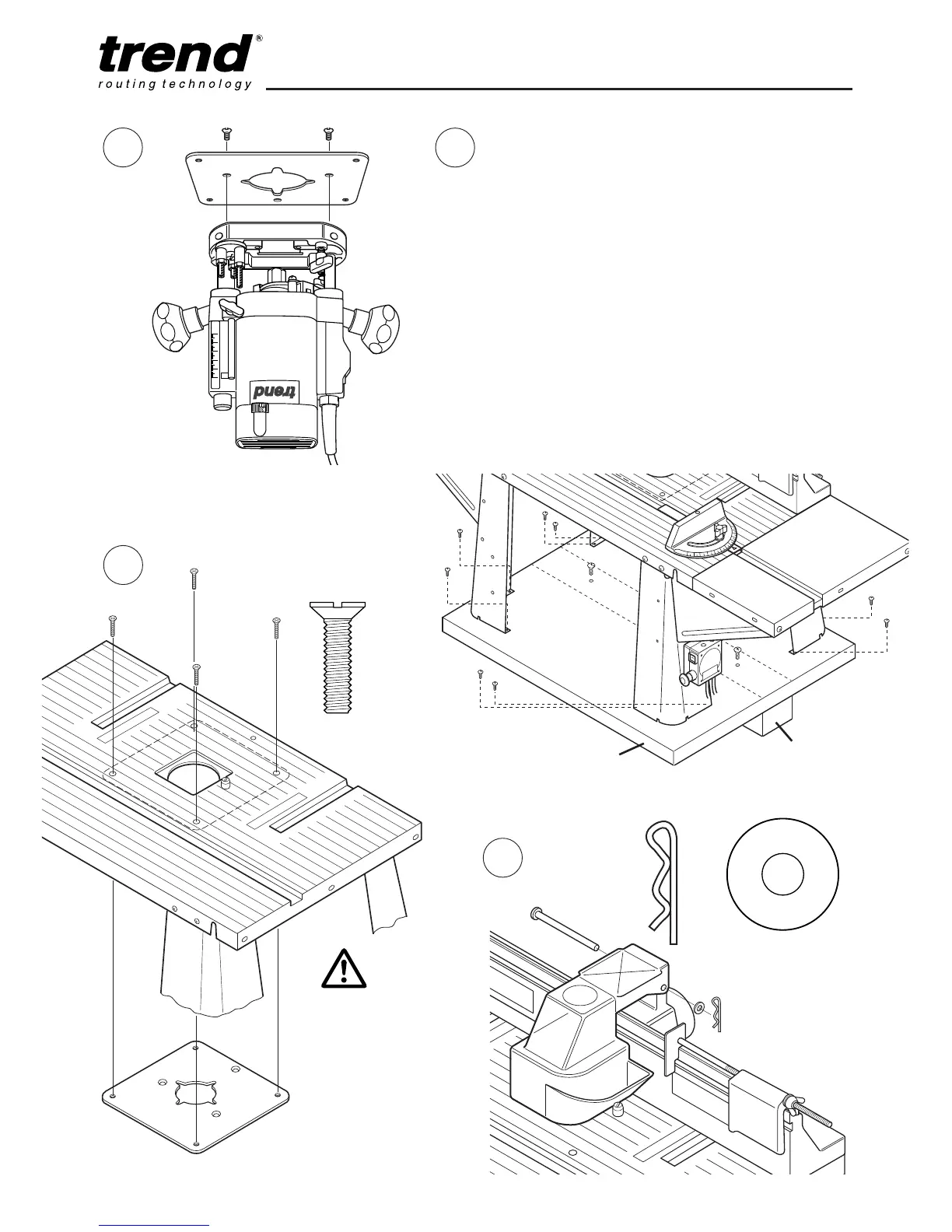
The fixing plate must be fitted to the router
base before installation into the router
table.
F
G
x1
Mounting Table to Workbench or
Workboard
The router table must be mounted onto either
the optional floor stand or onto a suitable
workbench or workboard.
Each table leg has four holes at the bottom
mounting. Firmly secure the table assembly to a
workbench or workboard, using self-tapping
screws (not provided).
If a workboard is used, this will allow quick
mounting and removal from a workbench by
using cramps. If a Workmate
®
is to be used
then a batten can be fitted to allow securing in
the Workmate’s
®
jaws.
Workboard 575mm x 450mm
Batten 560mm x 100mm
IMPORTANT:
Please tighten
screws across
the diagonals,
to ensure the
plate remains
flat. Tighten all
screws evenly.


 To Next Page