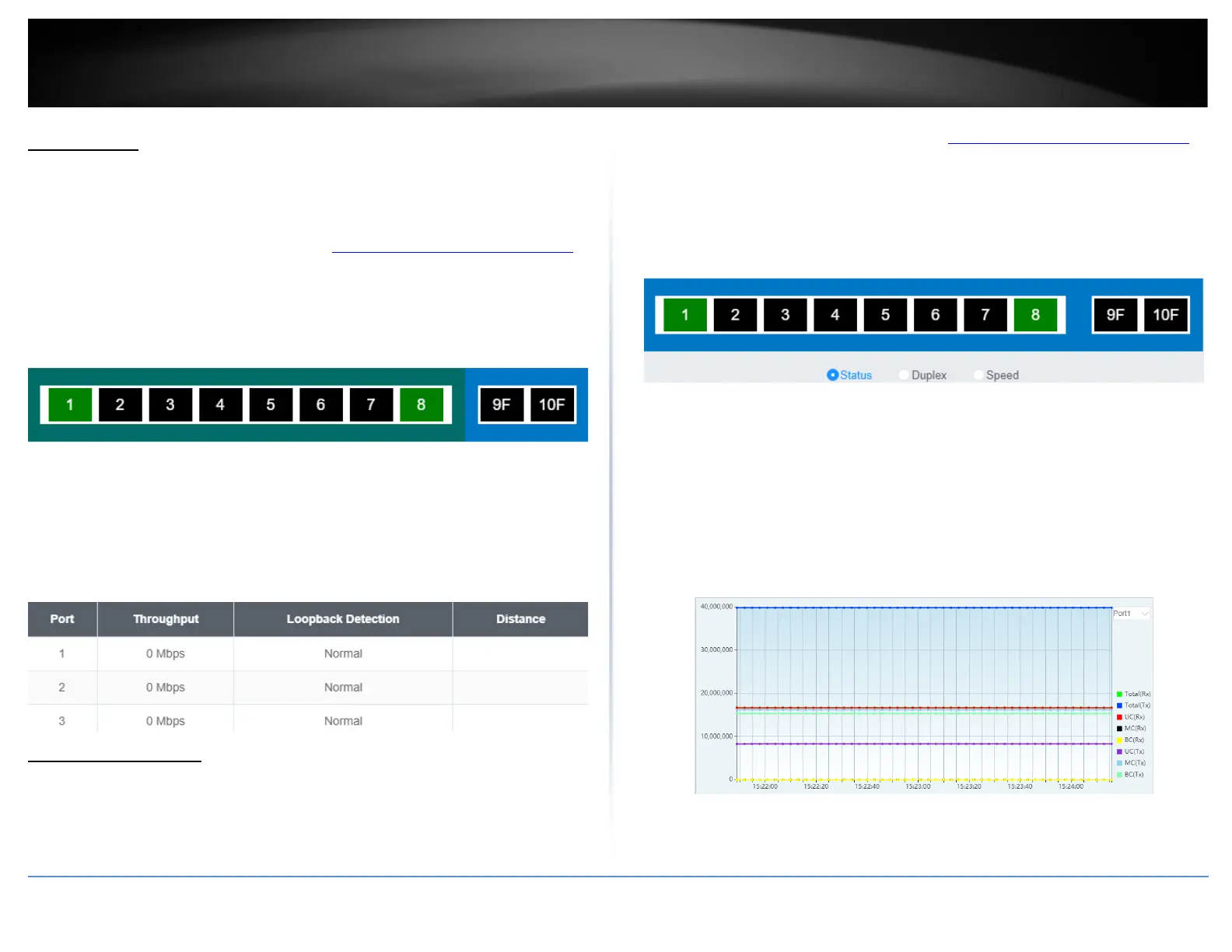
Switch View
View your switch status information
Dashboard > Switch View
1. Log into your switch management page (see “Access your switch management page”
on page 5).
2. Click on Dashboard, then click on Switch View. The switch view shows the ports that
are connected.
3. Review the settings below.
• Port: Designates the port number that is displayed.
• Throughput: Current throughput being used for the specified port
• Loopback Detection: Displays the loopback detection status
• Distance: Displays the estimated length of the cable measured in meters
Real-time Statistics
View your switch status information
Dashboard > Real-time Statistics
1. Log into your switch management page (see “Access your switch management page”
on page 5).
2. Click on Dashboard, then click on Real-time Statistics. The switch view shows the
ports that are connected. Select Status, Duplex, or Speed to display which ports are
currently using the selected feature.
3. Select the port from the drop down menu to review the current settings.
• Total(Rx): The total number of packets received
• Total(TX): The total number of packets transmitted
• UC (Rx): The number of Unicast packets received
• MC(Rx): The number of Multicast packets received
• BC(Rx): The number of Broadcast packets received
• UC(Tx): The number of Unicast packets transmitted
• MC(Tx): The number of Multicast packets transmitted
• BC(Tx): The number of Broadcast packets transmitted








 To Next Page