
 Need help?
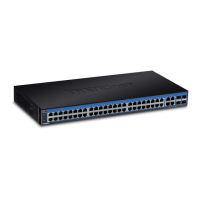
Do you have a question about the TRENDnet TEG-524WS and is the answer not in the manual?
Steps to set a static IP, access, and login to the switch management page.
Procedure to save IP address settings to the switch's NV-RAM.
Instructions to login and view the switch's dashboard for system information.
Configuring IPv4 addresses, routes, and ARP aging time.
Configuring IPv6 addresses, routes, and neighbor settings.
Defining or restricting access to the switch management page by IP address.
Changing admin password, adding users, and setting idle timeout.
Enabling secure HTTPS/SSL management access for the switch.
Enabling secure SSH management access to the switch.
Enabling SNMP agent, configuring engine ID, views, groups, users, and traps.
Setting port parameters like speed, duplex, flow control, and jumbo frames.
Setting STP, MST, bridge priority, and port-specific STP configurations.
Enabling the feature to detect and prevent disruption from network loops.
Managing QoS settings including CoS, port priority, DSCP, and scheduling algorithms.
Setting up port security, MAC address filtering, and 802.1x access control.
Using the wizard, profile list, and finder to create and manage ACLs.
Steps for rebooting or resetting the switch to factory default settings.
Details TRENDnet's limited warranty, exclusions, limitations, and RMA procedures.
 General
| Switching Capacity | 48 Gbps |
|---|---|
| Forwarding Rate | 35.7 Mpps |
| MAC Address Table | 8K |
| RAM Buffer | 512 KB |
| Jumbo Frame | 9KB |
| Standards | IEEE 802.3, IEEE 802.3u, IEEE 802.3x |
| Dimensions | 17.3 x 1.7 in |
| Power Supply | 100-240V AC, 50/60Hz |
| Operating Temperature | 0°C to 40°C (32°F to 104°F) |













 To Next Page
