

EasyManua.ls Logo

TRENDnet THA-103AC - User Manual

TRENDnet THA-103AC
29 pages
Print Icon
To Next Page IconTo Next Page
Loading...

TRENDnetUser’sGuide
CoverPage

Other manuals for TRENDnet THA-103AC

Question and Answer IconNeed help?

Do you have a question about the TRENDnet THA-103AC and is the answer not in the manual?

Summary

Product Overview

Overview

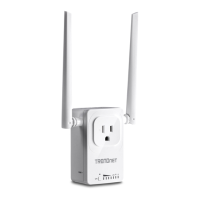
General description of the THA-103AC smart switch and WiFi extender.

Setting Up the THA-103 AC

WPS Setup

Guide for setting up the device using the WPS button.

Web Browser Setup

Instructions for configuring the device via a web browser.

iOS Setup

Step-by-step guide for setting up the device using an iOS device.

Android Setup

Download and Connect App

Steps to download the app and connect the device.

Add Device via App

Instructions for adding the device using the mobile app.

Android Setup - WiFi Configuration

Connect to Wireless Network

Guide to connecting the device to your wireless network via the app.

Managing the App

App Device Management

App Schedule and Wi-Fi Settings

Android App Management

Power On;Off Device

How to turn the connected device on or off using the Android app.

App Device Settings

Scheduling

Guidance on creating and managing device power schedules.

Add a Schedule

Steps to create a new timed schedule for device operation.

App Schedule and Wi-Fi Info

Browser Management

Network Configuration - LAN

Network Configuration - Wireless

Wireless Repeater Settings

Administrator Settings

Device Controls

Power Control

Manually turning the connected device on or off.

Power Schedule

Creating and managing automated power schedules for the device.
Device Status Information

Summary

Product Overview

Overview

General description of the THA-103AC smart switch and WiFi extender.

Setting Up the THA-103 AC

WPS Setup

Guide for setting up the device using the WPS button.

Web Browser Setup

Instructions for configuring the device via a web browser.

iOS Setup

Step-by-step guide for setting up the device using an iOS device.

Android Setup

Download and Connect App

Steps to download the app and connect the device.

Add Device via App

Instructions for adding the device using the mobile app.

Android Setup - WiFi Configuration

Connect to Wireless Network

Guide to connecting the device to your wireless network via the app.

Managing the App

App Device Management

App Schedule and Wi-Fi Settings

Android App Management

Power On;Off Device

How to turn the connected device on or off using the Android app.

App Device Settings

Scheduling

Guidance on creating and managing device power schedules.

Add a Schedule

Steps to create a new timed schedule for device operation.

App Schedule and Wi-Fi Info

Browser Management

Network Configuration - LAN

Network Configuration - Wireless

Wireless Repeater Settings

Administrator Settings

Device Controls

Power Control

Manually turning the connected device on or off.

Power Schedule

Creating and managing automated power schedules for the device.

Device Status Information

TRENDnet THA-103AC Specifications

General IconGeneral
BrandTRENDnet
ModelTHA-103AC
CategorySwitch
LanguageEnglish

Related product manuals









