©Copyright2015TRENDnet.AllRightsReserved.
TRENDnetUser’sGuide
THA‐103AC
6
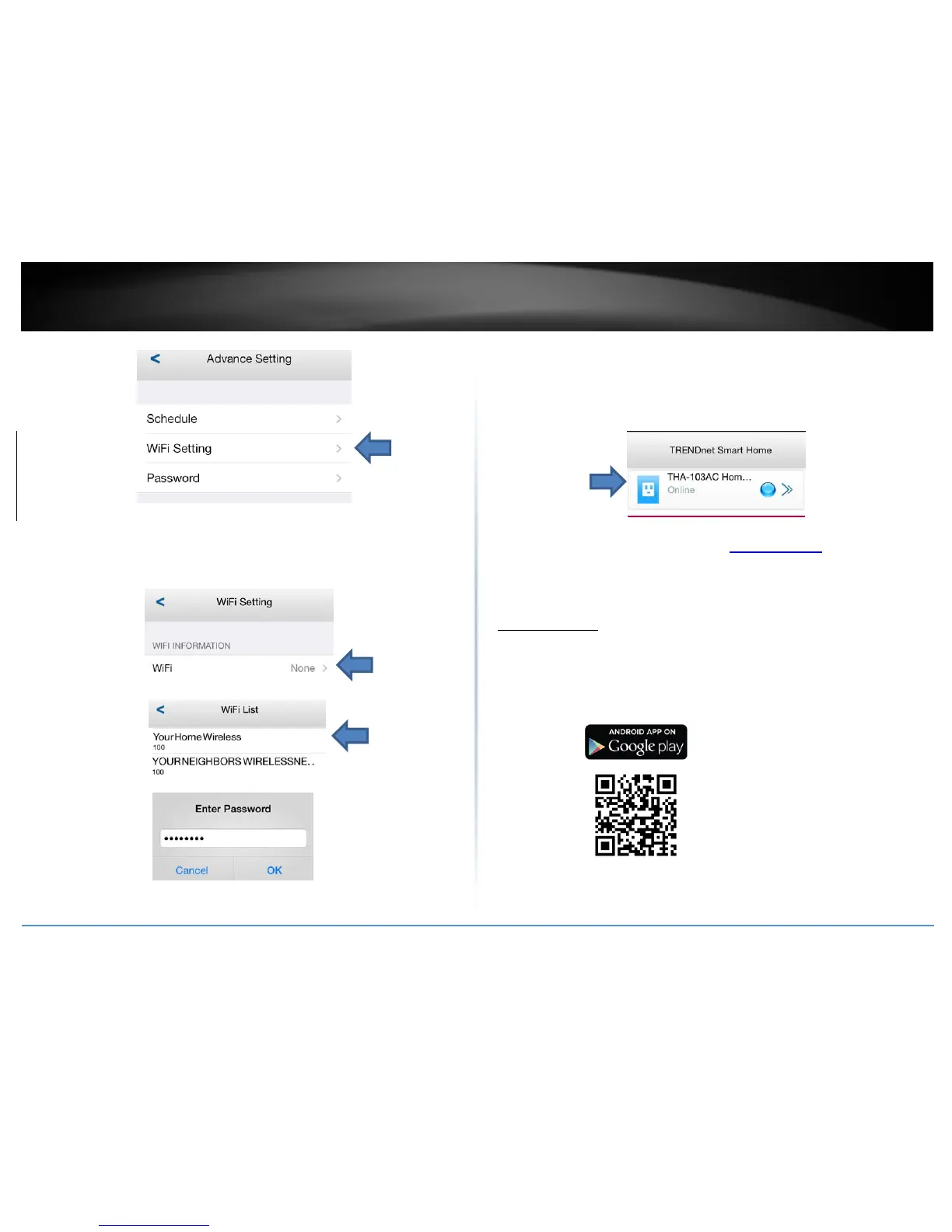
8. SelecttheWirelessSSID/Nameyouwouldliketoconnecttoandenterthe
correctpassword,thentapOK.
Pleaseallowcoupleofminutesforthedevicetoconnecttothehomenetwork
andreboot.
9. OnceyouseethedeviceStatusisbacktoOnline,thesetupiscomplete.Now
youcanmanageyourapplianceslocallyandremotely.
Formoreappfeatures,pleaserefertoManagingtheAppsection.Once
setup,thewirelessrepeaterextendedyourwirelessnetworkautomatically.
AndroidSetup
Asmartphoneisrequiredtoproceedwiththissetup.
1. DownloadTRENDnetSmartHomeappfromGooglePlay.
2. PlugtheTHA‐103ACtoapoweroutletandpoweronthedevice.


 To Next Page