©Copyright2015TRENDnet.AllRightsReserved.
TRENDnetUser’sGuide
THA‐103AC
5
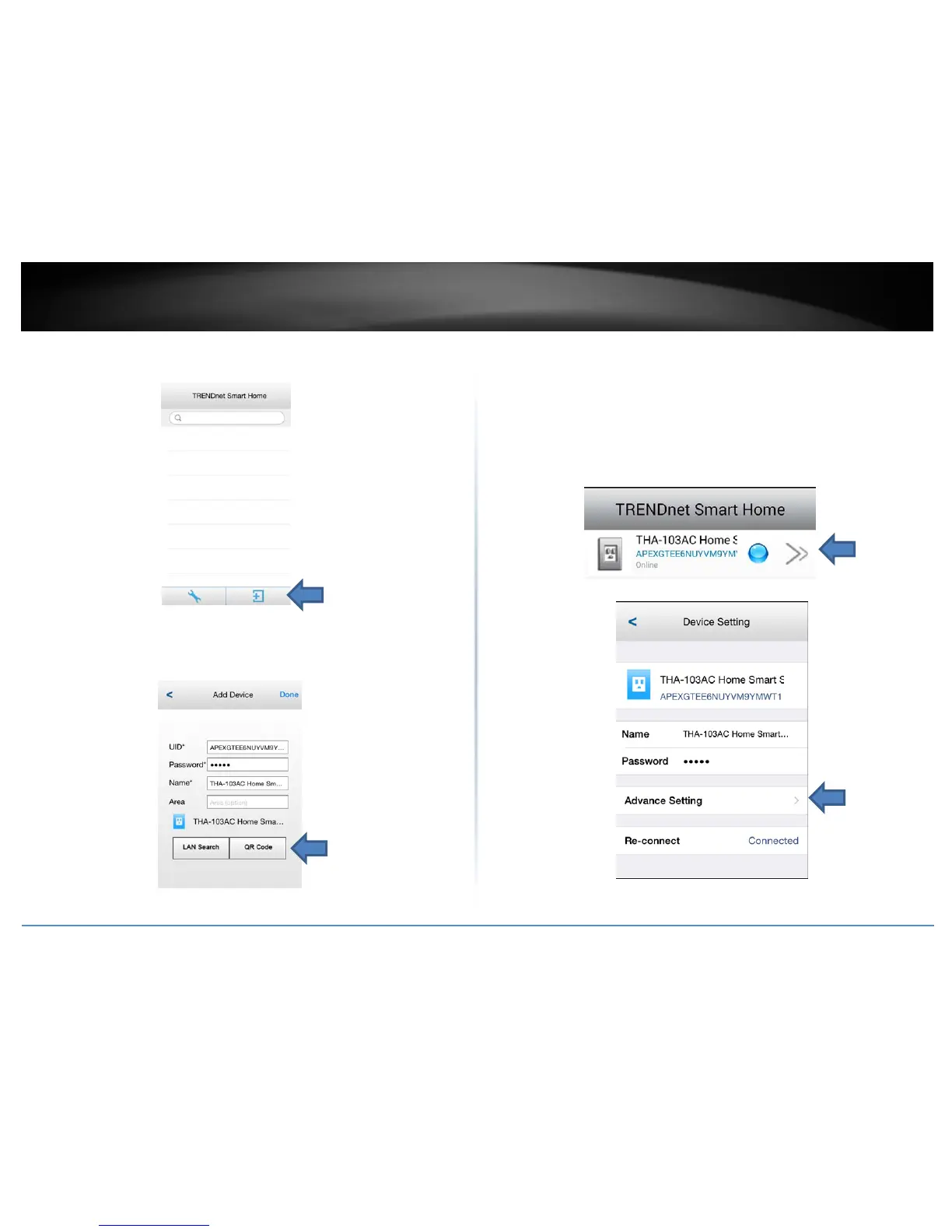
4. Taponthe+buttontoaccesstheconfigurationpage.Youcanaddthedevice
byusingLANsearchorQRcodescan.
5. TaponQRCodebuttonandpointyourphonecameralenstothedevice’slabel
wheretheQRcodeislocated.TheappshoulddetecttheTHA‐103AC’sproduct
IDandstarttocommunicatewiththedevice.(Pleasemakesureyourphone
hasabarcodescannerapp,otherwise,pleaseusethe
LANsearchmethod).
Enterthedevice’spassword(defaultisadmin)andcreateanameforthis
switch.
6. TapDoneaftertheinformationisfilled.
7. Tabthe>>symboltoaccesstheDeviceSettingsAdvancedSettingWiFi
SettingandgotoWiFisettings.


 To Next Page