©Copyright2015TRENDnet.AllRightsReserved.
TRENDnetUser’sGuide
THA‐103AC
7
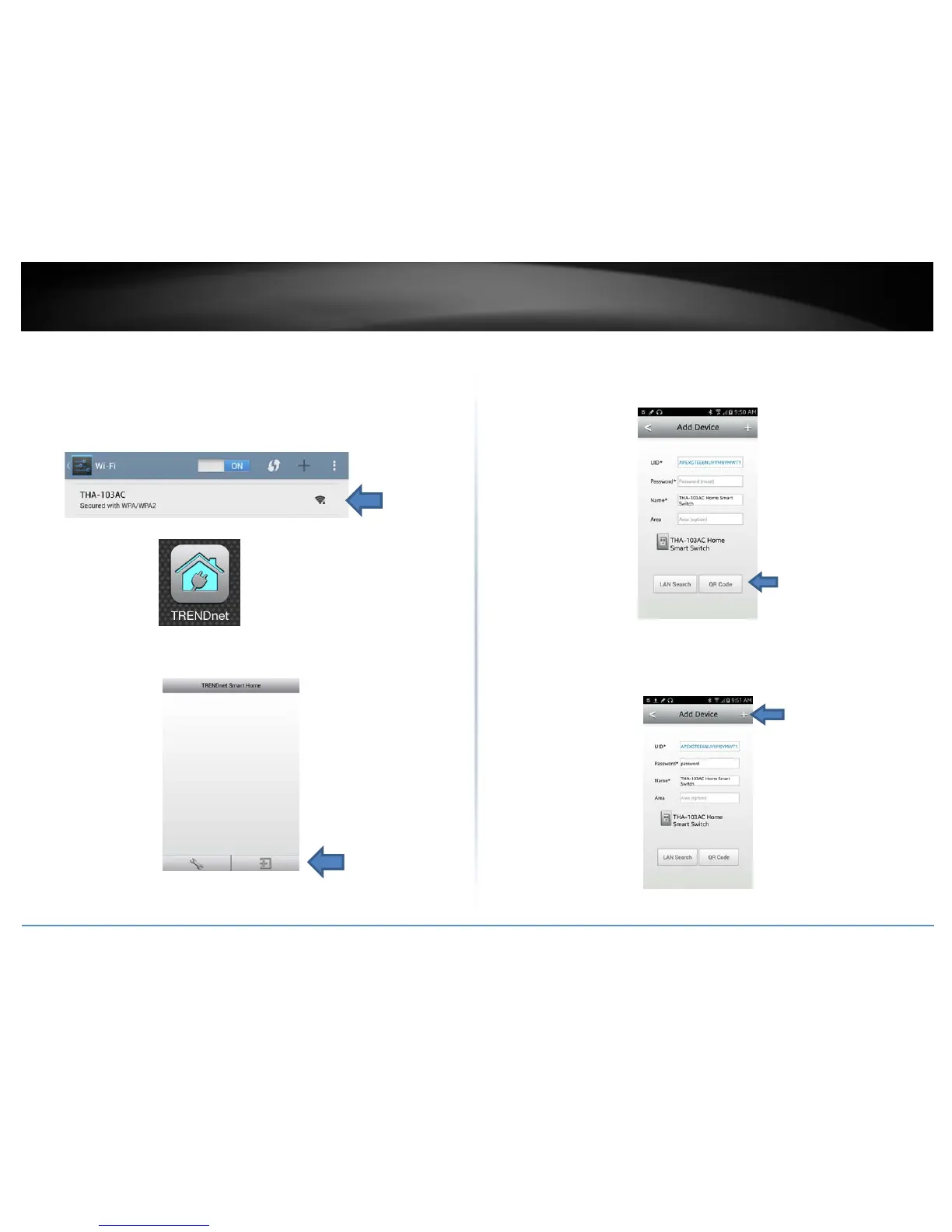
3. Connect your mobile phone to THA‐103AC; you should be able to see a
NetworkNamesimilartoTHA‐103AC_24G_1234for2.4GHzwirelessbandor
THA‐103AC_5G_1234 for 5 GHz wireless band under the available wireless
network list. Connect to the available wireless network, depending on your
mobile phone’s
support (default wireless key is password). Once connected,
opentheTRENDnetSmartHomeapp.
4. Taponthe+buttontoaccesstheconfigurationpage.Youcanaddthedevice
byusingLANsearchorQRcodescan.
5. TaponQRCodebuttonandpointyourphonecameralenstothedevice’slabel
where
theQRcodeislocated.TheappshoulddetecttheTHA‐103AC’sproduct
IDandstarttocommunicatewiththedevice.(pleasemakesureyourphone
hasabarcodescannerapp,otherwise,pleaseusetheLANsearchmethod)
Enterthedevice’spassword(defaultisadmin)andcreateanameforthis
switch.
6. Tapthe+signwhentheinformationisfilledin.


 To Next Page