1. How do I configure TCP/IP settings on my computer?
Troubleshooting
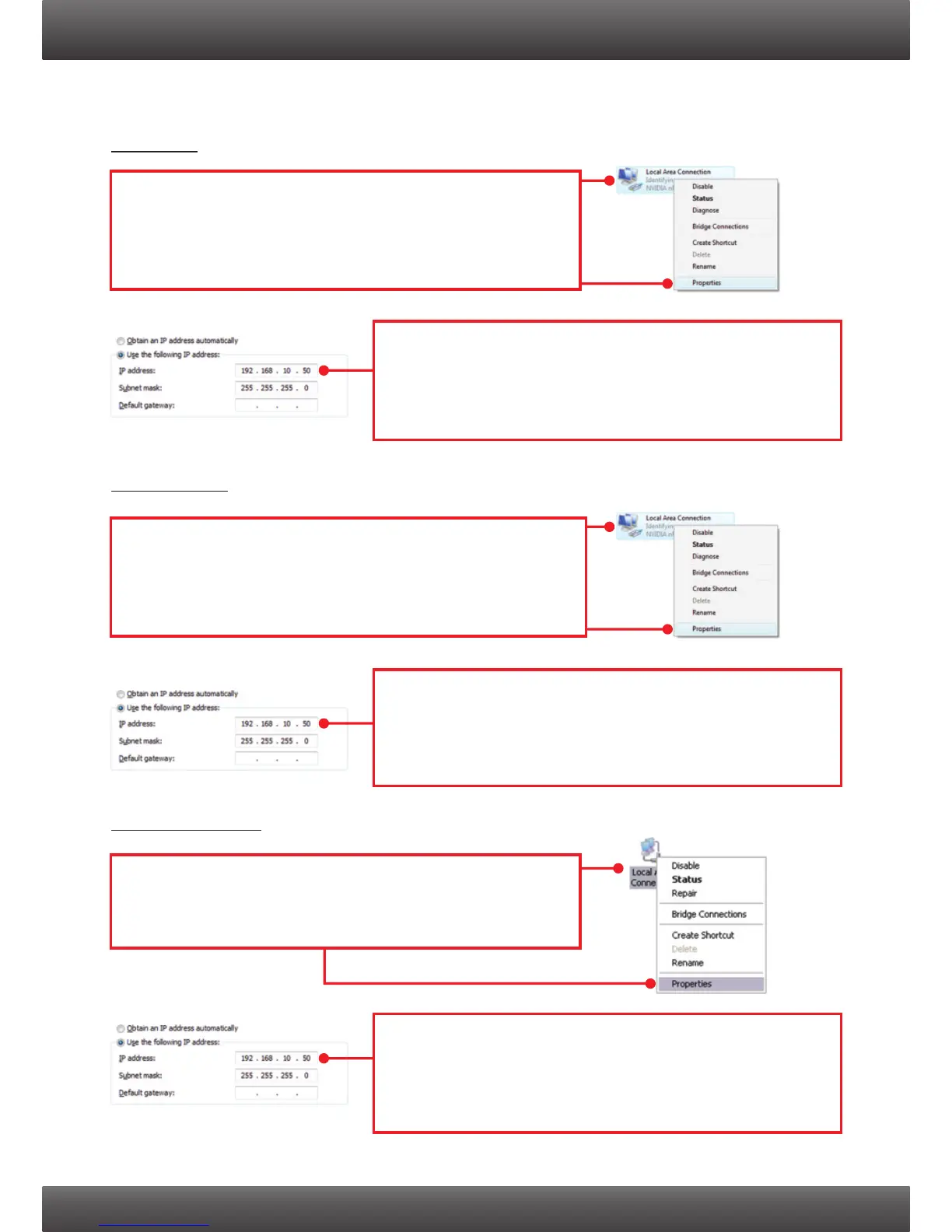
1. Go into the Control Panel, click Network and Internet,
click Network and Sharing Center, click Change
Adapter Settings and then right-click the Local Area
Connection icon and then click Properties.
Windows 7
Windows Vista
Windows XP / 2000
1. Go into the Control Panel, click Network and Internet,
click Network and Sharing Center, click Manage
Network Connections and then right-click the Local
Area Connection icon and then click Properties.
1. Go into the Control Panel, double-click the Network
Connections icon and then right-click the Local Area
Connection icon and then click Properties.
2. Click Internet Protocol Version 4(TCP/IPv4) and then
click Properties. Then click on Use the following IP
address, and make sure you assign your network
adapter an IP address in the subnet of 192.168.10.x.
2. Click Internet Protocol Version (TCP/IP) and then click
Properties. Then click on Use the following IP
address, and make sure you assign your network
adapter an IP address in the subnet of 192.168.10.x.
2. Click Internet Protocol Version 4(TCP/IPv4) and then
click Properties. Then click on Use the following IP
address, and make sure you assign your network
adapter an IP address in the subnet of 192.168.10.x.
9



 To Next Page