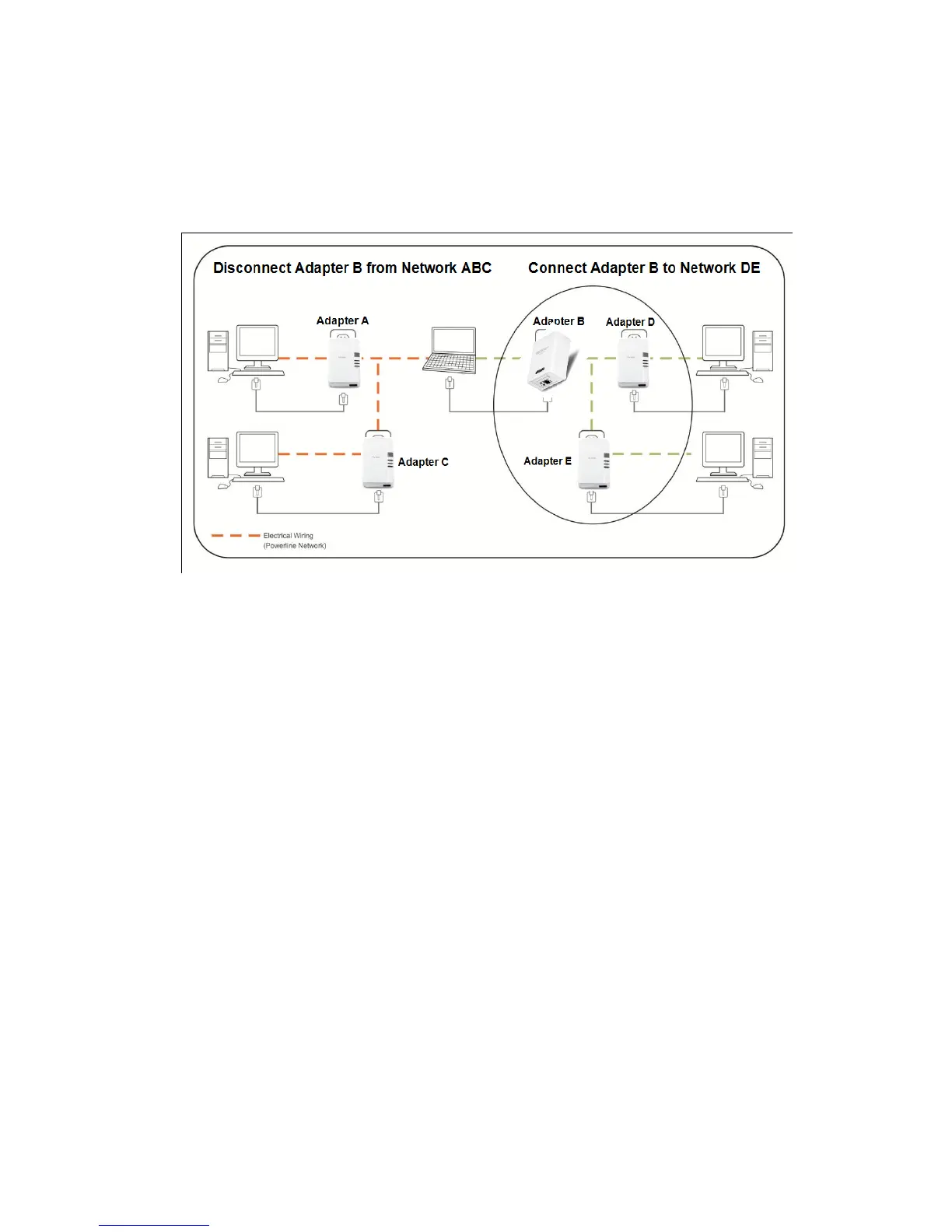
4.6 Moving Powerline Adapters between different Powerline Networks
Use the previous procedures in Chapter 4: Powerline, Sections 4.1 - 4.4, to connect one group of
adapters, then you can carry out the procedures on another group of adapters to create multiple
overlapping powerline networks. This procedure describes how to disconnect a powerline adapter from
one powerline network and connect the adapter to a different powerline network.
Assuming “Adapter B” is the TPL-310AP and all other powerline adapters are TPL-303E powerline
adapters and for reference in the diagram and this procedure, the adapters will be labeled Adapter A,
B, C, D, and E. Adapters A, B, and C are currently connect together to form one powerline network and
Adapters D and E form another powerline network. Adapter B will be disconnected from Adapters A
and C and connected to Adapters D and E.
1. Push and hold the Sync button on Adapter B (i.e. TPL-310AP) for 10 seconds and release it. All LEDs
will turn off and turn back on. This will erase the current network name/security key assigned to
Adapter B (i.e. TPL-310AP) and disconnect from Adapters A and C.
2. Push and hold the Sync button on Adapter D for 2 seconds and release it. The PWR LED will start
blinking.
3. Within 2 minutes (120 sec), push and hold the Sync button on Adapter B for 2 seconds and release
it. The PWR LED will start blinking. This will establish connectivity between Adapters B, D, and E by
assigning Adapter B’s network name/security key to match the network name/security key of
Adapters D and E.
4. To verify connectivity between the powerline adapters, make sure that the PL LED LED (P-Link on
TPL-303E/304E) on each powerline adapter is on solid (Green, Amber, Red, Green only – TPL-
303E/304E). Please refer to the LED section 1.4 for details on the LED indicator.














 To Next Page