Chapter 3: Wireless Access Point Web Management Interface
3.1 Default Configuration Settings
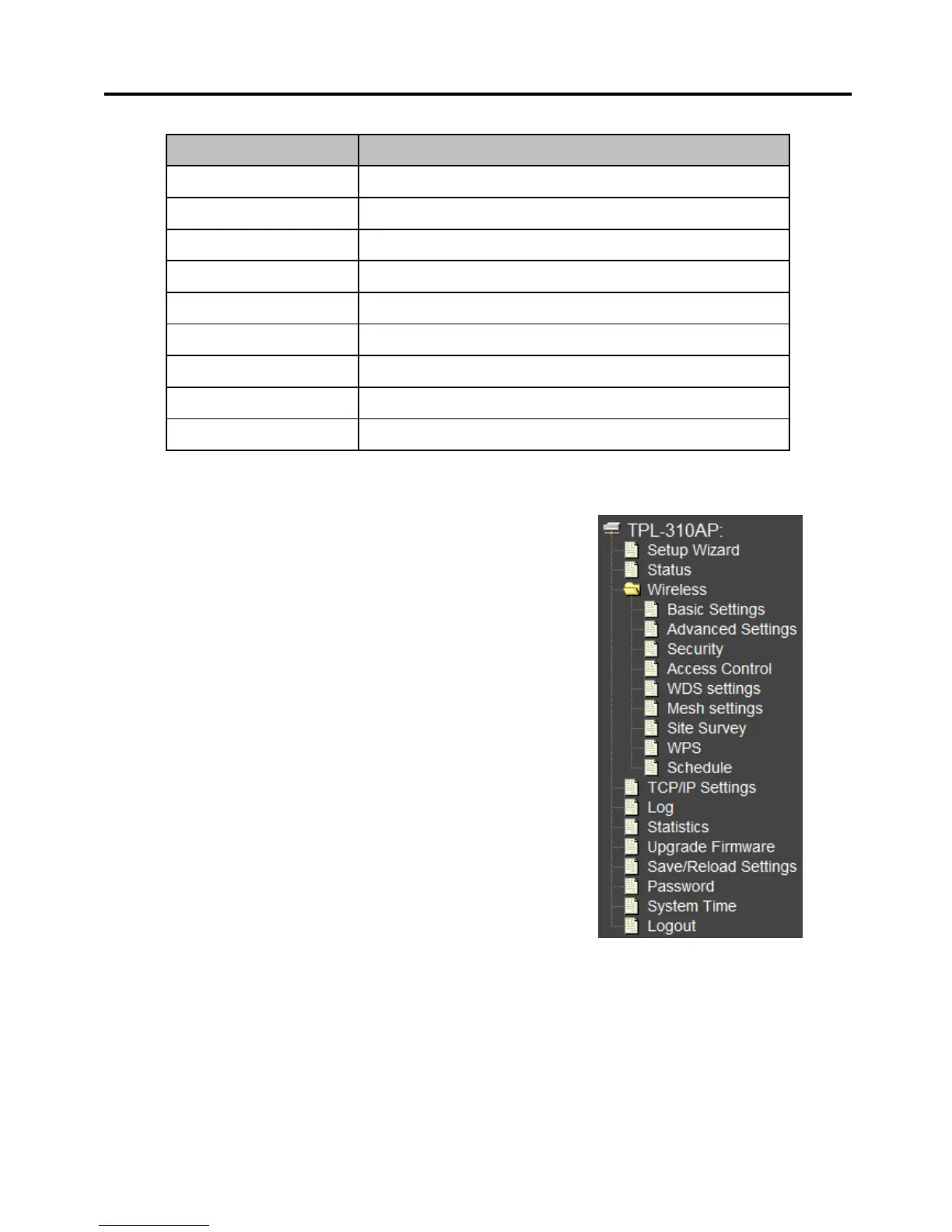
3.2 Menu Items
Setup Wizard: Quickly configure the basic settings such as IP
settings, SSID (Wireless Network Name), and Wireless Security.
Status: Displays the current device status and some basic
settings of the device.
Wireless: Configure the wireless parameters such as AP, WDS,
Mesh, AP client, and repeater modes. Configure wireless
security settings, WPS, access control such as MAC filtering,
and wireless scheduling.
TCP/IP Settting: Configure the IP address settings for the
local area network or Ethernet port.
Log: Displays the device internal system log or configure the
device to send system logs to a remote log server (Syslog).
Statistics: Displays the number of packets transmitted and
eceived on the wireless and wired interfaces.
Upgrade Firmware: Upgrade the device firmware.
Save/Reload Settings: Backup configuration, restore from configuration file, and reset the wireless
access point settings to factory defaults.
Password: Change the device username and password.
System Time: Set the device system time.
Logout: Logout of the web management interface.



 To Next Page