Home
TRENDnet
Adapter
TPL-422E
Page 12
TRENDnet TPL-422E - Page 12
26 pages
Manual
Save Page as PDF
To Next Page
To Next Page
To Previous Page
To Previous Page
Loading...
© Copyright 2018
TRENDnet. All Rights
Reserved.
TRENDnet User’
s Guide
TPL-422E / TPL-422E
2K
10
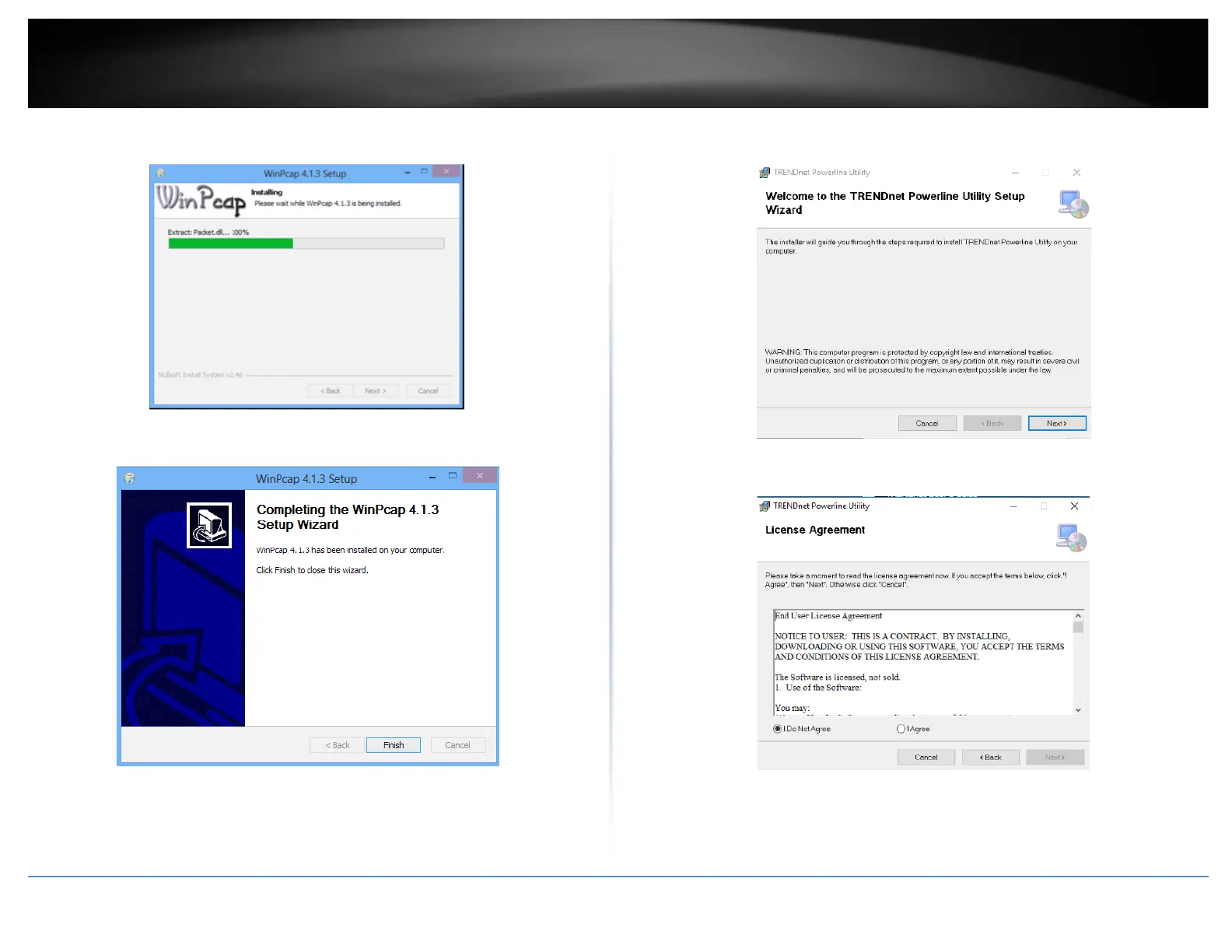
9. Wait for the WinPcap
installation to co
mplete.
10. After the process
has been completed, click
Finish
.
11. At the TRENDnet Po
werline Utility Setup Wizard
, click
N
ext
.
12. In the License Agr
eement window, click
I Agree
, a
nd then click
N
ext
.
11
13
Table of Contents
Main Page
Table of Contents
2
Product Overview
3
Package Contents
3
Features
3
Product Hardware Features
4
Expanding a Powerline Network
5
Basic Installation
6
Installing Your Powerline Adapters
7
Powerline Security
7
Before You Install
7
Connect a Powerline Adapter to Your Router
8
Add Adapters to Your Network
8
Securing Your Powerline Network
9
Scramble Your Network Name and Encryption
9
The Powerline Utility
10
Powerline Utility System Requirements
10
Software Installation
10
Using the Utility
14
Powerline Utility - Map View
15
Powerline Utility - Detailed View
17
Powerline Utility - Device Setup
18
Powerline Utility - Advanced
19
Powerline Utility - Options
20
Powerline Utility - about
21
Technical Specifications
22
Troubleshooting
23
Appendix
24
Other manuals for TRENDnet TPL-422E
Quick Installation Guide
2 pages
Related product manuals
TRENDnet TPL-402E
29 pages
TRENDnet TPL-406E
30 pages
TRENDnet TPL-401E
12 pages
TRENDnet TPL-4052E
32 pages
TRENDnet TPL-401E2K
23 pages
TRENDnet TPL-308E
31 pages
TRENDnet TPL-306E
30 pages
TRENDnet TPL-331EP
14 pages
TRENDnet TPL-310AP
58 pages
TRENDnet TPL-331EP2K
14 pages
TRENDnet TEW-647GA
16 pages
TRENDnet TEW-424UB
24 pages














 To Next Page