TAB 5 English
21
WELCOME
Thank you for purchasing this tablet.
It brings you much convenience for your business (supports Word, Excel, send & receive e-mails...) and
entertainment (supports 3D game, chatting, movie playback, e-Books.....).
Running on Android 4.0, with a 1 GHz processor and highly responsive capacitive touch screen, it brings you
wonderful user experience.
Before beginning, please refer to this user manual carefully.
IMPORTANT NOTICES
⊙ The new battery will be in its best condition after 2-3 times full charge and discharge.
⊙ While using the earphone, if the volume is excessively high it may cause hearing damage. So please adjust the
volume of the player to a moderate level and balance the time of using.
⊙ Do not disconnect the tablet suddenly when formatting or uploading and downloading, which can lead to
program errors.
⊙ Do not dismantle the tablet by yourself, and do not use alcohol, thinner or benzene to clean its surface.
⊙ Do not use the tablet while driving or walking.
⊙ The tablet is not moisture and water resistant. Please do not use it in a damp environment.
⊙ Do not drop or hit it to hard surface, or the screen may get damaged.
⊙ Do not upgrade the firmware by yourself. This would cause damage to your tablet.
KEYS AND FUNCTIONS
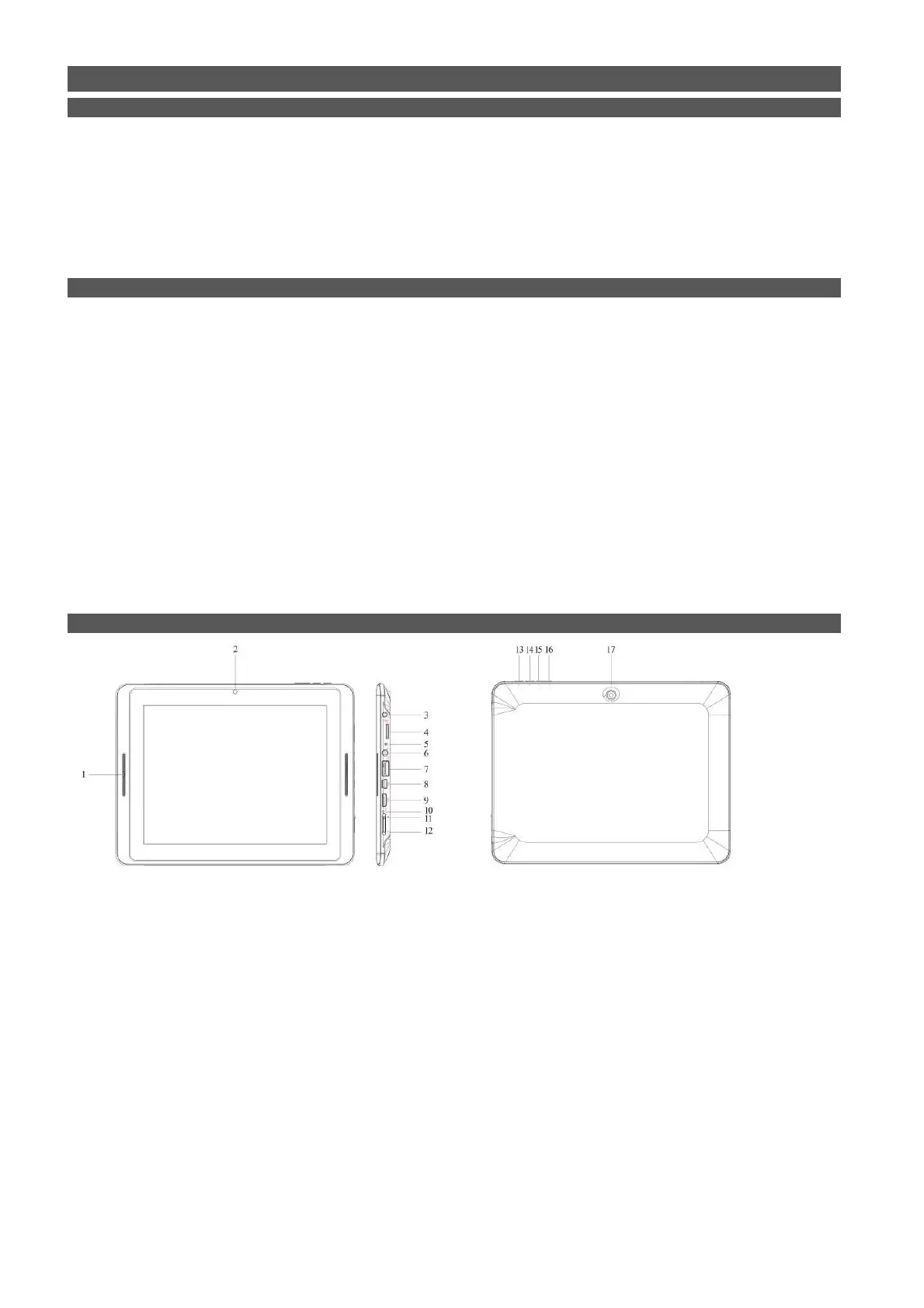
1. Speaker
2. Front-facing camera
3. DC jack: connect to 5V adaptor
4. TF/Micro SD card slot
5. MIC
6. Headphone jack
7. USB host: support mouse, keyboard, 3G USB dangle, Ethernet adapter, USB flash disk / flash drive
8. Mini-USB port: connect to computer
9. Mini-HDMI port
10. Reset hole, when the tablet is frozen or does not respond to any keys or any operations, you may use a pin
to reset the tablet.
11/12. Power and lock key: pull downward to turn on/off and lock/unlock the screen and pull upward to lock
G-sensor
13. ESC button: to go back to previous menu
14. Menu button
15/16. Vol+/Vol+
17. Rear-facing camera


 To Next Page