# 0 1 2 3
*
5 5 5 1 2 1 2 #
Input or Edit Resident Names
To Input or Edit Names on Units with an Electronic Directory use Command "#9":
Enter: #9# Edit 1st Residents Name for Directory Display.
Enter: #9 123# Edit Resident 123's Name for Directory Display.
Programming Number
Resident Code
The "1" key once
to produce a Blank Space.
Note: You cannot access lower case letters via keypad programming.
# 9 1 2 3 #
E N T E R N A M E
Page 5
Creating a New Resident with a Phone Number Assignment
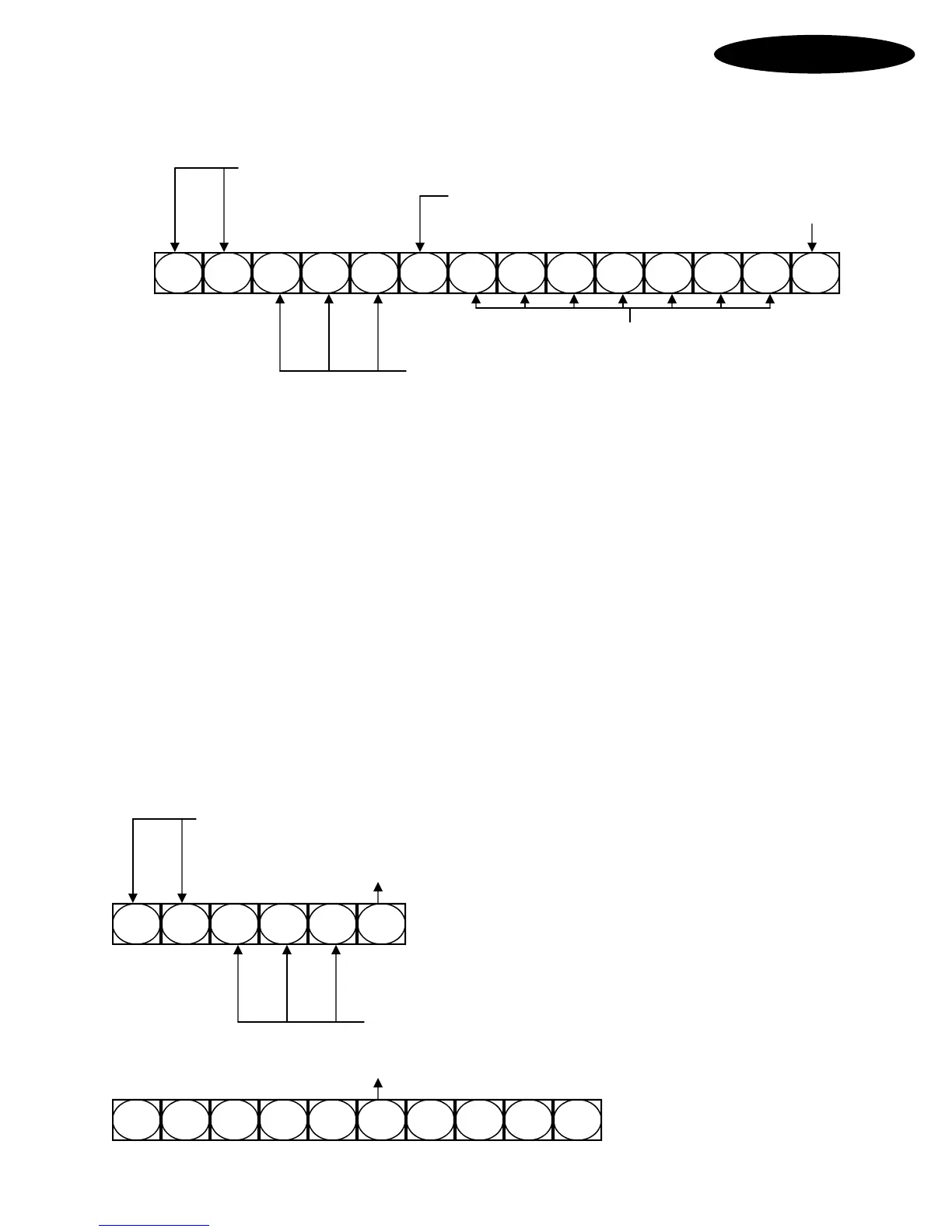
Format: #0 123*5551212# (Beep-Beep)
Programming Number
Separator
Programming terminator
Resident telephone number
Resident Code
Where:
#0 is the command to Create or Modify a Resident's data.
123 defines the Resident's Code. (This is the Code a Visitor dials to call a Resident)
The * key separates the Resident Code from their Home Phone Number.
5551212 is their specific Home Phone Number up to 16 digits.
The # key terminates this Command.
(Beep-Beep) means the Command was accepted or "Long-Tone" means Command was rejected.
Obviously, replace the 123 and the 5551212 above with the correct desired numbers.
New! Resident Codes may now be variable length of 1 to 4 digits mixed.
New! Multiple phone numbers may be allowed per Resident on special request.
Enter: #0 123*5551212# Assigns or replaces Resident 123’s 1st Phone Number.
Enter: #0 123*2*5551212# Assigns or replaces Resident 123’s 2nd Phone Number.
Enter: #0 123*3*5551212# Assigns or replaces Resident 123’s 3rd Phone Number.
Enter: #0 123*3*# Deletes Resident 123’s 3rd Phone Number.
Enter: #0 123# Deletes Resident 123 entirely from System.



 To Next Page