Page 8
Detail Programming System Clock
This unit employs an accurate digital clock that includes Year, Month, Date and Day
of the week. As per ISO-8601 standards, the 1st day of the week is Monday. This plays
a key roll if you have time zone restrictions enabled, as one can then restrict ac-
cess based on the day of the week. The clock will continue accurate time keeping
without system power for about 4 days. After that, the clock will need to be set.
This unit doesn't use clock batteries as they eventually fail someday and are expen-
sive. The clock itself employs 24 hour military standard time keeping. This elimi-
nates confusion regarding AM and PM settings.
The day begins at midnight at 00:00 (Hours:Minutes) rather than 12:00 AM.
The day ends before midnight at 23:59 (Hours:Minutes) rather than 11:59 PM.
00:00 is midnight (12:00 AM)
02:00 is two o'clock (2:00 AM)
12:00 is noon (12:00 PM)
18:00 is six o'clock (6:00 PM)
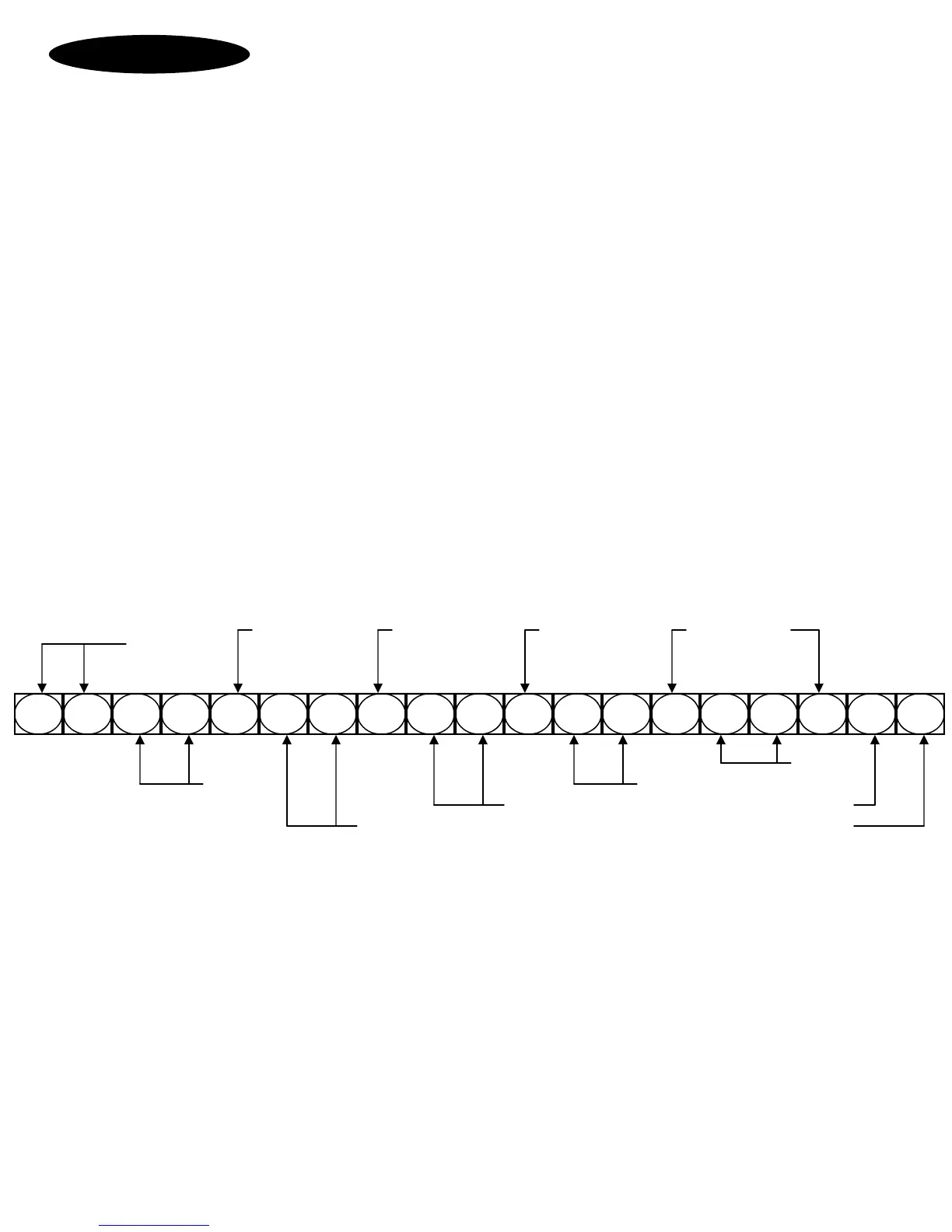
# 3 1 0
*
0 1
*
0 2
*
2 3
*
3 0
*
1 #
View the Clock via unit display by going into programming mode and use command:
*#3 Display current time as Year/Month/Date, Hours:Minutes, Day-week, Seconds
Set the Clock using this command while in programming mode:
#3 YY*MM*DD*HH*mm*D# As Year/Month/Date, Hours:minutes, Day-week, Terminate command.
#3 10*01*02*23*30*1# As Year=10, Month=Jan, Date=2nd, Hours=23, Minutes=30, Day=Monday
Separator Separator Separator Separator
Programming
Number
Minutes
Year Hours
Date Day
Month Programming terminator
Leap year is automatically adjusted for and Daylight Savings time is computed and automatically ad-
justed for if Time Zones are enabled. Time Zones 98 and 99 are dedicated to Daylight Savings Time.
This DST is calculated when the year changes. The DST rules observed are based on the previous
years rules deduced from the settings in the Time Zone database. If the rules change then set Time
Zones 98 and 99 to match the new rules and the new rules will be applied automatically from then
on. See Time Zoning for greater details.



 To Next Page