Trinamic CANopen quickstart guide • Guide • Document Revision V1.00 • 2021-Sept-10
2 / 10
3 Wiring
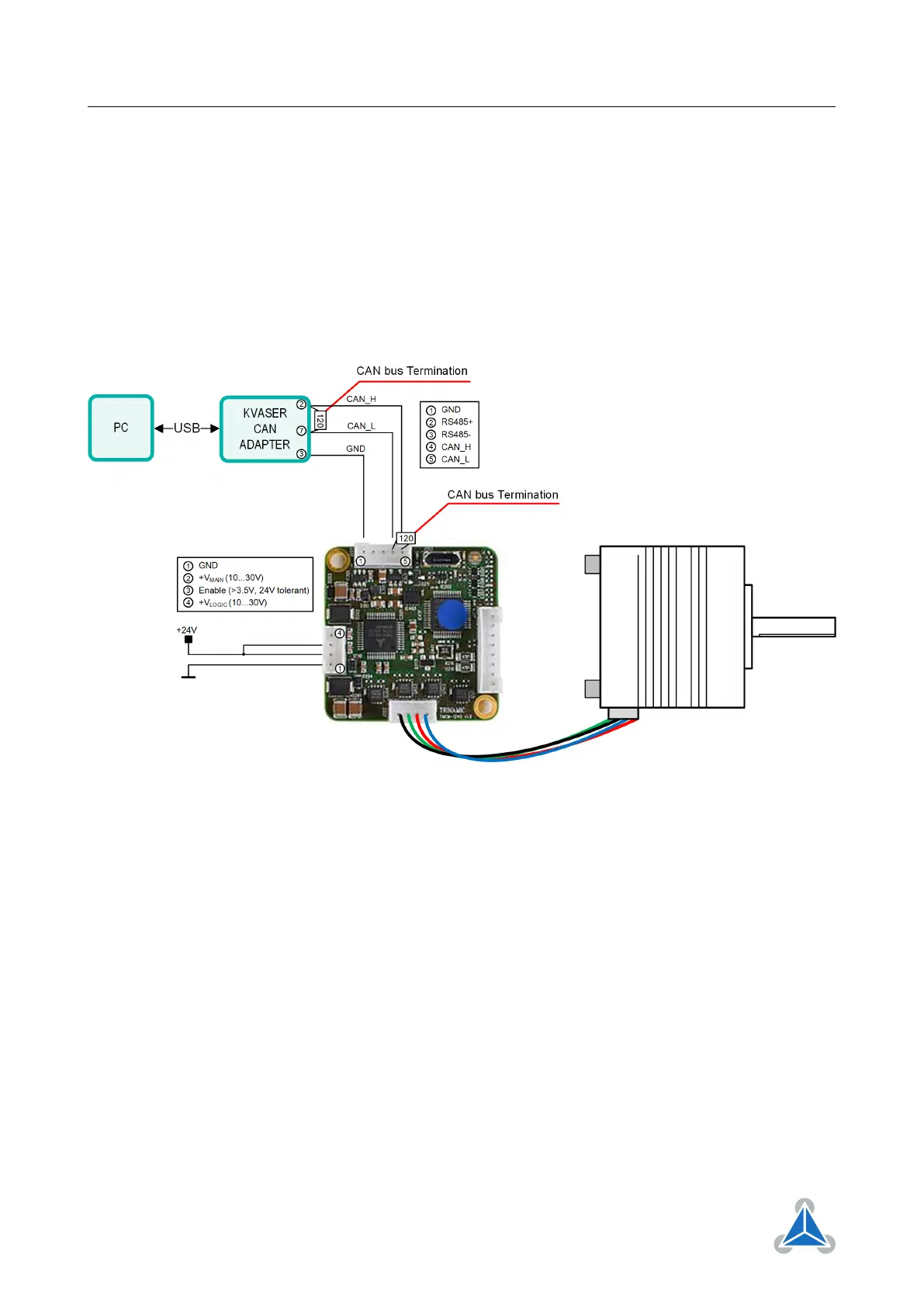
For the setup following parts are needed:
• TMCM-1240-CANopen
• Stepper motor (e.g. QSH4218-35-10-027)
• CAN adapter (here: Kvaser Leaf Light HS v2)
• Supply Voltage (24V)
Figure 1
+V
MAIN
and Enable should be wired. +V
LOGIC
can be left open as in figure. CAN bus termination resistors
must also be added (figure 1).
4 TMCM-CANopen
In this section the TMCM-1240 will be controlled with TMCM-CANopen.
4.1 Connect with the TMCM-CANopen
1. Open the TMCM-CANopen software
2. Connect the CAN adapter to the PC. Make sure direct USB between TMCM-1240 and PC is discon-
nected. The CAN adapter will show up in the TMCL-IDE interface tree. Click on the CAN adapter to
open the connection interface (figure 2).
©2021 TRINAMIC Motion Control GmbH & Co. KG, Hamburg, Germany
Terms of delivery and rights to technical change reserved.
Download newest version at www.trinamic.com


 To Next Page