MID DRIVE ESYSTEMMID DRIVE ESYSTEMMID DRIVE ESYSTEM
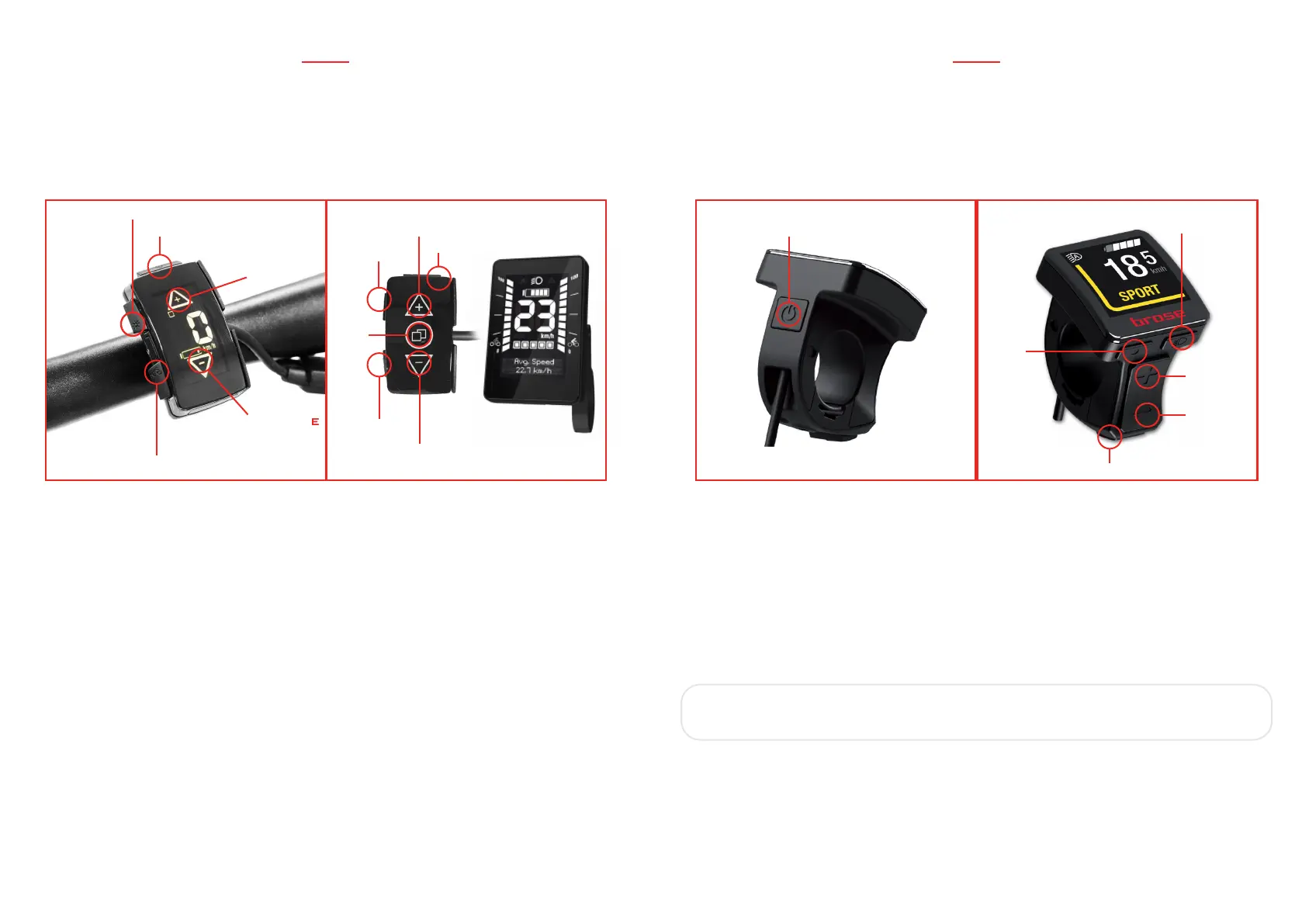
WALK ASSIST PRESS FOR 2 SECS
LIGHTS
POWER
INCREASE
SUPPORT
LEVEL
MENU
DECREASE
SUPPORT
LEVEL
MID DRIVE ESYSTEM
USING THE SYSTEM BROSE ALLROUND DISPLAY
- To turn on the system, press the power button.
- Choose the desired assist level by pushing the “+/-” on the handlebar control. Choose
between ECO, TOUR, SPORT and BOOST. To make the bike move with electric assistance
you just have to pedal.
- To activate the walk assist, just press for 2 seconds the specific button.
IMPORTANT: the walk assist works only when the assistance level is
set to ECO or more.
- Integrated lights can be switched on and off pressing the specific button.
- To turn off the system, press the power button on the handlebar control for 3 seconds.
When the display is off, the complete system is off too.
WALK ASSIST
LIGHTS
POWER
INCREASE
SUPPORT
LEVEL
DECREASE
SUPPORT
LEVEL
INCREASE
SUPPORT
LEVEL
DECREASE
SUPPORT
LEVEL
WALK
ASSIST
MENU
LIGHTS
POWER
USING THE SYSTEM BLOKS NEW STYLESPORTIVE DISPLAY
- Choose the desired assist level by pushing the “+/-” on the handlebar control. Choose
between level 0-4 (0= no assistance - 4= max assistance).
- To make the bike move with electric assistance you just have to pedal.
- To activate the walk assist, just press for 2 seconds the specific button on the handlebar
control. The bike will slowly move by itself, without pedalling.
- Integrated lights can be switched on and off pressing the specific button.
- To turn off the system, press the power button on the handlebar control for 3 seconds.
When the display is off, the complete system is off too.
40
41


 To Next Page