USING THE SYSTEM BROSE DISPLAY
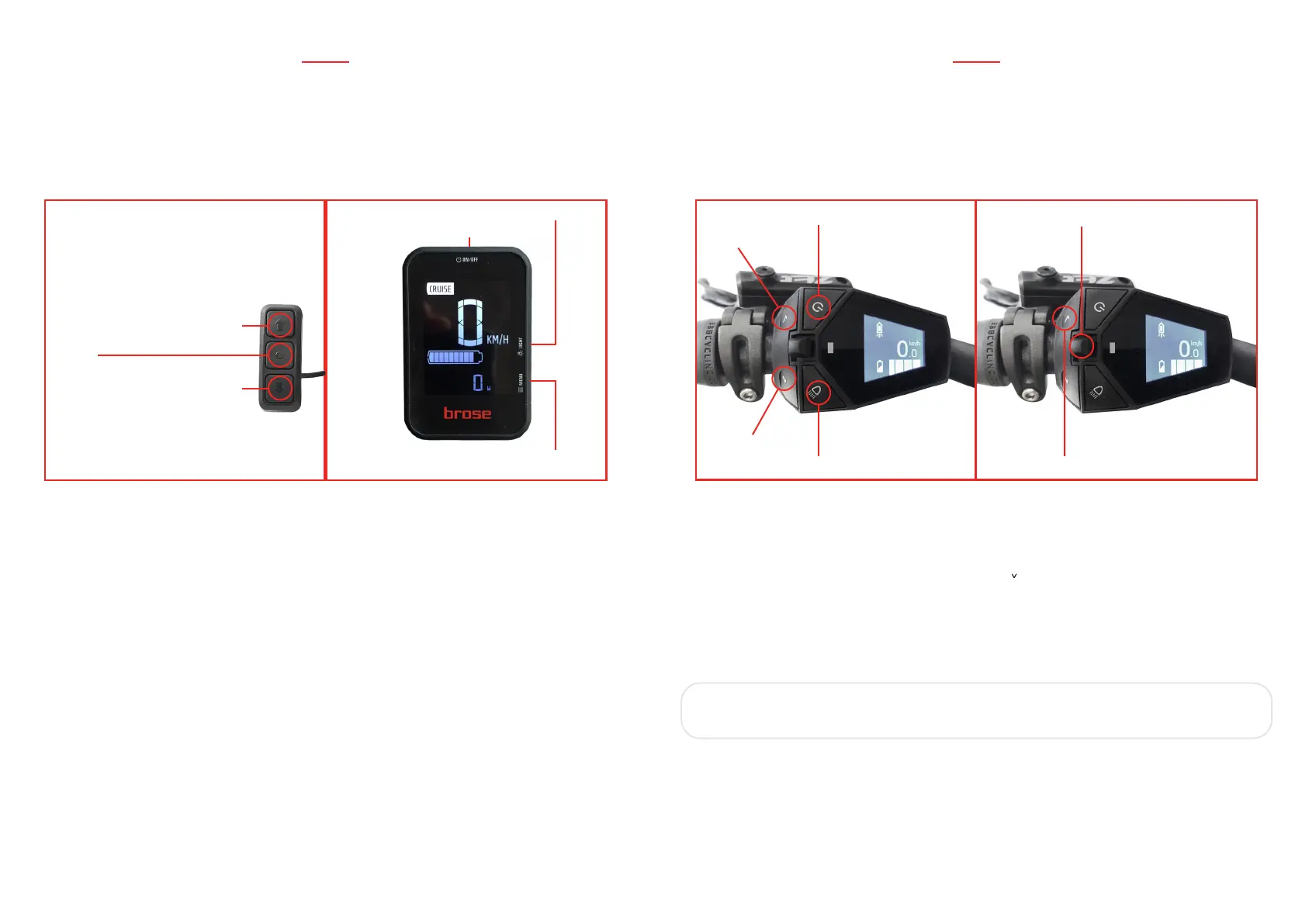
- Choose the desired assist level by pushing the “>/<” on the handlebar control.
Choose between “CRUISE” (less assistance), “TOUR”, “SPORT” (max assistance).
- To make the bike move with electric assistance you just have to pedal.
- To activate the walk assist, just press for 3 seconds the “<” button on the handlebar
control. The bike will slowly move by itself, without pedalling.
- Integrated lights can be switched on and off pressing the specific button.
- To turn off the system, press the power button on the display for 3 seconds.
When the display is off, the complete system is off too.
MID DRIVE ESYSTEM
LIGHTS
MENU
INCREASE SUPPORT LEVEL
DECREASE SUPPORT LEVEL
WALK ASSIST PRESS FOR
2 SECS
MENU
POWER
MID DRIVE ESYSTEM
WALK ASSIST PRESS FOR 2 SECS
NAVIGATION JOYSTICK
LIGHTS
POWERINCREASE
SUPPORT
LEVEL
DECREASE
SUPPORT
LEVEL
USING THE SYSTEM MARQUARDT COMFORT PLUS DISPLAY
- Choose the desired assist level by pushing the “^/ ” on the handlebar control. To make
the bike move with electric assistance you just have to pedal.
- To activate the walk assist, just press for 2 seconds the “^” button on the handlebar
control. The bike will slowly move by itself, without pedalling.
IMPORTANT: the walk assist works only when the assistance level is
set to 1 or more.
- Integrated lights can be switched on and off by pressing the specific button.
- To turn off the system, press the power button on the display for 3 seconds.
When the display is off, the complete system is off too.
42
43


 To Next Page