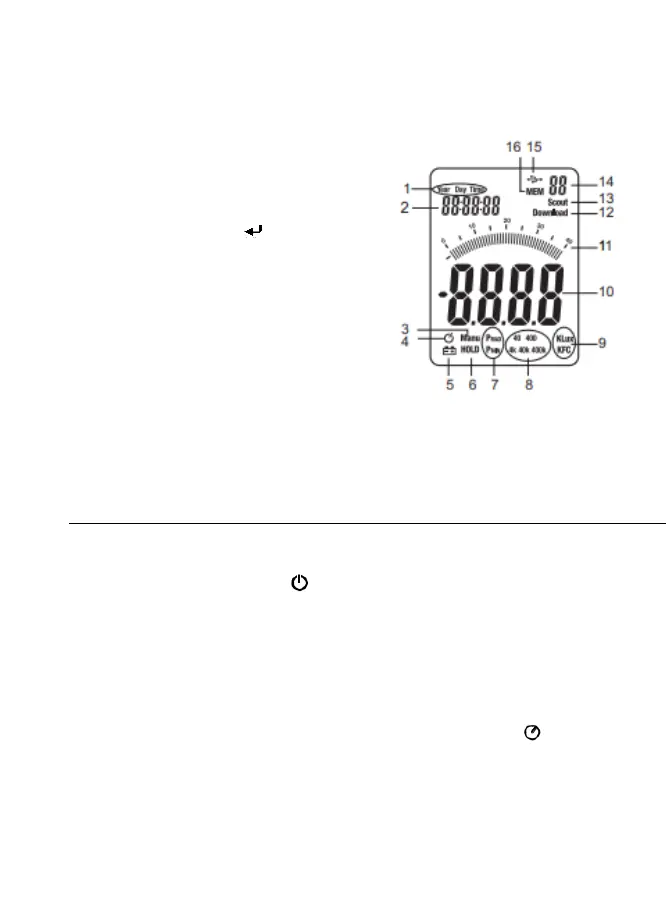
Display Description
1. Clock Setting Modes
2. Clock Display
3. Relative Mode Icon
4. Auto Power OFF (APO) Icon
5. Low Battery Icon
6. Data Hold Icon
7. Peak Hold Modes
8. Range Indicators
9. Unit of Measure
10. Digital Display
11. Bargraph Display
12. Data Download to PC Icon
13. PC Serial Connection Established
14. Memory Address Number
15. USB PC Connection Icon
16. Memory Icon
Operation
Meter Power
1. Press the Power button to turn the meter ON or OFF
2. If the meter does not switch on when the power button is pressed
or if the low battery icon is displayed on the LCD, replace the
battery.
Auto Power Off (APO)
1. The meter is equipped with an automatic power off (APO) feature
that turns the meter off after 20 minutes of inactivity. The icon
appears while APO is enabled.
2. To disable the APO feature, simultaneously press and
release the RANGE/APO and REC/SETUP buttons. Press
and release again to re-activate the APO feature.



 To Next Page