12
7
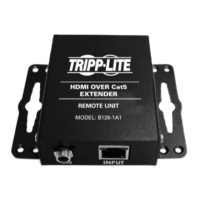
Connect theexternal power supplyto the receiver unitand plug the
receiverunitintoaTrippLiteSurgeSuppressor,PowerDistributionUnit
(PDU), or Uninterruptible Power Supply (UPS). The green RJ45 LED
illuminatestoindicatethattheunitisreceivingpowerfromtheexternal
power supply.
8
Connect a monitor to the OUTPUT 1 port on the receiver unit using a
TrippLiteP568-SeriesHigh-SpeedHDMICable.
9
Repeatstep8fortheOUTPUT 2 port on the receiver unit.
10
Turnonthepowertotheconnecteddevices.TheorangeRJ45LEDs
on the transmitter and receiver units will illuminate to indicate that
a signal isbeing received from the HDMI source. The video image
should now be displayed on the connected monitors.
11
Ifnecessary,usetheEqualizationcontrolonthereceiverunittoadjust
the video image. Note: An improper Equalization setting can cause
the monitor not to display an image at all. Try each setting until an
acceptable image is displayed.
Standard Extender/Splitter Installation
13-08-043 93-32D0.indd 12 8/28/2013 2:17:40 PM



 To Next Page
 Loading...