21
5. Touch Operation
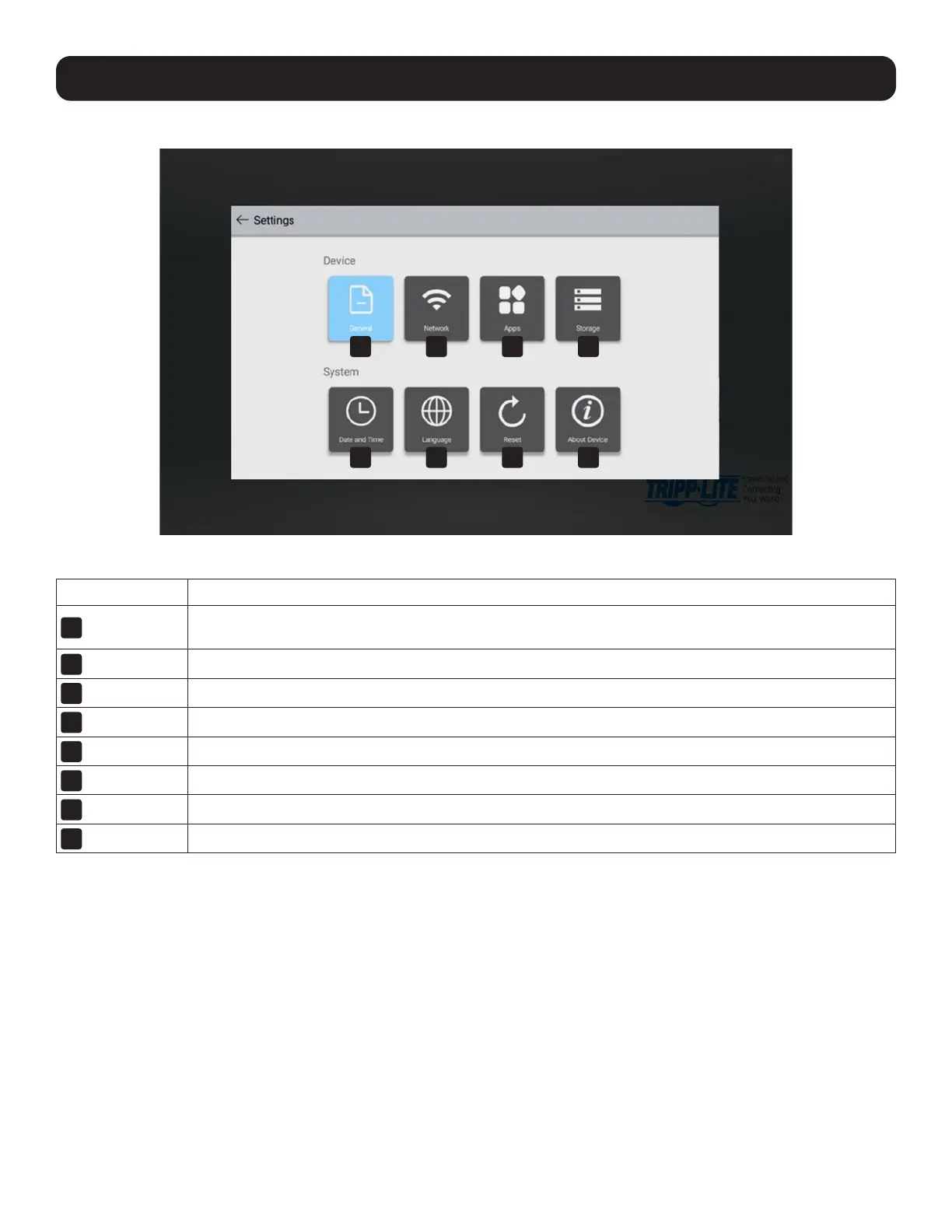
5.5.1 Settings Menu
Note: This menu is also accessible from the More Applications screen shown in Section 5.1.3.
Button Description
1
General
Volume level, eye protection on/off, DICOM calibration on/off, sidebar on/off, startup, shutdown, screen
lock, wake on LAN, HDMI output format, wallpaper.
2
Network
Wi-Fi, WLAN hotspot, Ethernet LAN, file sharing, Bluetooth, proxy settings.
3
Apps
Settings for installed Android applications.
4
Storage
View Android storage space used and remaining by category.
5
Date and Time
Set time, date, time zone and network synchronization.
6
Language
Set language and input methods.
7
Reset
Return the system to factory settings, permanently erasing any other data.
8
About Device
View information about the hardware and operating system.
1
5
2
6
3
7
4
8



 To Next Page