18
1 2
4
3
65
4 x screws
4 x screws
4 x screws
4 x screws
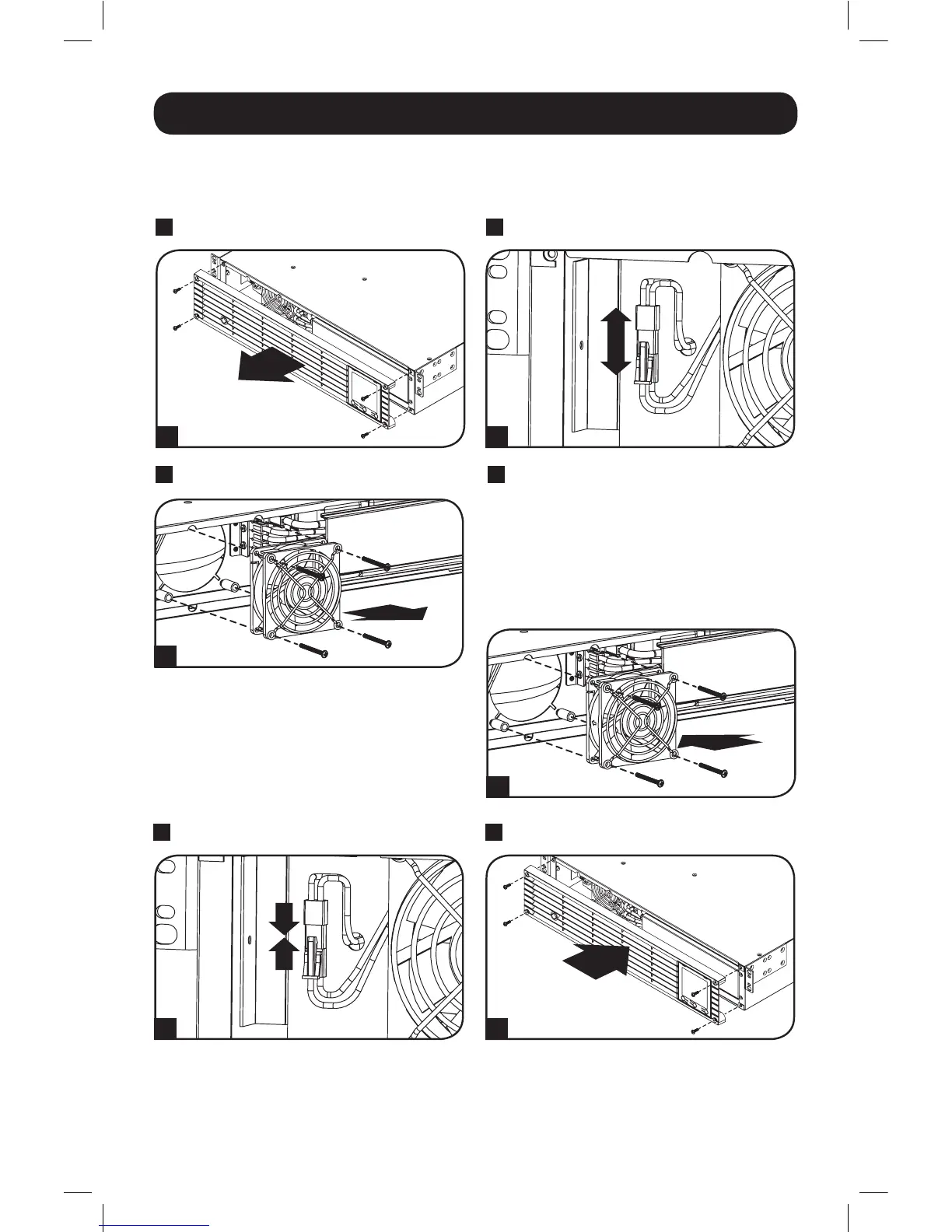
Fan Replacement
The cooling fan installed in the UPS should be replaced by qualified service personnel. Before
proceeding with fan replacement, first put the UPS in OFF mode, disconnect the UPS from the AC
mains, and disconnect any connected equipment. Use tools with insulated handles.
2
Disconnect the fan wires.
3
Remove the 4 Fan Screws.
4
Install the new fan by aligning
the screw holes between the
fan and the UPS. IMPORTANT:
To ensure optimal airflow, the
arrow on the side of the fan
housing must point inward.
Reinstall the fan screws.
1
Remove Front Panel.
5
Reconnect the fan wires.
6
Replace Front Panel.
16-12-138-933440.indb 18 12/20/2016 2:18:13 PM



 To Next Page