
 To Next Page
M
Mrs. Crystal CraigAug 14, 2025
What to do if my Tripp Lite UPS is overloaded?
- TTammy JohnsonAug 14, 2025
If your Tripp Lite UPS is overloaded, remove some of the connected devices from the UPS output.

What to do if my Tripp Lite UPS is overloaded?
If your Tripp Lite UPS is overloaded, remove some of the connected devices from the UPS output.
How to disable EPO function on Tripp Lite UPS?
To disable the EPO (Emergency Power Off) function on your Tripp Lite UPS, set the circuit in the closed position.
What to do if my Tripp Lite SmartOnline SVTX shows fault code 43?
If fault code 43 is displayed on your Tripp Lite UPS, remove some of the connected devices to reduce the load on the UPS output, and then restart the UPS.
What to do if my Tripp Lite SmartOnline SVTX is overloaded in Bypass mode?
If your Tripp Lite UPS is overloaded and devices are being fed directly by the electrical network via the Bypass, remove some of the connected devices from the UPS output.
What to do if my Tripp Lite UPS shows fault code 14?
If fault code 14 is displayed on your Tripp Lite UPS, check the output wiring and examine the connected devices to see if any are causing a short circuit.
What to do if my Tripp Lite SmartOnline SVTX is locked in Bypass mode after repeated overloads?
If your Tripp Lite UPS is locked in Bypass mode after repeated overloads, first, remove some of the connected devices to reduce the load on the UPS output. Then, shut down the UPS and restart it.
What to do if my Tripp Lite SmartOnline SVTX shows warning code 02?
If warning code 02 is displayed on your Tripp Lite UPS, check and correct the input neutral connection. If the connection is okay and the alarm continues, check L2 and L3 input fuses.
What to do if my Tripp Lite UPS has no display and alarm, even when the mains are normal?
If your Tripp Lite UPS has no display and alarm, make sure that all input wiring is firmly connected to AC mains.
What to do if my Tripp Lite UPS shows warning code 02 and L2 or L3 input fuse is damaged?
If warning code 02 is displayed on your Tripp Lite UPS and the L2 or L3 input fuse is damaged, replace the fuse.
Guidelines for safely placing the UPS unit to prevent damage or hazards.
Precautions for connecting equipment and avoiding risks during use.
Safety instructions and warnings related to the UPS system's batteries.
Key considerations and warnings for the physical installation of the UPS.
Critical safety instructions for connecting the UPS to power sources.
Procedure for connecting the internal UPS batteries, including safety warnings.
Step-by-step guide for installing a single UPS unit, including wiring specifications.
Instructions for setting up multiple UPS units in a parallel configuration for increased capacity.
Lists and explains various fault codes that may appear on the UPS.
 General
| Frequency | 50/60 Hz |
|---|---|
| Waveform | Pure Sine Wave |
| Transfer Time | 0 ms |
| Display | LCD |
| Series | SVTX |
| Type | Online |
| Topology | Double Conversion |
| Input Voltage | 120V or 208/240V (depending on model) |
| Output Voltage | 120V or 208/240V (depending on model) |
| Power Factor | 0.9 |
| Battery Type | Sealed Lead-Acid (SLA) |
| Efficiency | Up to 94% |
| Communication Ports | USB |
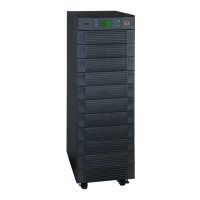
| Form Factor | Tower |
| Operating Temperature | 0°C to 40°C (32°F to 104°F) |
| Dimensions | Varies by model |
| Weight | Varies by model |
| Typical Recharge Time | 4-6 hours to 90% capacity |