7
Enclosure Configuration
Adding or Removing Front and Rear Doors
WARNING: Do not attempt to add or remove doors without assistance.
Removing Door
1
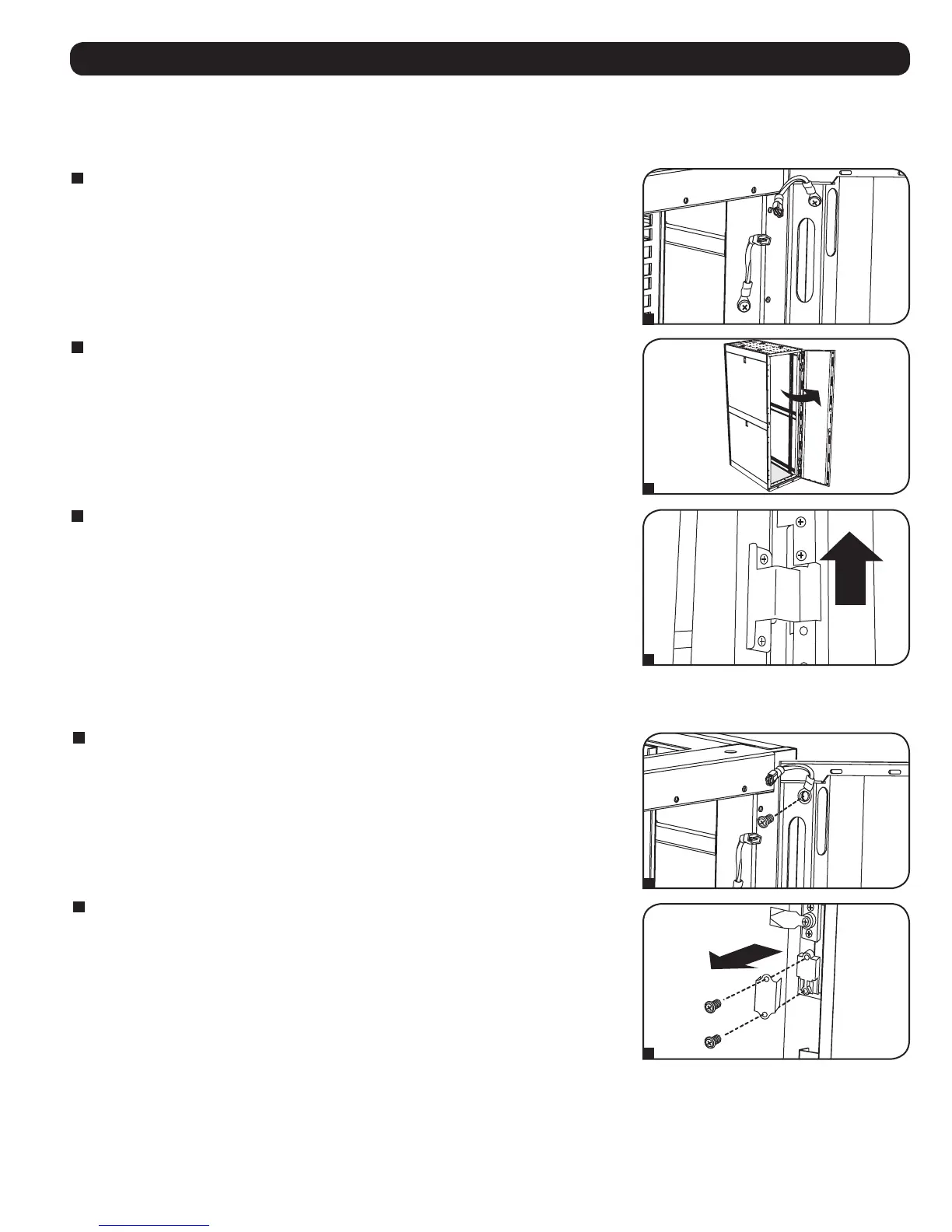
Disconnect the door's ground wire.
2
Open the door until it is perpendicular (90 degrees) to the front of the enclosure.
3
Lift the door from the hinges and remove it from the enclosure.
To Reinstall Door, Reverse Steps 1-3
(Optional) If the enclosure is joined to another enclosure, turn the door back toward the enclosure as
you lift it from the hinges.
Reversing Front Door
WARNING: Do not attempt to reverse the front door without assistance.
1
Remove the screw connecting the ground wire to the inside of the door.
2
Remove the 2 screws connecting the door handle to the door. Remove the door handle.
1
2
3
1
2



 To Next Page