EasyManua.ls Logo

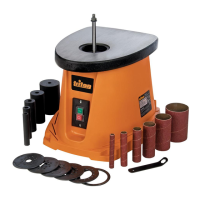
Triton TSPST 450 - User Manual

Triton TSPST 450
29 pages
Print Icon
To Next Page IconTo Next Page
Loading...
Version date: 22.10.18
tritontools.com
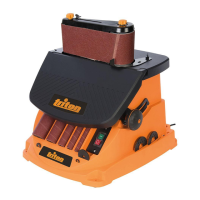
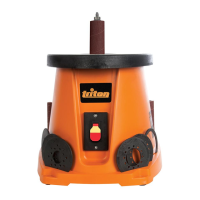
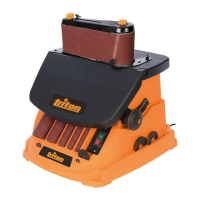
3.5A Oscillating
Spindle & Belt Sander
Operating & Safety Instructions
Instruções de
Operação e Segurança
Instructions d’utilisation
et consignes de sécurité
Instrucciones de
uso y de seguridad
TSPST 450
WARNING: Some dust created by power sanding, sawing, grinding, drilling, and other construction activities contains chemicals known to the State of
California to cause cancer and birth defects or other reproductive harm. Some examples of these chemicals are: lead from lead-based paints, crystalline
silica from bricks and cement and other masonry products, and arsenic and chromium from chemically treated lumber. Your risk from exposure to these
chemicals varies, depending on how often you do this type of work. To reduce your exposure, work in a well-ventilated area and with approved safety
equipment, such as dust masks that are specially designed to lter out microscopic particles.
964966_Manual.indd 1 22/10/2018 10:12

Questions and Answers

  • T
    Tara JonesJul 28, 2025
    How to fix a Triton TSPST 450 when the sanding sleeve doesn't rotate?
    • S
      swilkinsonJul 28, 2025
      If the Sanding Sleeve on your Triton Sander does not rotate with the Sleeve Drum, the Spindle Nut may not be tight enough. Tighten the Spindle Nut in small increments until the Sleeve Drum secures the Sanding Sleeve.
  • K
    Kevin ClayAug 4, 2025
    What to do if my Triton TSPST 450 doesn't turn on?
    • B
      brettvillarrealAug 4, 2025
      If your Triton Sander isn't functioning when you operate the ON/OFF switch, first check the power supply. If the power supply is fine, the ON/OFF switch may be defective and require replacement by an authorized Triton service center.
  • R
    Rachel MartinezAug 12, 2025
    Why is my Triton Sander producing so much dust?
    • D
      David TranAug 12, 2025
      If you are producing large amounts of dust with your Triton Sander, there are two potential causes. First, the dust extractor passage may be blocked; turn off the machine at the mains, remove the spindle sander components or belt sander unit, and clear the blockage. Second, you might be using the incorrect throat plate; change to the correct-sized throat plate.
  • D
    debraellisonAug 18, 2025
    What to do if my Triton TSPST 450 drum is not at full speed?
    • P
      Peter TurnerAug 18, 2025
      If the sanding drum on your Triton Sander isn't operating at full speed or the motor sounds different than normal, the motor may be overheating. Switch OFF the sander and allow it to cool for a ½ hour. Other possible causes are a faulty motor or worn motor belt, both of which require contacting an authorized Triton service center.

Summary

Operating & Safety Instructions

Specification

USA Safety Rules

Oscillating Spindle & Belt Sander Safety

Intended Use

Before Use

Belt Sander Mode

Tracking Adjustment

How to adjust the belt tracking using the Belt Tracking Knob for proper alignment.

Spindle Sander Mode

Fitting a Sanding Sleeve

Step-by-step guide for installing sanding sleeves onto the spindle.

Maintenance

Troubleshooting

Triton TSPST 450 Specifications

General IconGeneral
Power450W
Sanding Pad Size125mm
No Load Speed7000-12000 RPM
Dust ExtractionYes
Variable SpeedYes
Pad Size125mm
Power SourceCorded Electric

Related product manuals