EasyManua.ls Logo

Triton TSPS450 - User Manual

Triton TSPS450
12 pages
Print Icon
To Next Page IconTo Next Page
Loading...
643723_Z1MANPRO1_AUS.indd 1 24/02/2015 16:41

Other manuals for Triton TSPS450

Questions and Answers

  • R
    Ryan WestAug 13, 2025
    How to tighten the sanding sleeve on my Triton Sander?
    • P
      phillipsrandyAug 13, 2025
      If the Sanding Sleeve on your Triton Sander isn't rotating with the Rubber Drum, it's likely that the Spindle Lock Nut isn't tight enough. Tighten the Spindle Lock Nut in small increments until the Rubber Drum secures the Sanding Sleeve.
  • N
    Nicholas FosterAug 17, 2025
    What to do if my Triton TSPS450 Sander produces large amounts of dust?
    • D
      Danielle BartonAug 17, 2025
      If your Triton Sander is producing excessive dust, there could be a couple of reasons. First, the dust extractor passage might be blocked. To resolve this, turn off the machine at the mains, then remove the Rubber Drum, Table Insert, and Spindle Washer to clear any blockages from the dust extractor passage. Alternatively, you might be using the wrong Table Insert. Try switching to the correct-sized Table Insert.
  • J
    James ThomasAug 20, 2025
    Why is my Triton Sander drum not operating at full speed?
    • B
      benjamin30Aug 20, 2025
      If the sanding drum on your Triton Sander isn't operating at full speed, or the motor sounds different, it could be due to motor overheating. Try switching off the sander and allowing it to cool down for half an hour. If the issue persists after cooling, the motor may be faulty.
  • J
    Jennifer Moore PhDAug 25, 2025
    What to do if my Triton Sander has no function when On/Off Switch is operated?
    • M
      Monica VargasAug 25, 2025
      If your Triton Sander isn't functioning when you operate the On/Off Switch, first check the power supply to ensure the sander is receiving power. If the power supply is fine, the On/Off Switch may be defective.
  • M
    Michael ParsonsAug 28, 2025
    Why is my Triton Power Tool producing so much dust?
    • M
      Miguel StevensonAug 28, 2025
      Excessive dust production in your Triton Power Tool can be due to a blocked dust extractor passage. To resolve this, turn off the machine at the mains, then remove the Rubber Drum, Table Insert, and Spindle Washer to clear any blockages from the dust extractor passage. Another potential cause is using an incorrect Table Insert. Ensure you are using the correct size.
  • H
    Hunter FordSep 1, 2025
    What to do if my Triton Power Tool doesn't turn on?
    • K
      Karen WaltersSep 1, 2025
      If your Triton Power Tool fails to operate when the On/Off switch is activated, first check the power supply to ensure it is properly connected and functioning. If the power supply is not the issue, the On/Off switch may be defective and need replacement by an authorised Triton service centre.
  • M
    Melissa HollowaySep 4, 2025
    How to prevent corrosion on my Triton Power Tool table top?
    • S
      scottchapmanSep 4, 2025
      Corrosion on the Triton Power Tool table top is often caused by moisture. To prevent this, use a clean, dry cloth to apply a thin film of compatible protective lubrication over the clean table top surface.
  • C
    Cheryl RussellSep 8, 2025
    Why isn't the sanding sleeve rotating on my Triton Power Tool?
    • E
      Emily BruceSep 8, 2025
      If the sanding sleeve isn't rotating with the rubber drum on your Triton Power Tool, the spindle lock nut might not be tight enough. Tighten the spindle lock nut in small increments until the rubber drum secures the sanding sleeve.

Summary

Description of Symbols

Specification

Technical Abbreviations Key

General Power Tool Safety Warnings

Oscillating Spindle Sander Safety

Product Familiarisation

Intended Use

Specifies the machine as a bench-mounted unit for sanding and shaping irregular shapes on various workpieces.

Unpacking and Preparation

Instructions for unpacking, preparing, and setting up the sander for operation, including mounting and dust extraction.

Component Selection and Fitting

Table Inserts and Sanding Sleeves

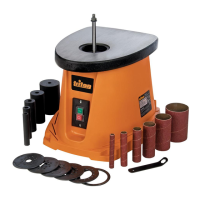
Guidance on selecting appropriate table inserts and fitting sanding sleeves and rubber drums for various spindle sizes.

Sanding Disc Grades

Advice on choosing the correct grit grade of sanding disc for different finishing tasks and material preparation.

Operation and Maintenance

Operation Procedures

Steps for switching the sander on/off, locking the switch, and performing the sanding process correctly.

Maintenance and Accessories

Information on routine maintenance, cleaning, lubrication, and available accessories for the spindle sander.

Storage

Disposal

Troubleshooting

Warranty

Warranty Exclusions

Conditions under which the product warranty is invalidated, including misuse, accidents, and non-approved parts.

Guarantee

Purchase Record

Section for recording purchase details to validate the guarantee and retain proof of purchase.

Triton TSPS450 Specifications

General IconGeneral
BrandTriton
ModelTSPS450
CategorySander
LanguageEnglish

Related product manuals