User Interface
15
User Interface
Controls
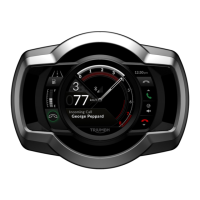
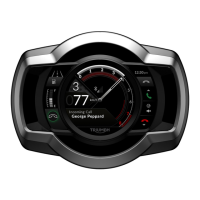
The My Triumph Connectivity Module is
controlled using the motorcycle joystick
to interact with menus and trays
displayed on the instruments.
The menus are available through a
Bluetooth option in the Main Menu, and
the trays are presented in the same
way as those for mileage, fuel and
service information. Some features, such
as the Phonebook, present a keyboard
through which text can be entered. This
is the same as the keyboard used to
enter the Rider Name through the
Display Setup menu.
The way in which information is
presented depends on the model of the
motorcycle and on the theme selected
through the Display Setup menu.
Note
Refer to the Owner’s Handbook for your
motorcycle for information on using the
joystick, HOME button, Main Menu and
text-entry keyboard.
Bluetooth Menu
The Bluetooth option is added to the
Main Menu on the instruments when
your dealer configures your motorcycle
after fitting the My Triumph
Connectivity Module.
To access the Bluetooth menu:
1. Switch on the ignition.
2. Press the HOME button.
3. Push joystick down to highlight the
Bluetooth option.
4. Press joystick centre to select the
Bluetooth option.
The menu allows access to the following
options:
Call
• Phonebook
This option provides an
alphanumeric keyboard through
which you can access contacts
stored in the connected phone. You
use the joystick to enter the initial
character(s) of the name for which
you want to search and to select a
contact from the resulting list. The
resulting list can be also scrolled
through using the joystick.
• Dial Number
This option provides a numeric
keyboard through which you can
enter a number to dial on the
connected phone. You use the
joystick to enter the number that
you want to dial and to make the
call.


 To Next Page