Let’s Get On with the Race!
Once you have selected your trail and your race settings it’s time to race!
Highlight START on the RACE SETTINGS Screen and click the GREEN button to START THE RACE!
Tips when in a race
CHANGING YOUR VIEW
You can change the view at any time during a race by
pressing and holding the BLUE button on the bike
console.
ABORTING
You can abort out of the race at any time if necessary by
pressing and holding the
RED button on the bike console.
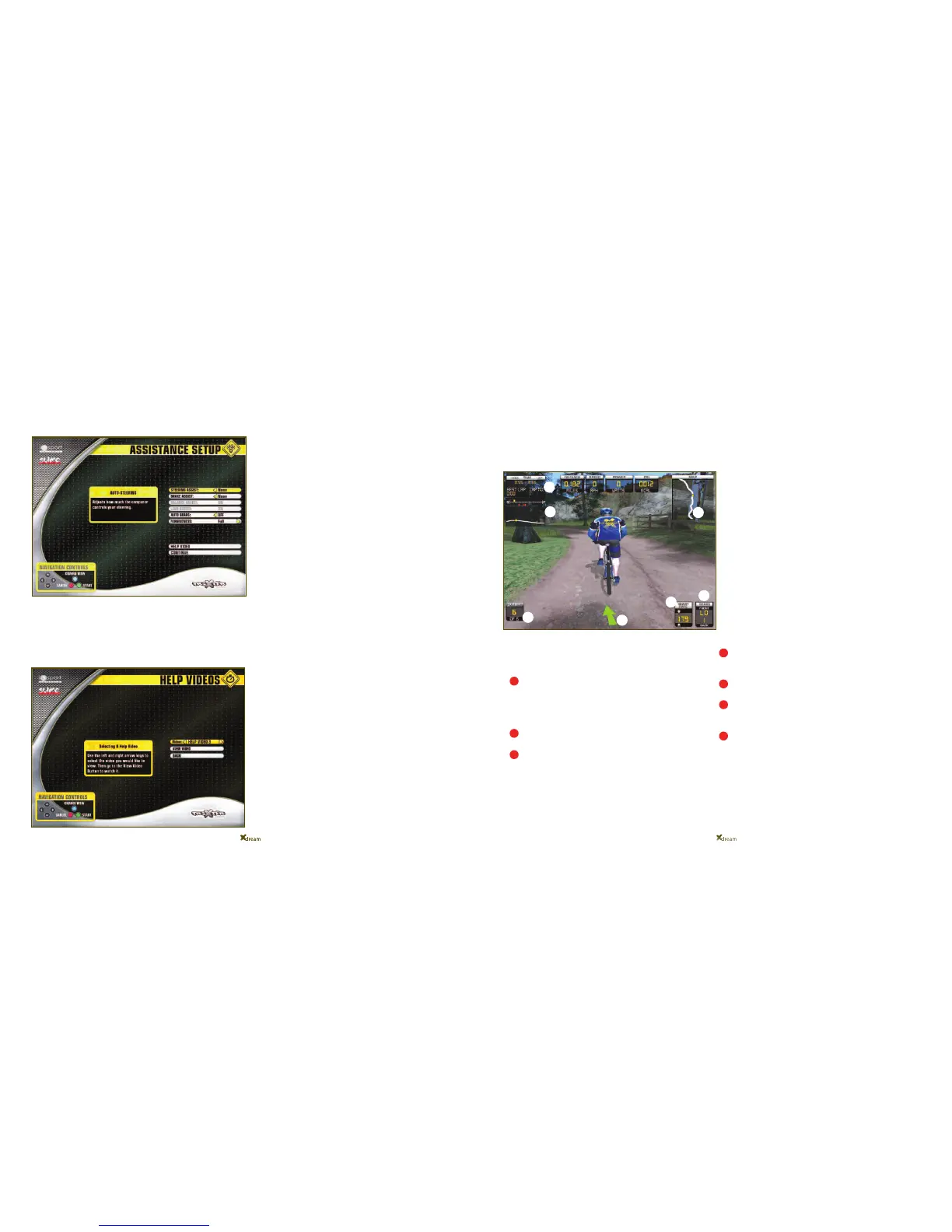
You will notice that the race screen displays many pieces
of information about the race, which can be very useful!
- The navigation arrow in the middle of the bottom of
the screen will pre-warn you which way the trail is going
to go. The arrow will also change colour from GREEN to
RED to warn you if you begin to veer off the track so
keep an eye on it!
- Bottom left hand corner you will notice your Race
Position.
- Bottom right hand corner you will notice your Gear
display.
- The Xdream is compatible with Polar Heart Rate
Monitors. If you are wearing one, your heart rate will
appear to the left of your gear display.
- Top left hand corner you will notice your Timer/Lap
number
- Just below the timer is the race timeline. You are the
yellow circle and your race competitors are the red
triangles.
- Top right hand corner you will notice the map of the
track from above. You are the yellow circle and your race
competitors are the red triangles.
page 29 page 30page 29
Removal of Assistance Settings
Partial Steering
On completion of the BLUE category on the BEGINNER
tier, you will notice that the Partial Steering Assistance
is removed.You will no longer have any steering assistance
or braking assistance therefore it is now up to you
alone to keep your bike on the track, and to use
your brakes when needed.
Autogears
On completion of the RED category on the BEGINNER
tier, you will notice that Autogears are removed. You will
now have to adjust your own gears depending on the
gradient and terrain that you are riding on, just as you
would when riding your own mountain bike!
Just remember that the gear pod on the right is your main
gearbox - Use it for small incremental changes.
Use the gear pod on the left for major changes:
Select Low for steep climbs
Select Mid for flat sections
Select High for downhills
Access to REWARD/TIPS video
sequences
You are able to go back and replay any of the
REWARD/TIPS video sequences, or the initial tutorial
video, at any time by selecting the HELP button on the
ASSISTANCE SETTINGS screen.
Select MAIN to watch the tutorial again or use the
navigation arrows to select a REWARD/TIPS video
sequence to watch again.
You will have little time to study these displays during a
race but some of them can be very handy to glance at
once in a while especially if you want to know how close
your competitors are to you!
5
6
2
4
3
7
1
1
2
3
4
5
6
7


 To Next Page