18
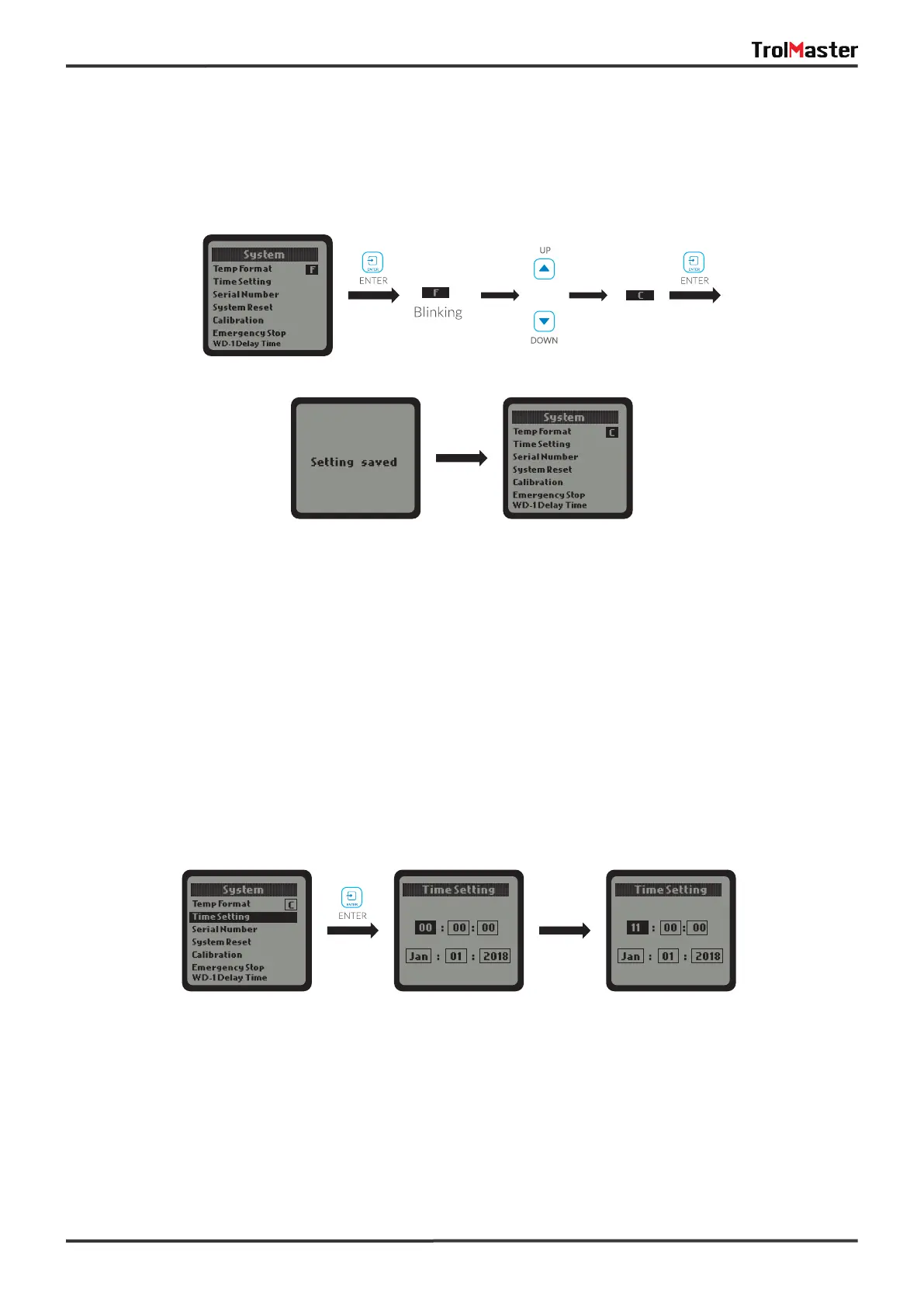
When the Temp Format is selected, press the ENTER button and the temperature symbol F or C will be
highlighted and blinking. Press UP or DOWN button to convert the temperature format between F and C.
Finally, press ENTER button to confirm and save the change. The LCD screen will display “Setting saved” .
a. Temp Format:
When the Time Setting is selected, press ENTER button and the LCD display will show the default time if it's
the first time to use this unit. The time consists of two lines:
1
st
line: HOUR : MINUTE : SECOND
2
nd
line: MONTH : DATE : YEAR
Press ENTER button and the HOUR will be highlighted and blinking. Press UP or DOWN button to change the
hour. Press ENTER button again and the cursor will skip to the next, the MlNUTE will be highlighted and
blinking. Similarly, you can change the MINUTE and SECOND. When the 1st line of time (HOUR:MINUTE:SECOND)
has been changed, press ENTER button and the LCD screen will display “Setting saved".
The date setting (MONTH:DATE:YEAR) is similar to above time setting.
b. Time Setting:
or
Default Time Current Time
(Example)



 To Next Page