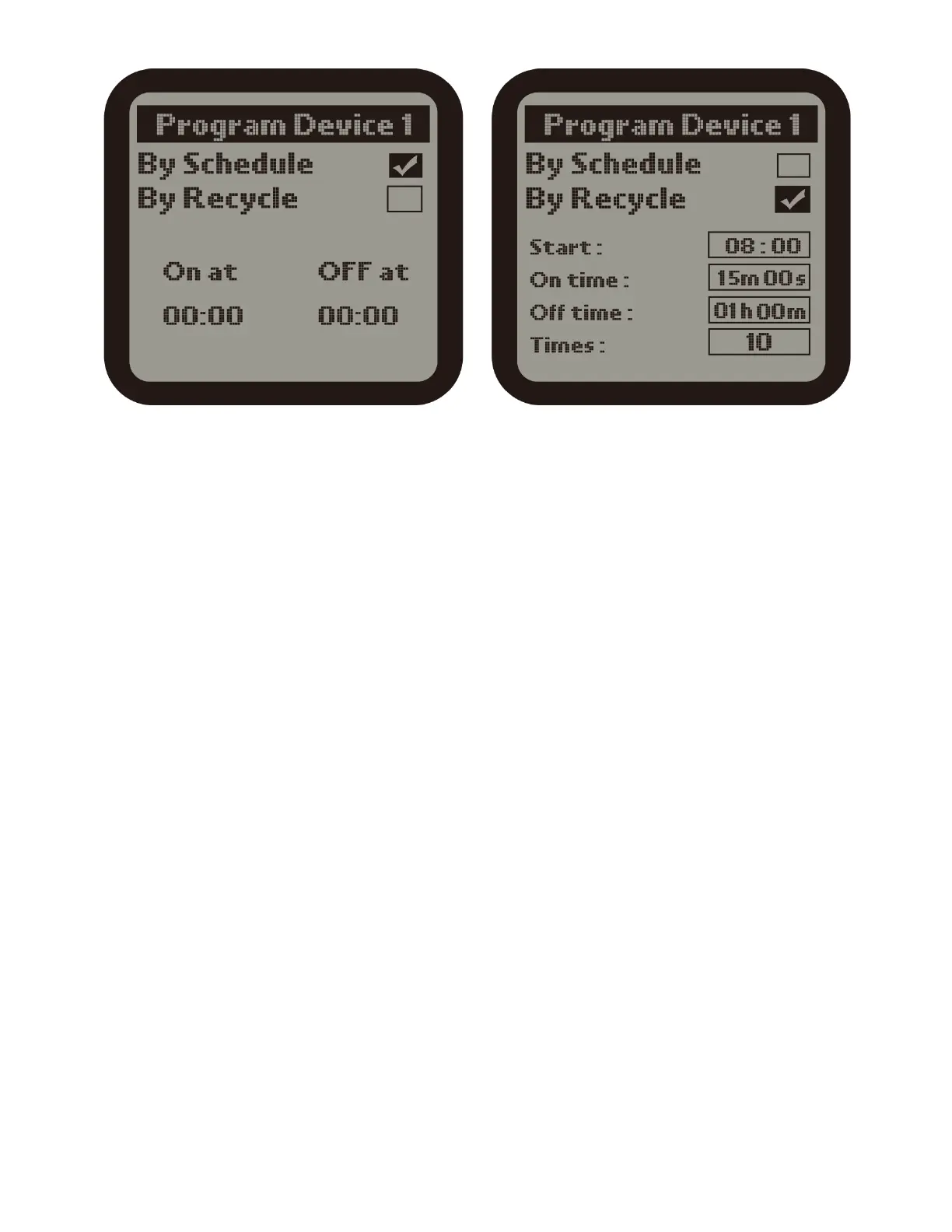
2). Press number 1 to enter into the Program Device 1 page. There are two
timing control type: By Schedule & By Recycle. Press ENTER button, the TICK
icon will be highlighted and flashing. Then press UP or DOWN button to select
By Schedule or By Recycle. Finally, press ENTER button to confirm your
selection and the LCD will display" setting saved". Press UP or DOWN button to
select the subdirectory you desire to change. The selected item wil be
highlighted, press ENTER button it will be flashing. Press UP or DOWN button
to change the time and press ENTER button to save your change. The number
of times ( frequency) starts from 1 to 100.
a ). By Schedule :
On : The start time of continuous working time of the Program Device 1.
Off : The finish time of continuous working time of the Program Device 1.
b ). By Recyle :
Start : The start time of cycle working time of the Program Device 1.
ON Time : The duration of working time per cycle for the Program Device 1.
OFF Time : The duration of non-working time per cycle for the Program Device
1.
Times : The number of times of the daily working cycle.
The setting procedure of other Program Device Station is same as above.



 To Next Page